

We need to have an XML file. Below is our XML. We will create a web application. Add this XML file in the solution.
- <?xml version="1.0" encoding="utf-8" ?>
- <STUDENTS>
- <STUDENT>
- <StudentID>1</StudentID>
- <Name>John Smith</Name>
- <Marks>200</Marks>
- </STUDENT>
- <STUDENT>
- <StudentID>2</StudentID>
- <Name>Mark Johnson</Name>
- <Marks>300</Marks>
- </STUDENT>
- <STUDENT>
- <StudentID>3</StudentID>
- <Name>Nitin Tyagi</Name>
- <Marks>400</Marks>
- </STUDENT>
- </STUDENTS>
- <%@ Page Language="C#" AutoEventWireup="true" CodeBehind="Index.aspx.cs" Inherits="BindGridviewFromXML.Index" %>
- <!DOCTYPE html>
- <html xmlns="http://www.w3.org/1999/xhtml">
- <head runat="server">
- <title></title>
- </head>
- <body>
- <form id="form1" runat="server">
- <div>
- <asp:GridView ID="Grddata" runat="server" AutoGenerateColumns="false">
- <Columns>
- <asp:BoundFieldDataField="StudentId" HeaderText="StudentId" />
- <asp:BoundFieldDataField="Name" HeaderText="Name" />
- <asp:BoundFieldDataField="Marks" HeaderText="Marks" />
- </Columns>
- </asp:GridView>
- </div>
- </form>
- </body>
- </html>
- using System;
- usingSystem.Data;
- usingSystem.Web.UI;
- namespaceBindGridviewFromXML
- {
- public partial class Index: System.Web.UI.Page
- {
- protected void Page_Load(object sender, EventArgs e)
- {
- if (!Page.IsPostBack)
- {
- BindGridview();
- }
- }
- protected void BindGridview()
- {
- using(DataSet ds = new DataSet())
- {
- ds.ReadXml(Server.MapPath("~/Students.xml"));
- Grddata.DataSource = ds;
- Grddata.DataBind();
- }
- }
- }
- }
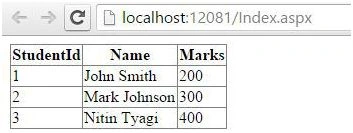
Gridview is displaying the records that were present in the XML file.
Join the conversation! Your thoughts help the community grow.