

Here, I am going to explain how to bind dropdown menu using jQuery AJAX. Follow the below steps.
Step 1
Add one .aspx web page to your ASP.NET application.
Step 2
Create a class CountryList with the following properties.
- public class CountryList
- {
- public int CountryId { get; set; }
- public string CountryName { get; set; }
- }
Step 3
Create a Static method to return the data to AJAX call. I have created a List of CountryList to add CountryId and CountryName.
Notes
- The method should be static.
- The method should be a WebMethod.
- WebMethod is available inside System.Web.Services namespace.
- [WebMethod]
- public static List<CountryList> GetCountriesName()
- {
- List<CountryList> lst = new List<CountryList>();
- lst.Add(new CountryList() { CountryId=1,CountryName="India"});
- lst.Add(new CountryList() { CountryId = 2, CountryName = "Nepal" });
- lst.Add(new CountryList() { CountryId = 3, CountryName = "America" });
- return lst;
- }
Step 4
Now, it is time to write jQuery AJAX code. Add this jQuery script to the head section of your .aspx page.
- <script src="https://ajax.googleapis.com/ajax/libs/jquery/3.2.1/jquery.min.js"></script>
Create a dropdown menu to bind data.
- <select id="ddlNationality"><option value="0" >--Select Country--</option></select>
Write jQuery Ajax to call WebMethod (GetCountriesName) and bind the returning data to dropdown.
- <script type="text/javascript">
- $(document).ready(function () {
- $.ajax({
- type: "POST", url: "Index.aspx/GetCountriesName", dataType: "json", contentType: "application/json", success: function (res)
- {
- $.each(res.d, function (data, value) {
- $("#ddlNationality").append($("<option></option>").val(value.CountryId).html(value.CountryName));
- })
- }
- });
- })
- </script>
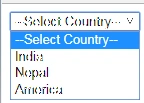
Now, see the output.
Join the conversation! Your thoughts help the community grow.