

Step 1
Create an asp.net MVC Application.
Step 2
Create a table and stored procedure.
Create an asp.net MVC Application.
Step 2
Create a table and stored procedure.
- Create a table.
- Create Table Country(CountryID int Primary key identity(5001,1),CountryName varchar(50))
- Insert data into the table.
- insert Country(CountryName)values('INDIA'),('USA'),('UK'),('IRAN'),('JAPAN')
- Create procedure.
- Create Procedure SP_GetCountry
- as
- begin
- select * from Country
- end
Step 3
Add DataAccessLogic in models folder.
Create a class Country.
Add DataAccessLogic in models folder.
Create a class Country.
- public class Country
- {
- public int CountryID {
- get;
- set;
- }
- public string CountryName {
- get;
- set;
- }
- }
Create a method GetCountry.
- public List < Country > GetCountry() {
- DataSet ds = new DataSet();
- using(SqlConnection con = new SqlConnection(strCon)) {
- using(SqlCommand cmd = new SqlCommand("SP_GetCountry", con)) {
- using(SqlDataAdapter da = new SqlDataAdapter(cmd)) {
- da.Fill(ds);
- }
- }
- }
- List < Country > countries = new List < Country > ();
- for (int i = 0; i < ds.Tables[0].Rows.Count; i++) {
- Country country = new Country();
- country.CountryID = Convert.ToInt32(ds.Tables[0].Rows[i][0]);
- country.CountryName = ds.Tables[0].Rows[i][1].ToString();
- countries;.Add(country);
- country = null;
- }
- return countries;
- }
Step 4
Create a Controller.
Create a Controller.
- public class HomeController: Controller {
- ClientDataService1 sc = new ClientDataService1();
- // GET: Home
- public ActionResult Index() {
- return View();
- }
- public JsonResult GetName() {
- List < Country > Country = sc.GetCountrt();
- return Json(Country, JsonRequestBehavior.AllowGet);
- }
- }
Step 5
Add a JSX file.
Add a JSX file.
- var TableExample = React.createClass({
- getInitialState: function() {
- return {
- Country: []
- };
- },
- componentDidMount: function() {
- $.ajax({
- url: this.props.url,
- dataType: 'json',
- success: function(data) {
- this.setState({
- Country: data
- });
- }.bind(this),
- error: function(xhr, status, err) {
- console.error(this.props.url, status, err.toString());
- }.bind(this)
- });
- },
- render: function() {
- return ( < table > {
- this.state.Country.map(function(item, key) {
- return ( < tr key = {
- key
- } > < td > {
- item.CountryID
- } < /td> < td > & nbsp; < /td> < td > {
- item.CountryName
- } < /td> < /tr>)
- })
- } < /table>);
- }
- }); ReactDOM.render( < TableExample url = "/Home/GetName" / > , document.getElementById('container'));
Step 6
Add a view, drag and drop all JS, JSX files.
Add a view, drag and drop all JS, JSX files.
- <div id="container"></div>
- <script src="~/Scripts/react/react.js"></script>
- <script src="~/Scripts/react/react-dom.js"></script>
- <script src="~/Scripts/jquery-1.10.2.min.js"></script>
- <script src="~/Scripts/JSX/Country.jsx"></script>
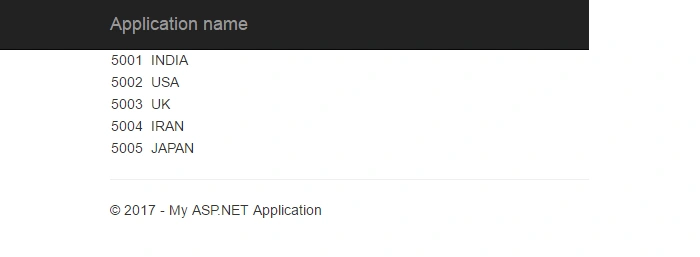
Output
Join the conversation! Your thoughts help the community grow.