

In this blog, we will create a registration form in ASP.NET, using Bootstrap and basic Manual Validation, in C# and will be showing the bootstrap alerts to the users.
Design
Step 1 - Go to Visual Studio and create new ASP.NET web application.
Step 2 - Create a new Webpage like index.aspx. Design the page as shown below. 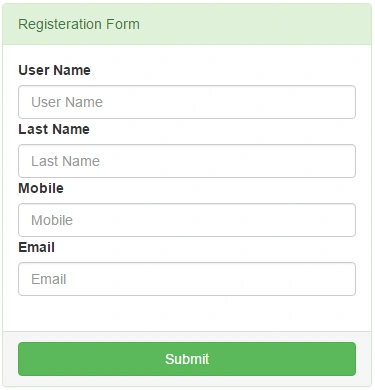
Here is the HTML code of the Index page design, shown above.
- <html>
- <head runat="server">
- <title>Manual validation using c#</title>
- <meta charset="utf-8">
- <meta name="viewport" content="width=device-width, initial-scale=1">
- <link rel="stylesheet" href="http://maxcdn.bootstrapcdn.com/bootstrap/3.3.7/css/bootstrap.min.css">
- <script src="https://ajax.googleapis.com/ajax/libs/jquery/1.12.4/jquery.min.js"></script>
- <script src="http://maxcdn.bootstrapcdn.com/bootstrap/3.3.7/js/bootstrap.min.js"></script>
- <style type="text/css">
- .messagealert {
- width: 100%;
- position: absolute;
- top: 40%;
- z-index: 999;
- padding: 0;
- font-size: 15px;
- text-align: center;
- }
- </style>
- <script type="text/javascript">
- function ShowMessage(message, messagetype) {
- var cssclass;
- switch (messagetype) {
- case 'Success':
- cssclass = 'alert-success'
- break;
- case 'Error':
- cssclass = 'alert-danger'
- break;
- case 'Warning':
- cssclass = 'alert-warning'
- break;
- default:
- cssclass = 'alert-info'
- }
- $('#alert_container').append('<div id="alert_div" style="margin: 0 0.5%; -webkit-box-shadow: 3px 4px 6px #999;" class="alert fade in ' + cssclass + '"><a href="#" class="close" data-dismiss="alert" aria-label="close">×</a><strong>' + messagetype + '!</strong> <span>' + message + '</span></div>');
- }
- </script>
- </head>
- <body>
- <form id="form1" runat="server">
- <div class="messagealert" id="alert_container">
- </div>
- <div class="container">
- <div class="row">
- <div class="col-md-4 col-md-offset-4" style="padding: 10px; margin-top: 2em;">
- <div class="panel panel-success">
- <div class="panel-heading">Registeration Form</div>
- <div class="panel-body">
- <label>User Name</label>
- <asp:TextBox ID="uname" runat="server" CssClass="form-control" placeholder="User Name"></asp:TextBox>
- <label>Last Name</label>
- <asp:TextBox ID="lname" runat="server" CssClass="form-control" placeholder="Last Name"></asp:TextBox>
- <label>Mobile</label>
- <asp:TextBox ID="mobile" runat="server" CssClass="form-control" placeholder="Mobile"></asp:TextBox>
- <label>Email</label>
- <asp:TextBox ID="email" runat="server" CssClass="form-control" placeholder="Email"></asp:TextBox>
- <br />
- </div>
- <div class="panel-footer"> <asp:Button ID="Button1" runat="server" CssClass=" btn btn-block btn-success" Text="Submit" OnClick="Button1_Click" /></div>
- </div>
- </div>
- </div>
- </div>
- </form>
- </body>
- </html>
- using System;
- using System.Collections.Generic;
- using System.Linq;
- using System.Text.RegularExpressions;
- using System.Web;
- using System.Web.UI;
- using System.Web.UI.WebControls;
- namespace ValidationBottstrapAlerts
- {
- public partial class index : System.Web.UI.Page
- {
- protected void Page_Load(object sender, EventArgs e)
- {
- }
- public enum MessageType { Success, Error, Info, Warning };
- protected void ShowMessage(string Message, MessageType type)
- {
- ScriptManager.RegisterStartupScript(this, this.GetType(), System.Guid.NewGuid().ToString(), "ShowMessage('" + Message + "','" + type + "');", true);
- }
- protected void Button1_Click(object sender, EventArgs e)
- {
- //check empty fields
- if (uname.Text == "" && lname.Text == "" && mobile.Text == "" && email.Text == "")
- {
- //Error alert
- ShowMessage("Please Enter the fields!!" + "<br/>User name, Last Name, Mobile Number, Email", MessageType.Error);
- }
- //check special characters
- else if (uname.Text.Contains('+') || uname.Text.Contains('-') || uname.Text.Contains('*') || uname.Text.Contains('/'))
- {
- //Warning Alert
- ShowMessage("Special characters not allowed in User Name fields!!", MessageType.Warning);
- }
- //Check Mobile number
- else if (mobile.Text.Length < 10)
- {
- ShowMessage("Invalid Your Mobile number!!"+mobile.Text, MessageType.Error);
- }
- //Check Email Id is valid
- else if (!IsValidEmailId(email.Text))
- {
- //Error alert
- ShowMessage("Invalid Your Email-ID!!"+email.Text, MessageType.Error);
- }
- else
- {
- //Success Alert
- ShowMessage("Successfully completed|"+uname.Text+"|"+lname.Text+"|"+mobile.Text+"|"+email.Text, MessageType.Success);
- }
- }
- private bool IsValidEmailId(string InputEmail)
- {
- //Regex To validate Email Address
- Regex regex = new Regex(@"^([\w\.\-]+)@([\w\-]+)((\.(\w){2,3})+)$");
- Match match = regex.Match(InputEmail);
- if (match.Success)
- return true;
- else
- return false;
- }
- }
- }
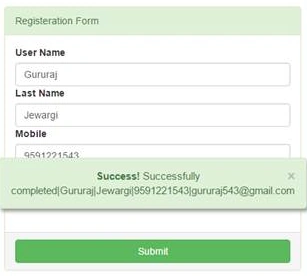
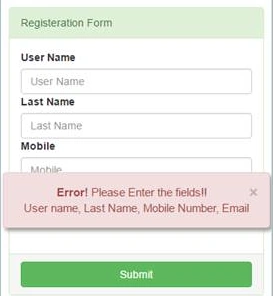
Thus, you can see in the above screenshot that users get alert messages whenever an entry is not valid.
SubashPosted Sep 23, 2016, 7:40 AM
Good start