

Introduction
In this blog we Lear how to create autocompelete textbox on the basis of SQL Server data.
Step 1:
First open Visual Studio ->File->New->Project->Windows From Application->Ok
Drag and Drop label and TextBox.
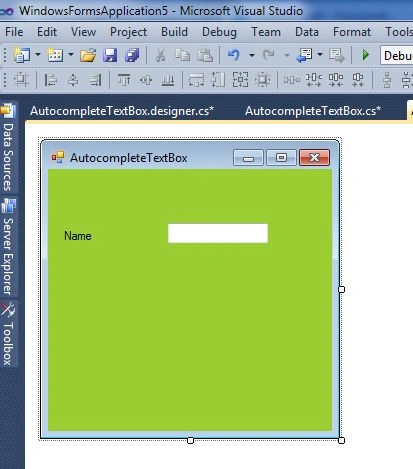
Step 2:
Now Double Click on Windows Form and write the following Code :
SqlConnection con = new SqlConnection(@"Data Source=IS9;Initial Catalog=practice;User ID=sa;Password=abc");
public void loadData()
{
con.Open();
AutoCompleteStringCollection namesCollection = new AutoCompleteStringCollection();
string querry = @"Select distinct [name] from [bio]";
SqlCommand cmd = new SqlCommand(querry, con);
SqlDataReader dr = cmd.ExecuteReader();
if (dr.HasRows == true)
{
while (dr.Read())
namesCollection.Add(dr["name"].ToString());
}
dr.Close();
con.Close();
textBox1.AutoCompleteMode = AutoCompleteMode.Append;
textBox1.AutoCompleteSource = AutoCompleteSource.CustomSource;
textBox1.AutoCompleteCustomSource = namesCollection;
}
private void textBox1_KeyUp(object sender, KeyEventArgs e)
{
loadData();
}
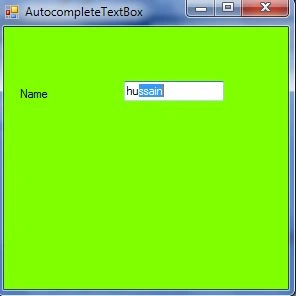
Output:
Press F5
Rizwan ShaikhPosted Oct 21, 2020, 6:43 AM
I want to use the autocomplte feature. But I want to save id, not the text. For example : ID : 1 Name: Nilesh In textbox autocomplete I am showing 'Nilesh' as a value which is correct but in DB I want to save id '1'. Can you tell me how I can do this?
DEEPAK JANGRAPosted Jun 21, 2019, 5:31 AM
Source Code is Totally Garbage. As Compare your example in Website
Andreas NeumannPosted Aug 13, 2018, 5:09 AM
Hi Hussain, thanks for this post!
Radhakrishnan VPosted Apr 9, 2015, 2:40 AM
Hi Nitin Patil, Use loaddata() method in form load instead of Keyup or keypress event.. It will work
Nitin PatilPosted Feb 8, 2015, 12:17 PM
Autocomplete list disappears after fraction of seconds using this code what if we want suggestion by middle text also
Mohamed Gani MnPosted Jan 19, 2015, 12:10 PM
Brother Good code and i doubted , Why you use Keypress event it use only page load event then it should be taking automatically append data.