

Introduction
In this blog, we will see how to implement an autocomplete input box using "Typeahead" jQuery plugin.
Typeahead is an open source jQuery based autocomplete plugin developed by Twitter. You can find more details and examples of the plugin here.
Now, we will see how to integrate it in our HTML input box.
For example, we can consider an input box for searching an employee's name.
- <div style="width: 280px;"> Employee name :
- <input id="inputbox" class="typeahead" type="text" placeholder="Enter Name" style="padding: 5px 10px;
- margin-top: 10px; border: 1px solid #c3c3c3; width: 260px; border-radius: 5px;"> </div>
- <link href="typeahead.css" rel="stylesheet" type="text/css" />
- <script src="jquery.min.1.11.1.js" type="text/javascript"></script>
- <script src="typeahead.jquery.js" type="text/javascript"></script>
- <script type="text/javascript">
- $(function() {
- $('#inputbox').typeahead({
- minLength: 3,
- highlight: true
- }, {
- name: 'autofill',
- source: substringMatcher(getdata()),
- limit: 10
- });
- });
- </script>
- min-length
It is the minimum number of characters to be entered in input box for the search to work.
- highlight
Whether the searched text should be highlighted in results or not.
- limit
The maximum number of results to be shown in search result box.
- source
This is the most important option in typeahead.jquery.js. We have to set the source for searching during initialization of input box with Typeahead.
In the above example, we have used two functions as value for source.
The first one is getdata().
- <script type="text/javascript">
- function getdata() {
- var datas;
- $.ajax({
- url: 'jsondata.aspx',
- async: false
- }).done(function(data) {
- datas = data;
- });
- return datas;
- }
- </script>
The AJAX page contains the below code on page load.
- protected void Page_Load(object sender, EventArgs e) {
- Response.AddHeader("content-type", "application/json");
- Response.Write("[\"Rajeev\",\"Sanjay\",\"Samuel\",\"Samson\",\"Ameer\",\"Anand\",\"Sania\",\"Sanal\",\"Rekha\",\"Sanju\",\"Sanuja\"]");
- }
- <script type="text/javascript">
- var substringMatcher = function(strs) {
- return function findMatches(q, cb) {
- var matches, substringRegex;
- // An array that will be populated with substring matches
- matches = [];
- // regex used to determine if a string contains the substring `q`
- substrRegex = new RegExp(q, 'i');
- // Iterate through the pool of strings and for any string that
- // contains the substring `q`, add it to the `matches` array
- $.each(strs, function(i, str) {
- if (substrRegex.test(str)) {
- matches.push(str);
- }
- });
- cb(matches);
- };
- };
- </script>
Now, we can run our page.
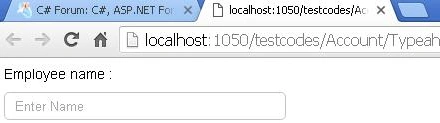
Now, enter some characters of employee name. We can see the results in the result box, as below.
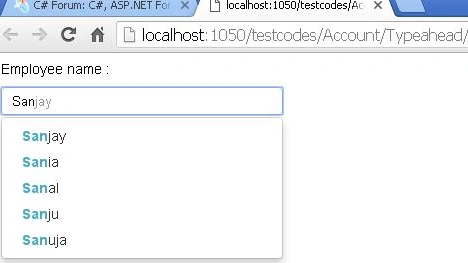
We can edit the typeahead.css file for changing the look and feel of the search box accordingly.
Additional options
We can call any script while selecting one result from the result box, using the below script.
- <script type="text/javascript">
- $(function() {
- $('#inputbox').bind('typeahead:selected', function(obj, data) {
- //Here 'data' will give the selected item
- });
- });
- </script>
Summary
In this article, we have learned how to implement an autocomplete input box in our website using the open source Typeahead jQuery plugin.
Hope it will be helpful!
sandeep tripathiPosted Feb 15, 2018, 1:38 AM
How to pass multiple value from gridiview in gridview textbox autocomplete using jquery
NehaPosted Dec 29, 2016, 8:59 AM
Thanks for sharing........................
Subhashkumar YadavPosted Dec 28, 2016, 12:55 AM
Now is working. Thanks.......................
Subhashkumar YadavPosted Dec 28, 2016, 12:46 AM
I am trying to use above Example is not working.Getting Error in Console----- jquery.min.1.11.1.js:4 Synchronous XMLHttpRequest on the main thread is deprecated because of its detrimental effects to the end user's experience. For more help, check https://xhr.spec.whatwg.org/.send @ jquery.min.1.11.1.js:4