

Continuing with the previous article, today, I’m sharing a simple example using DBContext Connect Database in ASP.NET MVC 5.
You can see my previous blogs below
Installing Entity Framework 6.x
Tools->Nuget Package Manager
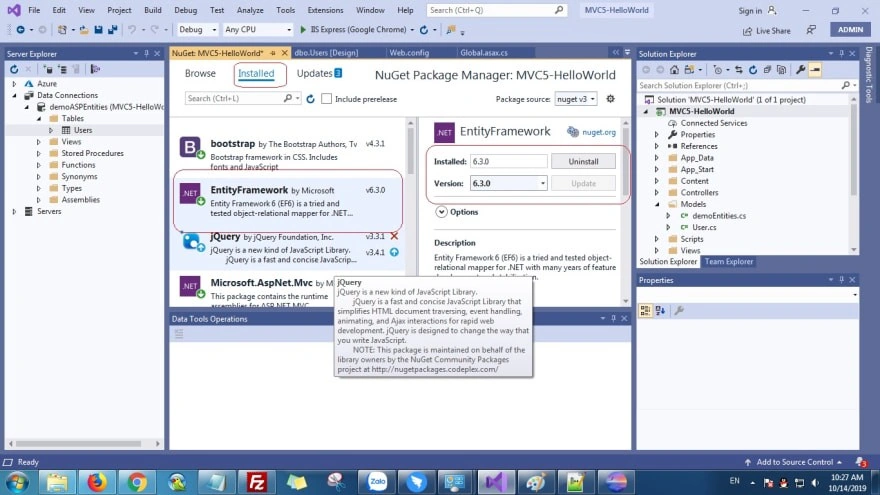
Entity Framework
It helps us to map relationship object in the database used in ADO.NET
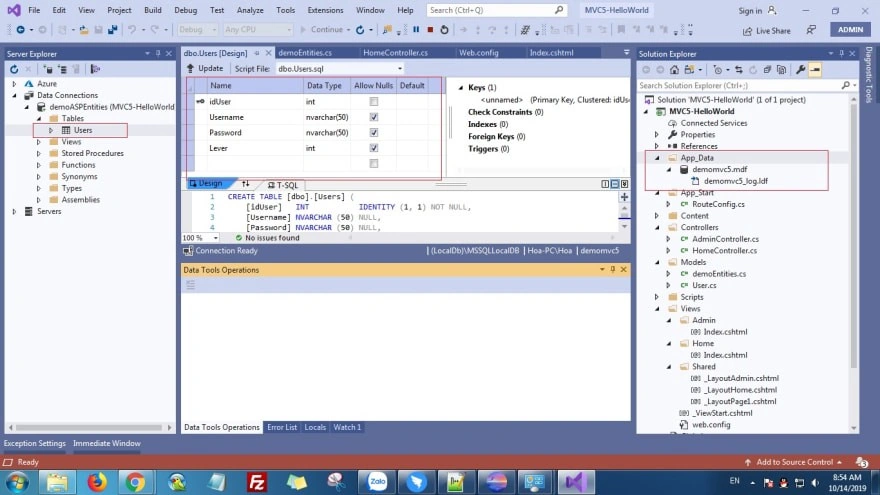
Okay, we need to create a database in App_Data directory, so you right click App_Data->New Item
After that, you open Web.config in the project and add the below code to connect database.
- <connectionStrings>
- <add name="demoASPEntities" connectionString="Data Source=(LocalDb)\MSSQLLocalDB;Initial Catalog=demomvc5;Integrated Security=SSPI;AttachDBFilename=|DataDirectory|\demomvc5.mdf" providerName="System.Data.SqlClient" />
- </connectionStrings>
Create models in ASP.Net MVC 5
In the picture above, we create a User table, so I will build the entity model for the User.
Click Models-> add class User.cs
- using System;
- using System.Collections.Generic;
- using System.Linq;
- using System.Web;
- using System.ComponentModel.DataAnnotations;
- using System.ComponentModel.DataAnnotations.Schema;
- namespace MVC5_HelloWorld.Models
- {
- public class User
- {
- [Key, Column(Order = 1)]
- [DatabaseGeneratedAttribute(DatabaseGeneratedOption.Identity)]
- public int idUser { get; set; }
- public string Username { get; set; }
- public string Password { get; set; }
- public int Lever { get; set; }
- }
- }
Create Class Connect Database extends DBContext
DBcontext is used in Entity Framework, it’s a very important part to connect to a table in database and execute query (insert, update, delete)
Models/demoEntities.cs
- using System;
- using System.Collections.Generic;
- using System.Linq;
- using System.Web;
- using MVC5_HelloWorld.Models;
- using System.Data.Entity;
- using System.Data.Entity.ModelConfiguration.Conventions;
- namespace MVC5_HelloWorld.Models
- {
- public class demoEntities : DbContext
- {
- public demoEntities() : base("demoASPEntities")
- {
- }
- public DbSet<User> Users { get; set; }
- protected override void OnModelCreating(DbModelBuilder modelBuilder)
- {
- modelBuilder.Entity<User>().ToTable("Users");
- modelBuilder.Conventions.Remove<PluralizingTableNameConvention>();
- base.OnModelCreating(modelBuilder);
- }
- }
- }
base(“demoASPEntities”)
The declaration name connect.
DbSet Users
We use the declaration table Users Controllesr/HomeController.cs
- using System;
- using System.Collections.Generic;
- using System.Linq;
- using System.Web;
- using System.Web.Mvc;
- using MVC5_HelloWorld.Models;
- namespace MVC5_HelloWorld.Controllers
- {
- public class HomeController : Controller
- {
- private demoEntities _db = new demoEntities();
- // GET: Home
- public ActionResult Index()
- {
- var data = (from s in _db.Users select s).ToList();
- ViewBag.users = data;
- ViewBag.title = "MVC5 - Hello World";
- return View();
- }
- }
- }
- @model MVC5_HelloWorld.Models.User
- <div class="container">
- <div class="row">
- <div class="col-md-12">
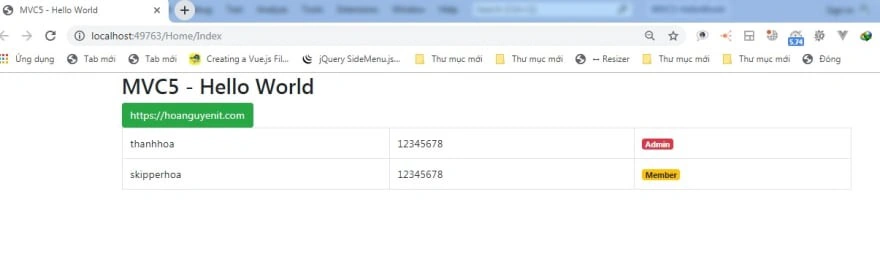
- <h2>@ViewBag.title</h2>
- <a href="https://hoanguyenit.com" class="btn btn-success">https://hoanguyenit.com</a>
- <table class="table table-bordered">
- @foreach (var user in ViewBag.users)
- {
- <tr>
- <td>@user.Username</td>
- <td>@user.Password</td>
- <td>@{
- if (user.Lever == 1)
- {
- <span class="badge badge-danger">Admin</span>
- }
- else
- {
- <span class="badge badge-warning">Member</span>
- }
- }</td>
- </tr>
- }
- </table>
- </div>
- </div>
- </div>
Join the conversation! Your thoughts help the community grow.