

Introduction
In this blog, let's discuss how to validate a form with AngularJS ng-pattern using regular expressions.
Background
Most of the times, we have to create form with validate input fields. Then we require to write code in JavaScript or server-side code for validation .This blog will show you how to achieve validation with reg-ex very easily.
Below, I have created a demostration example.
Step 1
We create HTML file and include reference of AngularJS file from CDN.
We create HTML file and include reference of AngularJS file from CDN.
Step 2
We create ng-app, ng-controller, and inject module.
We create ng-app, ng-controller, and inject module.
Step 3
We create Controller in JavaScript .
We create Controller in JavaScript .
Step 4
We use ng-pattern for giving regular expression.
We use ng-pattern for giving regular expression.
Step 5
We create span or div for hiding and showing when user input is $dirty or $invalid value.
We create span or div for hiding and showing when user input is $dirty or $invalid value.
HTML Code Snippet
- <html ng-app="myApp">
- <head>
- <title>ng-pattern with regx</title>
- <script src="https://ajax.googleapis.com/ajax/libs/angularjs/1.5.6/angular.min.js"></script>
- </head>
- <body>
- <h1 style="text-align:center">Validation Example</h1>
- <div ng-controller="cntrl" style="margin-left:500px">
- <form name="SaveForm" ng-submit="funcSave()">
- <table border="1" cellspacing="0" cellpadding="10">
- <tr>
- <td>Name</td>
- <td><input type="text" required maxlength="60" ng-pattern="/^[a-zA-Z. ]*[a-zA-Z]{1,60}$/" name="name" ng-model="name" />
- <br/>
- <span style="color:red" ng-show="SaveForm.name.$dirty && SaveForm.name.$invalid" class="ng-hide">
- Please Enter Valid Name.!
- </span>
- </td>
- </tr>
- <tr>
- <td>Date Of Birth (dd/mm/yyyy)</td>
- <td><input type="text" required ng-pattern="/^(0[1-9]|[12][0-9]|3[01])[\/](0[1-9]|1[012])[\/](19|20)\d\d$/" ng-model="dob" name="dob" />
- <br/>
- <span style="color:red" ng-show="SaveForm.dob.$dirty && SaveForm.dob.$invalid" class="ng-hide">
- Please Enter Valid Date Of Birth.!
- </span>
- </td>
- </tr>
- <tr>
- <td>Email</td>
- <td><input type="text" maxlength="100" required ng-pattern="/^\w+@[a-zA-Z_]+?\.[a-zA-Z]{2,3}$/" name="email" ng-model="email" />
- <br/>
- <span style="color:red" ng-show="SaveForm.email.$dirty && SaveForm.email.$invalid" class="ng-hide">
- Please Enter Valid Email.!
- </span>
- </td>
- </tr>
- <tr>
- <td>Mobile No </td>
- <td><input type="text" required maxlength="10" ng-pattern="/^[7-9][0-9]{9}$/" name="mobileno" ng-model="mobileno" />
- <br/>
- <span style="color:red" ng-show="SaveForm.mobileno.$dirty && SaveForm.mobileno.$invalid" class="ng-hide">
- Please Enter Valid Mobile No.!
- </span>
- </td>
- </tr>
- <tr>
- <td>Pin code </td>
- <td><input type="text" required maxlength="6" ng-pattern="/^[1-9][0-9]{5}$/" name="pincode" ng-model="pincode" />
- <br/>
- <span style="color:red" ng-show="SaveForm.pincode.$dirty && SaveForm.pincode.$invalid" class="ng-hide">
- Please Enter Valid Pin.!
- </span>
- </td>
- </tr>
- <tr>
- <td colspan="4" style="text-align:center"><input type="submit" value="submit" /></td>
- </tr>
- </table>
- </form>
- </div>
- </body>
- </html>
JavaScript Code Snippet
- <script>
- var app = angular.module("myApp", []);
- app.controller('cntrl',function($scope){
- $scope.funcSave = function()
- {
- if($scope.SaveForm.$valid) {
- alert("Form is Valid..!!");
- }
- else
- {
- alert("Form is not Valid..!!");
- }
- }
- })
- </script>
Output Screenshots
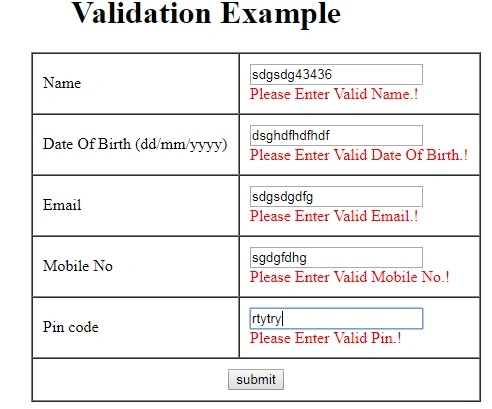
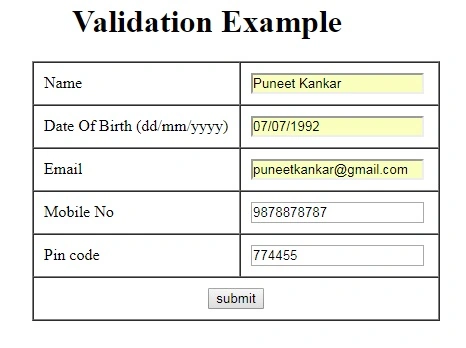
Note
One thing that you should keep in mind is - ng-pattern given name tag is required in input box and textarea. You can also create common JSON file for all forms accessing regx and given value in $rootscope.
Summary
I hope, you understood how to use regular expression in AngularJS ng-pattern.
Parshva JainPosted Aug 9, 2021, 12:09 PM
Is there any way through which I can apply ng-pattern globally to all the text fields in the application without having to write it in every text box ?
Shivam TiwariPosted Sep 10, 2017, 5:25 AM
Well done puneet ,its really very helpful for beginners.
Ramdutt PathakPosted Aug 25, 2017, 7:18 AM
Very helpfull to use..