

Hi all, I hope you are fine . If you are new to angular JS I suggest you to read the Basics of AngularJS.
Now with the belief that you have read my previous article, we are starting.
Using the code
We will explain that with a demo. Please see the below implementation.
- <body ng-app ng-init="placesVisited=['Delhi','Kerala','Tamil Nadu','Banglore','Uttar Pradesh','Noida','Haryana','Thrissur'];">
- <div>
- <input type="text" ng-model="curPlace" class="inputText">
- <ul>
- <li ng-repeat="place in placesVisited | filter:curPlace">
- <a ng-href="https://www.google.co.in/webhp?q={{place}}">{{place}} </a>
- </li>
- </ul>
- </div>
- <script src="angular.min.js"></script>
- </body>
- placesVisited=['Delhi','Kerala','Tamil Nadu','Banglore','Uttar Pradesh','Noida','Haryana','Thrissur'];
- <a ng-href="https://www.google.co.in/webhp?q={{place}}">{{place}} </a>
Include CSS if you need
- <style>
- .inputText {
- border: 1px solid #ccc;
- border-radius: 10px;
- background-color: #0ff;
- box-shadow: 1px 1px 1px 1px #ccc;
- width: 230px;
- height: 30px;
- }
- ul {
- list-style: none;
- padding: 10px;
- background-color: #CAEAF5;
- border-radius: 10px;
- border: 1px solid #ccc;
- width: 210px;
- }
- li {
- border: 1px solid #ccc;
- border-right: none;
- border-left: none;
- padding: 2px;
- text-align: center;
- }
- </style>
Complete HTML
Now that is all for the day, I will come with another set of items in Angular JS soon? .I hope you liked this article. Please give your valuable suggestions. Kindest Regards
Sibeesh Venu
- <!DOCTYPE html>
- <html>
- <head>
- <title>Angular animated search box - SibeeshPassion </title>
- <style>
- .inputText {
- border: 1px solid #ccc;
- border-radius: 10px;
- background-color: #0ff;
- box-shadow: 1px 1px 1px 1px #ccc;
- width: 230px;
- height: 30px;
- }
- ul {
- list-style: none;
- padding: 10px;
- background-color: #CAEAF5;
- border-radius: 10px;
- border: 1px solid #ccc;
- width: 210px;
- }
- li {
- border: 1px solid #ccc;
- border-right: none;
- border-left: none;
- padding: 2px;
- text-align: center;
- }
- </style>
- </head>
- <body ng-app ng-init="placesVisited=['Delhi','Kerala','Tamil Nadu','Banglore','Uttar Pradesh','Noida','Haryana','Thrissur'];">
- <div>
- <input type="text" ng-model="curPlace" class="inputText">
- <ul>
- <li ng-repeat="place in placesVisited | filter:curPlace">
- <a ng-href="https://www.google.co.in/webhp?q={{place}}">{{place}} </a>
- </li>
- </ul>
- </div>
- <script src="angular.min.js"></script>
- </body>
- </html>
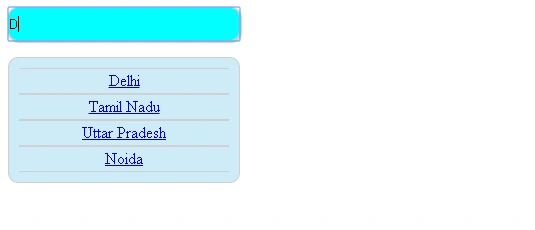
Output
Conclusion
Now that is all for the day, I will come with another set of items in Angular JS soon? .I hope you liked this article. Please give your valuable suggestions. Kindest Regards
Sibeesh Venu
Sibeesh VenuPosted Apr 17, 2015, 12:49 AM
Karthik Muthu Karuppan Thank you :)
Sibeesh VenuPosted Apr 17, 2015, 12:49 AM
Santhakumar Munuswamy Thank you :)
Sibeesh VenuPosted Apr 17, 2015, 12:49 AM
Shakti Singh Dulawat Thank you , I will do that :)
Karthik Muthu KaruppanPosted Apr 16, 2015, 11:31 AM
Good one
Santhakumar MunuswamyPosted Apr 16, 2015, 4:27 AM
good
Shakti Singh DulawatPosted Apr 16, 2015, 1:41 AM
Nice information if you add Screen shot of code result it will be easy to understand