

AngularJS Datepicker using JS files and reference
Step1
Now we are going see some DatePicker Reference files below .
Step1
Now we are going see some DatePicker Reference files below .
- <script type="text/javascript" src="//code.jquery.com/jquery-2.1.1.min.js"></script>
- <script type="text/javascript" src="//maxcdn.bootstrapcdn.com/bootstrap/3.3.1/js/bootstrap.min.js"></script>
- <script src="//cdnjs.cloudflare.com/ajax/libs/moment.js/2.9.0/moment-with-locales.js"></script>
- <script src="//cdn.rawgit.com/Eonasdan/bootstrap-datetimepicker/e8bddc60e73c1ec2475f827be36e1957af72e2ea/src/js/bootstrap-datetimepicker.js"></script>
Step 2
Here I defined normal input text box and assigned id and ng-model
Here I defined normal input text box and assigned id and ng-model
- <label>Licenceexpiry Date</label>
- <input type="text" name="dob" id="DOB" title="dob" ng-model="dob" >
Step 3
Then call textbox id and assign to datepicker from below JS code.
Then call textbox id and assign to datepicker from below JS code.
- <script>
- $('#dob').datetimepicker({
- useCurrent: false,
- format: 'DD/MM/YYYY',
- });
- </script>
Just put this scriptag code and mention your text box id and then give format on DD/MM/YYYY or MM/DD/YYYY
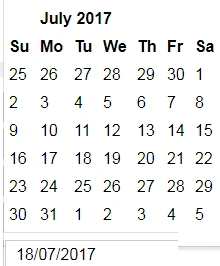
I hope this datepicker is mostly helpful for you.
I hope this datepicker is mostly helpful for you.
Join the conversation! Your thoughts help the community grow.