

In this blog, I will demonstrate input textbox, set comma separator, using AngularJS and most useful for quantity and countable input text.
HTML code
I have designed simple input type Text in HTML,.using AngularJS
- <div class="panel panel-primary">
- <div class="panel-heading">
- <h3 class="panel-title">AngularJS Comma Separator</h3>
- </div>
- <div class="panel-body"> <input type="text" class="form-control" ng-model="textValues" /> </div>
- <div class='panel-footer'> {{textValues}} </div>
- </div>
AngularJS code
Create Angular module & name it as csharpcor.
- var app = angular.module('csharpcor', []);
Module & controller name must assign to the HTML element
- app.controller('NgCtrl', function($scope) {
- $scope.TextValues=123456789;
- });
Module & controller name must assign to the HTML element
- <html ng-app="'csharpcor'" ng-controller="NgCtrl">
Create Angular Directives given below
- app.directive('commaseparator', function($filter) {
- 'use strict';
- return {
- require: 'ngModel',
- link: function(scope, elem, attrs, ctrl) {
- if (!ctrl) {
- return;
- }
- ctrl.$formatters.unshift(function() {
- return $filter('number')(ctrl.$modelValue);
- });
- ctrl.$parsers.unshift(function(viewValue) {
- var plainNumber = viewValue.replace(/[\,\.\-\+]/g, ''),
- b = $filter('number')(plainNumber);
- elem.val(b);
- return plainNumber;
- });
- }
- };
- });
Assgin Directive to the input text.
- <input type="text" class="form-control" ng-model="textValues" commaseparator />
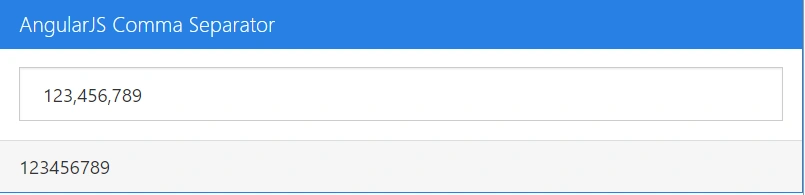
For source code, refer to the link.
demo userPosted Jun 12, 2019, 2:43 AM
How to convert this for Indian rupee comma separator format?
shin sinPosted Jun 3, 2017, 10:25 AM
<!DOCTYPE html><html> <script src="https://ajax.googleapis.com/ajax/libs/angularjs/1.6.4/angular.min.js"></script> <body> <div ng-app="myApp" ng-controller="myCtrl"> <input type="text" class="form-control" ng-model="textValues" commaseparator /> </div> <script> var app = angular.module('myApp', []); app.controller('myCtrl', function($scope) { $scope.price = "0"; }); app.directive('commaseparator', function($filter) { 'use strict'; return { require: 'ngModel', link: function(scope, elem, attrs, ctrl) { if (!ctrl) { return; } ctrl.$formatters.unshift(function() { return $filter('number')(ctrl.$modelValue); }); ctrl.$parsers.unshift(function(viewValue) { var plainNumber = viewValue.replace(/[\,\.\-\+]/g, ''), b = $filter('number')(plainNumber); elem.val(b); return plainNumber; }); } }; }); </script> </body> </html>