

In this blog, I will explain how to integrate Angular 6 within your existing ASP.NET project where your pages are in .aspx.
Setting up Angular 6 to a new machine.
Step 1 - Install NodeJS
You can install node.js and npm from the below URL.
https://nodejs.org/en/download/
https://nodejs.org/en/download/
For Angular 6, you have to install Node8.x and after successful installation, you can check version: node -v from command prompt.
Use npm -v to check NPM version. NPM should be 5.X
Step 2 - Then, install the Angular CLI globally.
Command to install,
npm install -g @angular/cli
npm install -g @angular/cli
command to check version:
tsc -v
Given below is the .aspx code where I am using <app-root name="list-user"></app-root> and added reference of the JS files.
- <%@ Page Language="C#" AutoEventWireup="true" CodeFile="UserList.aspx.cs" %>
- <!DOCTYPE html>
- <html xmlns="http://www.w3.org/1999/xhtml">
- <head runat="server">
- <title></title>
- <base href="/">
- </head>
- <body>
- <form id="form1" runat="server">
- <div>
- <app-root name="list-user"></app-root>
- <script src="../AngularApp/dist/my-new-angular-app/main.js"></script>
- <script src="../AngularApp/dist/my-new-angular-app/polyfills.js"></script>
- <script src="../AngularApp/dist/my-new-angular-app/runtime.js"></script>
- <script src="../AngularApp/dist/my-new-angular-app/styles.js"></script>
- <script src="../AngularApp/dist/my-new-angular-app/vendor.js"></script>
- </div>
- </form>
- </body>
- </html>
- import { Component, Input, ElementRef } from '@angular/core';
- import { Router, ActivatedRoute } from '@angular/router';
- @Component({
- selector: 'app-root',
- templateUrl: './app.component.html',
- styleUrls: ['./app.component.css']
- })
- export class AppComponent {
- @Input('name') name: string;
- title = 'app';
- constructor(private router: Router, private route: ActivatedRoute, private eleRef: ElementRef) { }
- ngOnInit(): void {
- let prop = this.eleRef.nativeElement.getAttribute('name');
- switch (prop) {
- case "testmodule":
- this.router.navigate(['/testAJ.aspx']);
- break;
- case "list-user":
- this.router.navigate(['/UserList.aspx']);
- break;
- default:
- this.router.navigate(['/']);
- break;
- }
- }
- }
Now, create an array of routes where we have defined which component will be called and after that, register this into Root Module. Now, you can output this routing component via the <router-outlet> component.Module.
- import { NgModule, ModuleWithProviders } from '@angular/core';
- import { RouterModule, Routes } from '@angular/router';
- import { ListUserComponent } from './listModule/list-user.component';
- const routes: Routes = [
- { path: 'testAJ.aspx', component: TestModuleComponent },
- { path: 'UserList.aspx', component: ListUserComponent }
- ];
- export const routing = RouterModule.forRoot(routes);
Add this in app.component.html,
- <router-outlet></router-outlet>
- export class State {
- stateID: string;
- stateName: string;
- }
- import { Injectable } from '@angular/core';
- import { HttpClient, HttpHeaders } from '@angular/common/http';
- import { State } from "../model/state.model";
- let httpOptions = {
- headers: new HttpHeaders({
- 'Content-Type': 'application/json',
- 'Cache-Control': 'no-cache'
- })
- };
- @Injectable()
- export class UserService {
- constructor(private http: HttpClient) { }
- baseUrl: string = 'put your Api here'
- getSatesByCountryCode(_countryCode: string) {
- let body = JSON.stringify({ CountryCode: _countryCode });
- return this.http.post(this.baseUrl + 'GetStatebyCountryId', body, httpOptions);
- }
- }
- import { Component, OnInit } from '@angular/core';
- import { Router } from "@angular/router";
- import { UserService } from "../service/user.service";
- import { State } from "../model/state.model";
- import { products } from '../model/products';
- @Component({
- selector: 'list-user',
- templateUrl: './list-user.component.html'
- })
- export class ListUserComponent {
- states: any = [];
- constructor(private router: Router, private userService: UserService) { }
- ngOnInit() {
- this.userService.getSatesByCountryCode('001')
- .subscribe(data => {
- this.states = data;
- this.states = JSON.parse(this.states.d);
- }, error => {
- console.log(error);
- }
- );
- }
- }
- <table>
- <thead>
- <tr>
- <th>State ID</th>
- <th>State Name</th>
- </tr>
- </thead>
- <tbody>
- <tr *ngFor="let state of states">
- <td>{{state.StateID}}</td>
- <td>{{state.StateName}}</td>
- </tr>
- </tbody>
- </table>
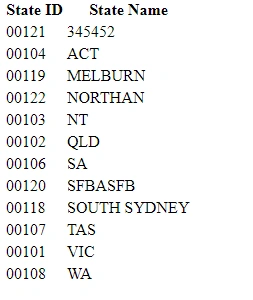
In this article, I have explained how to call the API from service and bind the data to HTML page with use of Angular 6 and ASP.NET. In my next blog, I will show how to use Kendo UI with Angular 6.
Below is the screenshot of output in the browser.
pratap patilPosted Feb 6, 2023, 9:24 AM
What will be the location of aspx file? It will be inside Angular application or inside the Dot net application.
Srihari RamakrishnanPosted Jul 19, 2021, 11:49 PM
Thanks for sharing this...In my scenario need to call aspx webmethod from angular service and calling from ngOnInit is working fine, but other events are not working for the http calls. When I call the webmethod from the button click event am getting the Http 404 error. Please help
Bhushan BhasmePosted Jul 8, 2021, 1:09 PM
Could you please tell me where you can place the path for global css file?
Bhushan BhasmePosted Jul 8, 2021, 11:30 AM
Hi , i am getting "Refused to load the stylesheet 'https://fonts.googleapis.com/css2?family=Roboto:ital,wght@0,100;0,300;0,400;0,500;0,700;0,900;1,100;1,300;1,400;1,500;1,700;1,900&display=swap' because it violates the following Content Security Policy directive: "style-src 'self' 'unsafe-inline' 'unsafe-eval'". Note that 'style-src-elem' was not explicitly set, so 'style-src' is used as a fallback." issue when i host anular app from aspx page..Please help
Bichitra pattanayakPosted Mar 22, 2020, 6:24 AM
Hi can you share project structure, asp.net and angular, is angular start up project or asp.net
Dhaval PujaraPosted Jul 25, 2019, 4:30 AM
How can we handle the Culture set in aspx pages and UI developed in Angular Application just as above ?
Phone DrigoPosted Jun 13, 2019, 1:20 PM
Where Can I find the source Code? Best Regards!
chathuranga muthukumaranaPosted Feb 5, 2019, 10:14 PM
Can u show the folder structure?
Raj KumarPosted Oct 11, 2018, 8:29 AM
Where can i found these sources : main.js,polyfills.js,vendor.js,styles.js,runtime.js and is these two different projects one is angular and another is .net?
Akhil KumarPosted Sep 12, 2018, 9:55 AM
Thanks for Sharing @Ankit
Muthu KumarPosted Sep 9, 2018, 11:11 AM
Thanks for sharing..
Naresh SinghalPosted Sep 8, 2018, 12:02 AM
Nice to know it.....
Sai Kumar KoonaPosted Sep 7, 2018, 8:33 PM
Good one....