

Adding a Calculated Column to a DataTable
An expression column contains a
value that is calculated from other column values in the same row, or from an
aggregate of rows in the table or in a related table. The DataType
of the column must be compatible with the return value of the expression.
Following Example shows how to use a calculated column in a DataTable
using System;
using System.Data;
namespace CalculatedColumninaDataTable
{
class Program
{
static void Main(string[] args)
{
DataTable Order = new DataTable();
Order.Columns.Add("ProductName", typeof(string));
Order.Columns.Add("Quantity", typeof(int));
Order.Columns.Add("UnitPrice", typeof(decimal));
Order.Columns.Add("UnitPriceDiscount", typeof(decimal));
// Add an expression column to the table.
Order.Columns.Add("TotalPrice", typeof(decimal), "(UnitPrice -UnitPriceDiscount) * Quantity");
DataRow newOrder = Order.NewRow();
Order.Rows.Add("Widget",7,1.84,0.14);
Order.Rows.Add("Bobbin", 8, 4.2,0.33);
Order.Rows.Add("Sniglet", 4, 6.39,0.13);
Order.Rows.Add("Wire", 8, 5.58,0.21);
Order.Rows.Add("Gear", 10, 0.17,0.1);
Console.WriteLine("ProductName Quantity UnitPrice TotalPrice \n");
foreach (DataRow row in Order.Rows)
Console.WriteLine("{0}\t \t {1}\t {2}\t \t {3} \n",
row["ProductName"], row["Quantity"],
row["UnitPrice"], row["TotalPrice"]);
Console.WriteLine("\nPress any key to continue.");
Console.ReadKey();
}
}
}
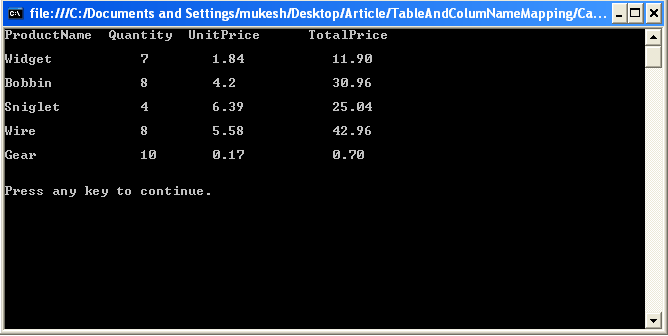
Output :
Harshil GandhiPosted Jul 14, 2018, 1:29 AM
If I use division then how to handle divided by zero exception