

Add two numbers in Java
Step 1: Let's open a notepad and write the following code.
//Code
- class demo {
- public static void main(String arg[]) {
- int a = 10, b = 20, c = 0;
- c = a + b;
- System.out.println("sum of two no is :" + c);
- }
- }
Step 2: Name it as "ab.java" and save the file on any location. I saved at "C:\app".
Step 3: Open command prompt (Press Window + R and write cmd and hit OK).
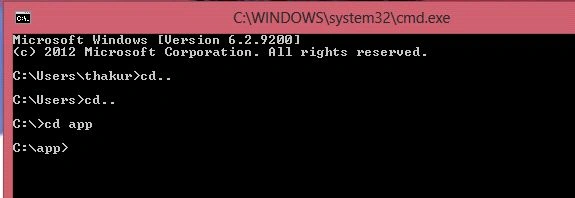
 Step 4: Go to "C:\app" by using command prompt
 Step 5: Now write the following code for checking my java file is compiling or not.
javac ab.java
Step 5: Now write the following code for checking my java file is compiling or not.
javac ab.java
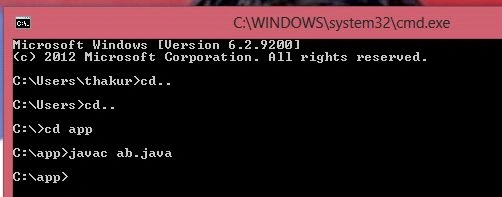 My java program compiled successfully.
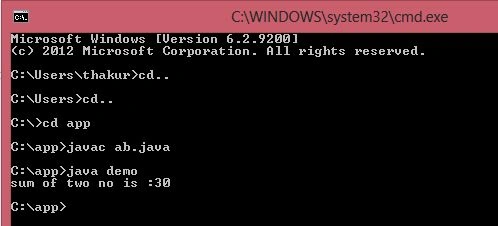
Step 6: Write the following code in command prompt. Press enter and see the output.
java demo
// demo is a class name that is written in my ab.java file.
Output
My java program compiled successfully.
Step 6: Write the following code in command prompt. Press enter and see the output.
java demo
// demo is a class name that is written in my ab.java file.
Output
 Happy Coding.
SubashPosted Sep 19, 2016, 7:45 AM
Good
Santhakumar MunuswamyPosted May 3, 2015, 11:44 AM
Good
Kiran ThakurPosted May 1, 2015, 12:33 PM
thank you all :)
NitinPosted May 1, 2015, 6:57 AM
good one
Pramod ThakurPosted May 1, 2015, 3:57 AM
Nice one.. Keep it up :)