

During your professional career, while using Entity Framework, you might face situations where you need to insert multiple data at a time.
Well, we can achieve insertion of multiple data in SQL by creating a custom table type and using it with a stored procedure.
Now, a question raised in your mind is probably "Is it possible to access procedures in Entity Framework that are using custom table type?"
The answer is "YES, It is possible - using EntityFrameworkExtras."
Now, let's have a look at how we can implement. it
Step 1
Create custom data type in your database.
Custom table type
Create custom data type in your database.
Custom table type
- //Custom data type
- -- ================================
- -- Create User-defined Table Type
- -- ================================
- --DROP TYPE dbo.Tvp_Employee
- CREATE TYPE dbo.Tvp_Employee AS TABLE
- (
- Name varchar(50) NULL,
- Salary numeric(18,0) Null
- )
- GO
Create stored procedure using the custom data type you have created recently.
- //Create stored procedure
- -- =============================================
- -- Author: Mitesh Gadhiya
- -- Create date: 15-jul-017
- -- Description: Demo for Inserting data with Custom table Type
- -- =============================================
- --DROP PROC Proc_insertemployee
- CREATE PROCEDURE Proc_insertemployee (@tbl_Employee TVP_EMPLOYEE readonly)
- AS
- BEGIN
- BEGIN try
- -- Insert statements for procedure here
- INSERT INTO tbl_employee
- (NAME,
- salary)
- SELECT NAME,
- salary
- FROM @tbl_Employee
- END try
- BEGIN catch
- DECLARE @ErrorNumber INT
- DECLARE @ErrorMessage VARCHAR(2000)
- DECLARE @ErrorSeverity INT
- DECLARE @ErrorState INT
- SELECT @ErrorNumber = Error_number(),
- @ErrorMessage = 'Error occured at time of inserting'
- + Error_message(),
- @Errorseverity = Error_severity(),
- @ErrorState = Error_state()
- RAISERROR (@Errormessage,@ErrorSeverity,@ErrorState)
- END catch
- END
- go
After creating procedure in your Visual Studio's project, add EntityFrameworkExtras using NuGet Package Manager.
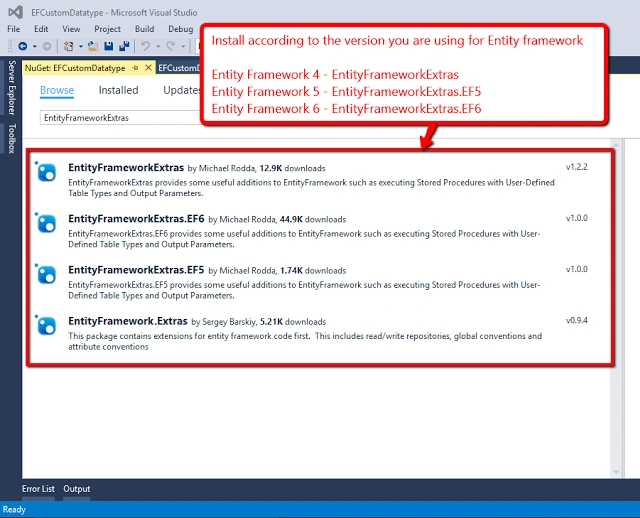
Step 4
After installing nuGet package successfully, add a new class to define Custom data type.
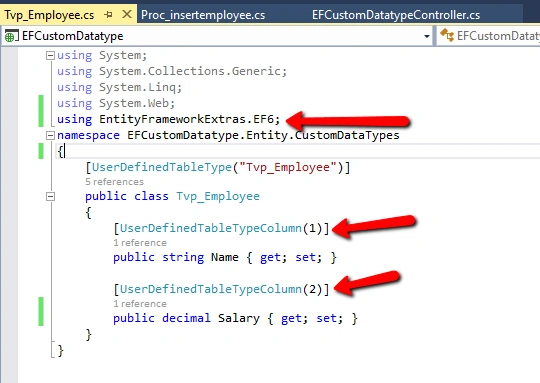
- using System;
- using System.Collections.Generic;
- using System.Linq;
- using System.Web;
- using EntityFrameworkExtras.EF6;
- namespace EFCustomDatatype.Entity.CustomDataTypes {
- [UserDefinedTableType("Tvp_Employee")]
- public class Tvp_Employee {
- [UserDefinedTableTypeColumn(1)]
- public string Name {
- get;
- set;
- }
- [UserDefinedTableTypeColumn(2)]
- public decimal Salary {
- get;
- set;
- }
- }
- }
Add a new class to define procedure that is using custom data type.

- using System;
- using System.Collections.Generic;
- using System.Linq;
- using System.Web;
- using EntityFrameworkExtras.EF6;
- using System.Data;
- namespace EFCustomDatatype.Entity.CustomDataTypes {
- [StoredProcedure("Proc_insertemployee")]
- public class Proc_insertemployee {
- [StoredProcedureParameter(SqlDbType.Udt, ParameterName = "tbl_Employee")]
- public List < tvp_employee > tbl_Employee {
- get;
- set;
- }
- }
- }
Call procedure from Controller and insert data into database.

Code snippet for calling store procedure from application.
- using EFCustomDatatype.Entity.CustomDataTypes;
- using EntityFrameworkExtras.EF6;
- using System;
- using System.Collections.Generic;
- using System.Data;
- using System.Data.Entity;
- using System.Linq;
- using System.Web;
- using System.Web.Mvc;
- namespace EFCustomDatatype.Controllers {
- public class EFCustomDatatypeController: Controller {
- Entity.EFCustomDatatypeEntities objEFCustomDatatype;
- public EFCustomDatatypeController() {
- objEFCustomDatatype = new Entity.EFCustomDatatypeEntities();
- }
- // GET: EFCustomDatatype
- public ActionResult Index() {
- try {
- var procedure = new Proc_insertemployee() {
- tbl_Employee = GetEmpData()
- };
- objEFCustomDatatype.Database.ExecuteStoredProcedure(procedure);
- } catch (Exception) {
- throw;
- }
- return View();
- }
- public List < tvp_employee > GetEmpData() {
- List < tvp_employee > lstEmp = new List < tvp_employee > ();
- for (int i = 0; i < 5; i++) {
- lstEmp.Add(new Tvp_Employee {
- Name = "Mitesh_" + i.ToString(),
- Salary = (1000 * (i + 1))
- });
- }
- return lstEmp;
- }
- }
- }
Cheers...Hope this will be helpful to you..:)
jasper laiPosted Nov 22, 2019, 4:21 AM
Hi, I cannot find where is the definition of EFCustomDatatypeEntities, would you please help me? thank you.
vishnu MalonePosted Aug 7, 2018, 4:45 AM
How to add tvp in edmx and how to use..please let me know..
ashkan abbasiPosted Mar 19, 2018, 1:49 PM
Thank you very much. It was really good. Many Thanks.