

Introduction
In this blog, we will discuss the radius
property of the border in Javascript. Here we set the border-radius of a div
control according to the value of the four TextBox in our program.
For this follow these steps:
Step1: First we create three tables
like this.
- <body>
- <table>
- <tr>
- <td> <input id="txt1" type="text" style="width: 20px; height: 20px;" /> </td>
- <td style="width: 300px;"> </td>
- <td> <input id="txt2" type="text" style="width: 20px; height: 20px;" /> </td>
- </tr>
- </table>
- <table>
- <tr>
- <td> </td>
- <td>
- <div id="div1" align="center"> My Name is Mahak Gupta</div>
- </td>
- <td> </td>
- </tr>
- </table>
- <table>
- <tr>
- <td> <input id="txt3" type="text" style="width: 20px; height: 20px;" /> </td>
- <td style="width: 300px;"> </td>
- <td> <input type="text" id="txt4" style="width: 20px; height: 20px;" /> </td>
- </tr>
- </table>
- </body>

Step 2: Now we write the code by this
code, when we put the value on the Top Left TextBox the Top Left radius of the
div will be changed. For this first we write the event on the TextBox (txt1)
like this:
- <input id="txt1" onchange="Show1()" type="text" style="width:20px;height:20px;" />
Now we will write the function:
- <script language="javascript">
- function Show1() {
- var a = document.getElementById('txt1').value;
- document.getElementById('div1').style.borderTopLeftRadius = a + "px";
- }
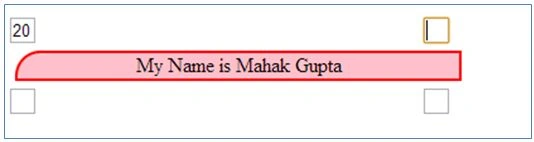
Here we take the txt1 value and set it as the
the radius of the div.
The Output will be:
- <input id="txt2" onchange="Show2()" type="text" style="width:20px;height:20px;" />
Now we will write the function:
- function Show2() {
- var a = document.getElementById('txt2').value;
- document.getElementById('div1').style.borderTopRightRadius = a + "px";
- }

- <input id="txt3" onchange="Show3()" type="text" style="width:20px;height:20px;"/>
Now we will write the function:
- function Show3()
- {
- var a = document.getElementById('txt3').value;
- document.getElementById('div1').style.borderBottomLeftRadius = a + "px";
- }
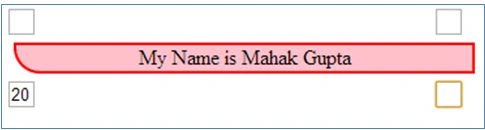
The Output will be:
- <input id="txt4" onchange="Show4()" type="text" style="width:20px;height:20px;" />
Now we will write the function:
- function Show4()
- var a = document.getElementById('txt4').value;
- document.getElementById('div1').style.borderBottomRightRadius = a + "px";
- }
The Output will be:


Join the conversation! Your thoughts help the community grow.