

Pre-requisite to understand this
Azure Subscription & Tenant – Logical boundary for resources and identities
Azure Active Directory (Entra ID) – Central identity and access management service
Azure Virtual Network (VNet) – Network isolation in Azure
Azure RBAC – Role-based authorization for Azure resources
Azure PaaS & IaaS Services – App Service, AKS, VM, SQL, Storage
Azure Monitor & Defender – Logging, monitoring, and threat protection
Introduction
Zero Trust Architecture in Azure is implemented using identity-first security, conditional access, and continuous verification across users, devices, applications, and workloads. Azure’s native services such as Azure AD (Entra ID), Conditional Access, Azure Firewall, Private Endpoints, and Defender for Cloud provide a tightly integrated ecosystem for Zero Trust. Instead of relying on network location, Azure Zero Trust evaluates identity, device health, access context, and risk signals before granting access to any resource.
What problem we can solve with this?
In traditional Azure deployments, users and services often gain broad access once inside a VNet or VPN. This creates a large blast radius when credentials are compromised or workloads are misconfigured. Azure Zero Trust eliminates implicit trust by enforcing identity validation and policy evaluation for every request. It also protects PaaS services that are traditionally exposed over public endpoints. Azure Zero Trust enables secure remote access, protects APIs, and reduces lateral movement inside VNets while improving visibility and compliance.
Problems addressed:
Prevents misuse of stolen Azure AD credentials
Reduces attack surface of Azure VNets
Secures PaaS services without public exposure
Blocks lateral movement between Azure workloads
Enables secure remote and hybrid access
Improves auditability and compliance
How to implement / use this in Azure?
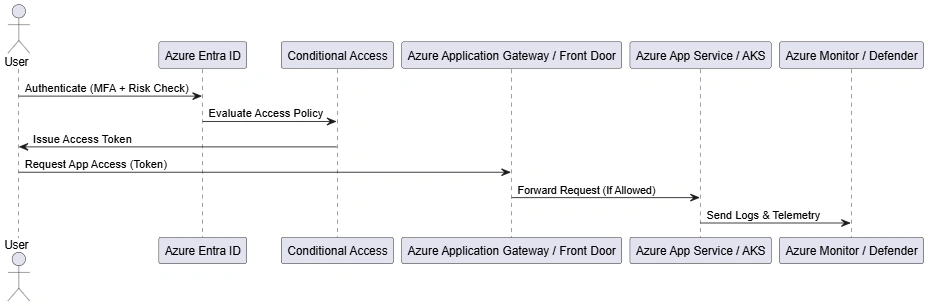
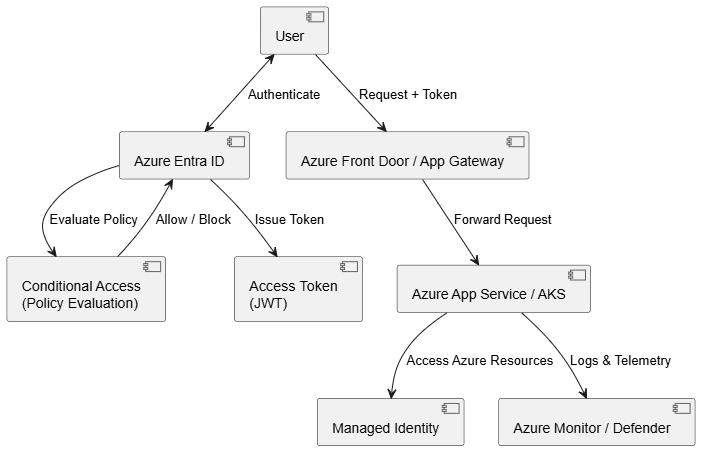
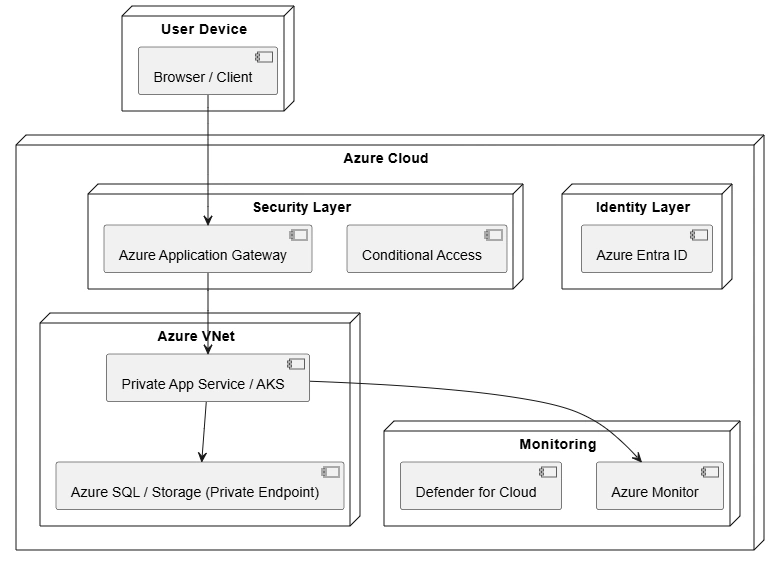
Azure Zero Trust is implemented by combining Entra ID, Conditional Access, Azure networking controls, and continuous monitoring. Users and workloads authenticate through Entra ID using MFA and risk-based policies. Access to Azure resources is controlled using RBAC and managed identities. Network access is restricted using Private Endpoints, NSGs, and Azure Firewall. Defender for Cloud and Azure Monitor continuously assess security posture and detect threats. Policies are enforced dynamically and automatically.
Implementation steps in Azure:
Azure Entra ID (Azure AD) – Central identity provider
Conditional Access Policies – Context-aware access decisions
Managed Identities – Passwordless service authentication
Private Endpoints – Eliminate public exposure of services
Azure Firewall / NSG – Network-level enforcement
Defender for Cloud – Continuous threat detection
Join the conversation! Your thoughts help the community grow.