

How SQL Server Captures Row Modifications Asynchronously via the Transaction Log
In high-throughput enterprise relational databases, tracking row modifications (INSERT, UPDATE, and DELETE) is essential for auditing, event streaming, and downstream synchronization. While application triggers or custom timestamp columns have historically been used for this purpose, they introduce significant transaction overhead and lock contention.
Change Data Capture (CDC) in SQL Server provides an asynchronous, log-based alternative. Operating directly on the database engine level, CDC extracts mutations from the transaction log without blocking active user transactions.
1. Internal Infrastructure: The cdc Schema
When CDC is enabled on a database and a target table using system stored procedures, SQL Server automatically creates a dedicated system schema named cdc.
-- Step 1: Enable CDC at Database Level
EXEC sys.sp_cdc_enable_db;
GO

-- Step 2: Enable CDC on a Specific Table
EXEC sys.sp_cdc_enable_table
    @source_schema = N'dbo',
    @source_name   = N'Orders',
    @role_name     = NULL; -- Optional gating security role
GO
System Objects Generated
Enabling CDC initializes several metadata objects inside the database:
cdc.change_tables: Stores a registry of all tracked tables, their capture instances, and initial Log Sequence Number (LSN) boundaries.cdc.captured_columns: Maps every source column to its corresponding position in the change tables.cdc.lsn_time_mapping: Maps binary LSN values to real-worldDATETIME2execution timestamps.cdc.dbo_Orders_CT(The Change Table): A shadow table dedicated specifically todbo.Ordersthat acts as the physical repository for all row modification histories.
2. The Internal Data Pipeline
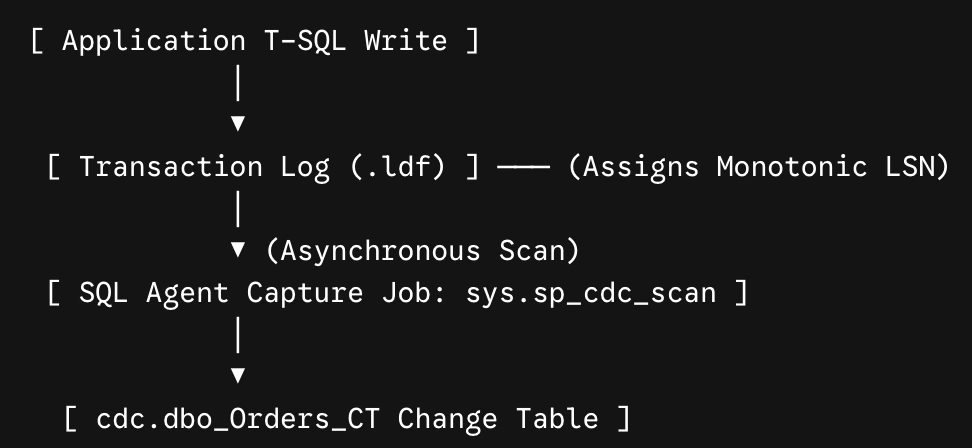
CDC operates asynchronously to avoid impacting user write latency. The engine uses a background log-scanning mechanism rather than synchronous triggers.
Execution Steps
Transaction Logging: When a transaction updates a tracked table, SQL Server writes the operational log record to the active transaction log file (
.ldf) as normal and assigns it a sequential Log Sequence Number (LSN).Log Scanning (
sys.sp_cdc_scan): A dedicated SQL Server Agent job continually runssys.sp_cdc_scan. This process reads committed log records associated with CDC-enabled tables asynchronously.Shadow Table Insertion: The capture job parses the before- and after-images of modified rows from the transaction log and appends them to the corresponding
cdc.<capture_instance>_CTtable.
3. Dissecting the Change Table (_CT) Schema
The auto-generated change table mirrors the data columns of the source table, augmented with five system metadata columns at the front:
| Metadata Column | Data Type | Description |
|---|---|---|
| __$start_lsn | binary(10) | The Log Sequence Number of the commit transaction. Defines physical execution order. |
| __$seqval | binary(10) | Sequence value used to order distinct operations occurring within the same transaction. |
| __$operation | int | Integer flag indicating the DML operation type:• 1 = DELETE• 2 = INSERT• 3 = UPDATE (Before Image)• 4 = UPDATE (After Image) |
| __$update_mask | varbinary(128) | A column-level bitmask identifying exactly which columns were modified during an update. |
| __$command_id | int | Internal identifier for the T-SQL command within the transaction. |
DML Representation Example
When an UPDATE operation changes an order amount from $150.00 to $200.00, CDC writes two rows to the change table:

4. Querying Captured Data Programmatically
Directly querying cdc.<capture_instance>_CT tables is discouraged because underlying schema metadata can shift. Instead, SQL Server automatically generates system Table-Valued Functions (TVFs).
A. Fetching All Detailed Changes
To extract every historical row mutation between two LSN boundaries:
-- 1. Determine active LSN boundaries
DECLARE @from_lsn binary(10) = sys.fn_cdc_get_min_lsn('dbo_Orders');
DECLARE @to_lsn   binary(10) = sys.fn_cdc_get_max_lsn();

-- 2. Extract detailed change records
SELECT
    sys.fn_cdc_map_lsn_to_time(__$start_lsn) AS CommitTime,
    CASE __$operation
        WHEN 1 THEN 'DELETE'
        WHEN 2 THEN 'INSERT'
        WHEN 3 THEN 'UPDATE (Before)'
        WHEN 4 THEN 'UPDATE (After)'
    END AS Operation,
    OrderID,
    CustomerName,
    Amount
FROM cdc.fn_cdc_get_all_changes_dbo_Orders(@from_lsn, @to_lsn, N'all')
ORDER BY __$start_lsn, __$seqval;
B. Fetching Net Changes
If a single record undergoes dozens of updates within a processing window, running fn_cdc_get_net_changes collapses intermediate states and returns only the final net state of the modified row:
SELECT
    CASE __$operation
        WHEN 1 THEN 'DELETE'
        WHEN 2 THEN 'INSERT'
        WHEN 4 THEN 'UPDATE'
    END AS NetOperation,
    OrderID,
    CustomerName,
    Amount
FROM cdc.fn_cdc_get_net_changes_dbo_Orders(@from_lsn, @to_lsn, N'all');
5. Retention and Storage Management
Because change tables continuously capture row history, SQL Server provisions an automated Cleanup Job (sys.sp_cdc_cleanup_change_table).
Default Retention: 4,320 minutes (3 days).
Cleanup Execution: The cleanup job evaluates the low-watermark LSN corresponding to the retention threshold and purges expired entries from the
_CTtables.Transaction Log Impact: Until the CDC capture job scans a log record, SQL Server cannot truncate that portion of the active transaction log (
.ldf), even after a log backup. Ensuring low capture latency is crucial to prevent log bloat.
Join the conversation! Your thoughts help the community grow.