
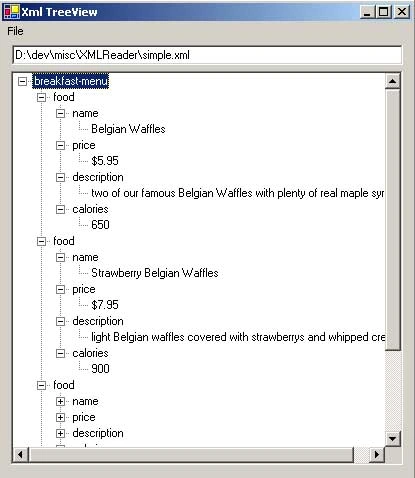
The application shown here was my first adventure into Xml in the .Net platform. My goal was to be able to reflect any Xml file into the Windows Forms TreeView control. I found various examples online, but none I found were suited for opening all Xml files, rather they were suited to one schema or another.
The problem I ran into while writing this was more of a programming theory issue than a coding issue.This example deals with two instances of recursion, one for reading the Xml file in and one for adding the data correctly to the TreeView control.
I am aware that this application reinvents the wheel, since Internet Explorer gives the exact same functionality, but I was more interested in learning how to work with Xml files within the .Net Platform, especially using the XmlDocument class and this seemed like a good start.
The following code snippet shows the method I used to accomplish my goal.
<![endif]>
private void FillTree(XmlNode node, TreeNodeCollection parentnode)
{
// End recursion if the node is a text type
if(node == null || node.NodeType == XmlNodeType.Text || node.NodeType == XmlNodeType.CDATA)
return;
TreeNodeCollection tmptreenodecollection = AddNodeToTree(node, parentnode);
// Add all the children of the current node to the treeview
foreach(XmlNode tmpchildnode in node.ChildNodes)
{
FillTree(tmpchildnode, tmptreenodecollection);
}
}
private TreeNodeCollection AddNodeToTree(XmlNode node, TreeNodeCollection parentnode)
{
TreeNode newchildnode = CreateTreeNodeFromXmlNode(node);
// if nothing to add, return the parent item
if(newchildnode == null) return parentnode;
// add the newly created tree node to its parent
if(parentnode != null) parentnode.Add(newchildnode);
return newchildnode.Nodes;
}
private TreeNode CreateTreeNodeFromXmlNode(XmlNode node)
{
TreeNode tmptreenode = new TreeNode();
if((node.HasChildNodes) && (node.FirstChild.Value != null))
{
tmptreenode = new TreeNode(node.Name);
TreeNode tmptreenode2 = new TreeNode(node.FirstChild.Value);
tmptreenode.Nodes.Add(tmptreenode2);
}
else if(node.NodeType != XmlNodeType.CDATA)
{
tmptreenode = new TreeNode(node.Name);
}
return tmptreenode;
}
Aggelos TzitzifasPosted Oct 17, 2013, 9:54 AM
very helpfull thenx!!!
lmd tasaPosted Aug 19, 2009, 8:08 AM
Hi I would like to read write XML file through treeview in C#. As I am quite new to C# and read lot of totorial for that but not able to complete the task. Could any body help me in that regard. The given below is the XML file that I want to work with!!! <?xml version="1.0" encoding="UTF-8" ?> <Root> <Amin Host_IP_Address="111.111.111.111"> <R.E> <Path> <Filter1>SSSSSSSSSSSSSSSS</Filter1> <Filter2>SSSSSSSSSSSSSSSS</Filter2> </Path> <Path> <Filter1>SSSSSSSSSSSSSSSS</Filter1> <Filter2>SSSSSSSSSSSSSSSS</Filter2> </Path> <Path> <Filter1>SSSSSSSSSSSSSSSS</Filter1> <Filter2>SSSSSSSSSSSSSSSS</Filter2> </Path> </R.E> <AAA> <Path> <Filter1>SSSSSSSSSSSSSSSS</Filter1> <Filter2>SSSSSSSSSSSSSSSS</Filter2> </Path> </AAA> </Amin> <Botha Host_IP_Address="111.111.111.111"> <R.E> <Path> <Filter1>SSSSSSSSSSSSSSSS</Filter1> <Filter2>SSSSSSSSSSSSSSSS</Filter2> </Path> <Path> <Filter1>SSSSSSSSSSSSSSSS</Filter1> <Filter2>SSSSSSSSSSSSSSSS</Filter2> </Path> <Path> <Filter1>SSSSSSSSSSSSSSSS</Filter1> <Filter2>SSSSSSSSSSSSSSSS</Filter2> </Path> </R.E> <AAA> <Path> <Filter1>SSSSSSSSSSSSSSSS</Filter1> <Filter2>SSSSSSSSSSSSSSSS</Filter2> </Path> </AAA> </Botha> </Root>
Rach SinghPosted Jan 22, 2009, 7:10 AM
Thanks for postiong it.. Can you bind it with parser also? Regards
Don SamjiPosted Dec 16, 2008, 1:16 AM
Great article! But do you know how to display the attributes of a tag in the XML file instead of the tag name into the treeview?
Robert SchultzPosted Feb 24, 2008, 6:00 PM
Thanks for sharing your work. Treeviews is one that I don't use much and this was so well done that I picked up on it very quickly. Now I wish there was an example on how to make a change then serialize. :D
Jian_Guo_HuPosted Aug 10, 2007, 2:55 PM
Do you have an easy way to bind xmlNode and treeNode?