

Step 1. Creating an MVC Application
- Open Visual Studio
- File à New Project…
- Select ASP.NET MVC3/4 Web Application.
- Enter the name of Application as "CodeFirstDemo".
- Click OK.
Step 2. Creating the Model
Right click on the Models folder and create a model with the name of "ProjectModels" and create properties, as shown in the code, given below:
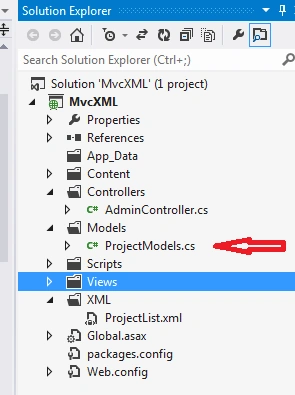
ProjectModels.cs
- namespace MvcXML.Models
- {
- public class ProjectModels {
- public int Id {
- get;
- set;
- }
- [Required]
- public string ProjectName {
- get;
- set;
- }
- [Required]
- public string Location {
- get;
- set;
- }
- public bool IsEdit {
- get;
- set;
- }
- }
- }
Step 3. Create a XML File
Create a folder with the name of XML, as shown in the following picture, and create an XML file with the name of "ProjectList.XML", using Add a New Item by right clicking on XML folder. Write the code as follows in XML file.
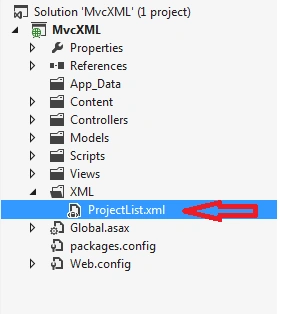
ProjectList.xml
- <?xml version="1.0" encoding="utf-8"?>
- <Projects>
- <Project>
- <Id>1</Id>
- <ProjectName>The Primus</ProjectName>
- <Location>Gurgaon</Location>
- </Project>
- <Project>
- <Id>2</Id>
- <ProjectName>DLF</ProjectName>
- <Location>Gudgoan</Location>
- </Project>
- <Project>
- <Id>4</Id>
- <ProjectName>Dev Builders</ProjectName>
- <Location>Grater Noida</Location>
- </Project>
- </Projects>
Step 4 : Create a Controller.
Right click on the Controller folder and create a controller with the name of "AdminController", as shown in the picture below. Write the code given below in Admincontroller within an Index Action.
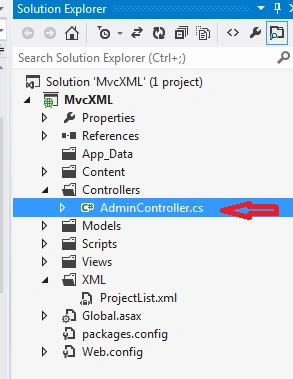
AdminController.cs
- public class AdminController: Controller {
- //
- // GET: /Admin/
- public ActionResult Index() {
- List < ProjectModels > lstProject = new List < ProjectModels > ();
- DataSet ds = new DataSet();
- ds.ReadXml(Server.MapPath("~/XML/ProjectList.xml"));
- DataView dvPrograms;
- dvPrograms = ds.Tables[0].DefaultView;
- dvPrograms.Sort = "Id";
- foreach(DataRowView dr in dvPrograms) {
- ProjectModels model = new ProjectModels();
- model.Id = Convert.ToInt32(dr[0]);
- model.ProjectName = Convert.ToString(dr[1]);
- model.Location = Convert.ToString(dr[2]);
- lstProject.Add(model);
- }
- if (lstProject.Count > 0) {
- return View(lstProject);
- }
- return View();
- return View();
- }
- ProjectModels model = new ProjectModels();
- public ActionResult AddEditProject(int ? id) {
- int Id = Convert.ToInt32(id);
- if (Id > 0) {
- GetDetailsById(Id);
- model.IsEdit = true;
- return View(model);
- } else {
- model.IsEdit = false;
- return View(model);
- }
- }
- [HttpPost]
- public ActionResult AddEditProject(ProjectModels mdl) {
- if (mdl.Id > 0) {
- XDocument xmlDoc = XDocument.Load(Server.MapPath("~/XML/ProjectList.xml"));
- var items = (from item in xmlDoc.Descendants("Project") select item).ToList();
- XElement selected = items.Where(p => p.Element("Id").Value == mdl.Id.ToString()).FirstOrDefault();
- selected.Remove();
- xmlDoc.Save(Server.MapPath("~/XML/ProjectList.xml"));
- xmlDoc.Element("Projects").Add(new XElement("Project", new XElement("Id", mdl.Id), new XElement("ProjectName", mdl.ProjectName), new XElement("Location", mdl.Location)));
- xmlDoc.Save(Server.MapPath("~/XML/ProjectList.xml"));
- return RedirectToAction("Index", "Admin");
- } else {
- XmlDocument oXmlDocument = new XmlDocument();
- oXmlDocument.Load(Server.MapPath("~/XML/ProjectList.xml"));
- XmlNodeList nodelist = oXmlDocument.GetElementsByTagName("Project");
- var x = oXmlDocument.GetElementsByTagName("Id");
- int Max = 0;
- foreach(XmlElement item in x) {
- int EId = Convert.ToInt32(item.InnerText.ToString());
- if (EId > Max) {
- Max = EId;
- }
- }
- Max = Max + 1;
- XDocument xmlDoc = XDocument.Load(Server.MapPath("~/XML/ProjectList.xml"));
- xmlDoc.Element("Projects").Add(new XElement("Project", new XElement("Id", Max), new XElement("ProjectName", mdl.ProjectName), new XElement("Location", mdl.Location)));
- xmlDoc.Save(Server.MapPath("~/XML/ProjectList.xml"));
- return RedirectToAction("Index", "Admin");
- }
- }
- public ActionResult Delete(int Id) {
- if (Id > 0) {
- XDocument xmlDoc = XDocument.Load(Server.MapPath("~/XML/ProjectList.xml"));
- var items = (from item in xmlDoc.Descendants("Project") select item).ToList();
- XElement selected = items.Where(p => p.Element("Id").Value == Id.ToString()).FirstOrDefault();
- selected.Remove();
- xmlDoc.Save(Server.MapPath("~/XML/ProjectList.xml"));
- }
- return RedirectToAction("Index", "Admin");
- }
- public void GetDetailsById(int Id) {
- XDocument oXmlDocument = XDocument.Load(Server.MapPath("~/XML/ProjectList.xml"));
- var items = (from item in oXmlDocument.Descendants("Project") where Convert.ToInt32(item.Element("Id").Value) == Id select new projectItems {
- Id = Convert.ToInt32(item.Element("Id").Value),
- ProjectName = item.Element("ProjectName").Value,
- Location = item.Element("Location").Value,
- }).SingleOrDefault();
- if (items != null) {
- model.Id = items.Id;
- model.ProjectName = items.ProjectName;
- model.Location = items.Location;
- }
- }
- public class projectItems {
- public int Id {
- get;
- set;
- }
- public string ProjectName {
- get;
- set;
- }
- public string Location {
- get;
- set;
- }
- public projectItems() {}
- }
- }
Now, create a View for the action, using right click on the controller's action and write the code as follows for the Index and AddEditProject respectively.
Index.cshtml file.
- @model IEnumerable
- <MvcXML.Models.ProjectModels>
- @{
- ViewBag.Title = "Index";
- }
- <style type="text/css">
- .topDiv
- {
- width: 50%;
- margin: 10px auto;
- background-color: #f2f2f2;
- text-align: left;
- padding: 2%;
- }
- </style>
- <div class="topDiv">
- <fieldset style="margin: 2% auto; width: 90%; background-color: #FFEBCD; text-align: center">
- <h4>
- @Html.ActionLink("Add New project", "AddEditProject")
- </h4>
- </fieldset>
- <fieldset>
- <table style="margin: 2% auto; padding: 5px; width: 90%">
- <tr style="background-color: #FFFACD">
- <th>
- ProjectName
- </th>
- <th>
- Location
- </th>
- <th>
- Manage
- </th>
- </tr>
- @{
- foreach (var item in Model)
- {
- <tr style="background-color: #FFFFF0">
- <td>
- @item.ProjectName
- </td>
- <td>
- @item.Location
- </td>
- <td>
- @Html.ActionLink("Edit", "AddEditProject", new { id = @item.Id }) / @Html.ActionLink("Delete", "Delete", new { id = @item.Id })
- @* /@Html.ActionLink("Details", "ProjectDetails", new { basePath = @item.basePath })*@
- </td>
- </tr>
- }
- }
- </table>
- </fieldset>
- </div>
Now, again go to AdminController and create new view for AddEditProject action with a right click and write the following code:
AddEditProject.cshtml
- @model MvcXML.Models.ProjectModels
- @{
- ViewBag.Title = "AddEditProject";
- }
- <style type="text/css">
- .topDiv
- {
- width: 50%;
- margin: 10px auto;
- background-color: #f2f2f2;
- text-align: center;
- padding: 2%;
- }
- .innerDiv
- {
- margin: 0 auto;
- padding: 1%;
- color: Gray;
- }
- </style>
- @using (Html.BeginForm())
- {
- <div class="topDiv">
- <table>
- <tr>
- <h2>Add/Edit User</h2>
- </tr>
- <tr>
- <td>
- @Html.LabelFor(m => m.ProjectName) :
- </td>
- <td>
- <div class="innerDiv">
- @Html.TextBoxFor(m => m.ProjectName)
- @Html.ValidationMessageFor(m => m.ProjectName)
- </div>
- </td>
- </tr>
- <tr>
- <td>
- @Html.LabelFor(m => m.Location) :
- </td>
- <td>
- <div class="innerDiv">
- @Html.TextBoxFor(m => m.Location)
- @Html.ValidationMessageFor(m => m.ProjectName)
- </div>
- </td>
- </tr>
- <tr>
- <td colspan="2">
- <div class="innerDiv">
- <input id="btnAdd" type="submit" value="@if (Model.IsEdit)
- {
- <text>Update</text>}
- else
- {
- <text>Add</text>}" style=" width:75px" />
- </div>
- </td>
- </tr>
- </table>
- </div>
- }
Now, press F5 to run the Application,
I hope your browser will look as shown below:
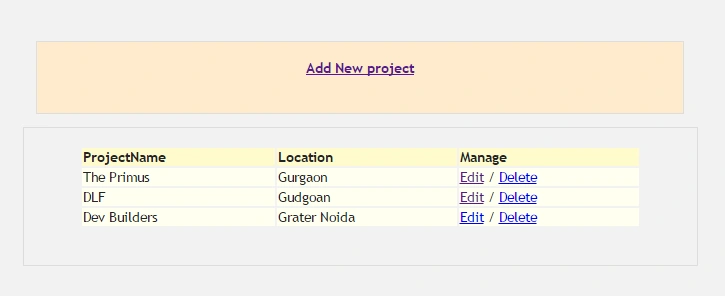
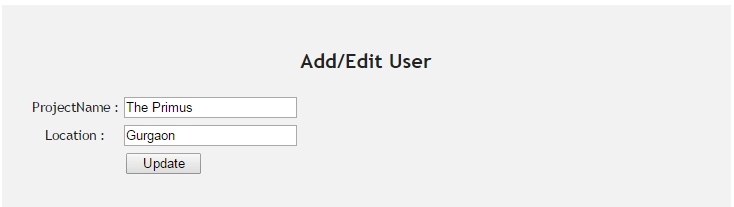
After clicking Add New Project and Edit link, your view will be as shown below:
Summary
In this walkthrough, we looked at the development for XML CRUD operation, using MVC. We defined XML class and use the class for CRUD operations.
Kumar BhimsenPosted Jun 12, 2018, 8:07 AM
http://localhost:50868/api/Test/InsertProduct?strXml={"S_Name":"Bhimsen","F_Name":"Bhimsen","Address":"Noida"}http://localhost:50868/api/Test/UpdateProduct?strXml={"Pk_regid":"1","S_Name":"Bhimsen","F_Name":"Bhimsen","Address":"Noida"} using (var client = new System.Net.Http.HttpClient()) { client.BaseAddress = new Uri("http://localhost:50868/api/Test/"); client.DefaultRequestHeaders.Accept.Clear(); client.DefaultRequestHeaders.Accept.Add(new System.Net.Http.Headers.MediaTypeWithQualityHeaderValue("application/json")); var response = client.GetAsync("InsertProduct?strXml={'S_Name':'Bhimsen','F_Name':'Bhimsen','Address':'Noida'}").Result; if (response.IsSuccessStatusCode) { string responseString = response.Content.ReadAsStringAsync().Result; //Newtonsoft.Json.Linq.JObject json = Newtonsoft.Json.Linq.JObject.Parse(responseString); //product = Newtonsoft.Json.JsonConvert.DeserializeObject<Product>(responseString); } } ============================================== [HttpGet] [Route("api/Test/InsertProduct")] public HttpResponseMessage InsertProduct(string strXml) { try { } catch (Exception exp) { } return new HttpResponseMessage(HttpStatusCode.OK) { // Content = new StringContent(JsonConvert.SerializeObject(new Fee_Update_ParametersRequest { Status = this.Status, Error_Message = this.Error_Message, Checksum = this.Checksum })) }; } ============================================================== [HttpGet] [Route("api/Test/UpdateProduct")] public HttpResponseMessage UpdateProduct(string strXml) { try { } catch (Exception exp) { } return new HttpResponseMessage(HttpStatusCode.OK) { // Content = new StringContent(JsonConvert.SerializeObject(new Fee_Update_ParametersRequest { Status = this.Status, Error_Message = this.Error_Message, Checksum = this.Checksum })) };
Kumar BhimsenPosted Jun 11, 2018, 7:23 AM
DataAccess DAobj = new DataAccess(); ArrayList names = new ArrayList(); ArrayList types = new ArrayList(); ArrayList values = new ArrayList(); DataAccess objDAO = new DataAccess(); ArrayList size = new ArrayList(); ArrayList outtype = new ArrayList(); private string _xmlDoc, _fk_roleId, _fk_moduleId, _fk_webpageId, _fk_userId; #region Properties public string xmlDoc { set { _xmlDoc = value; } } protected void btnGetTechers_Click(object sender, EventArgs e) { try { string Message = ""; xmlDoc = GetMain(); if (ApproveDisableRejectTeacher(ref Message) > 0) { ClientMessaging("Record updated Successfully !"); \ ddlUserType.SelectedIndex = 0; D_ddlSession.SelectedIndex = 0; } else { dvData.Visible = true; ClientMessaging("Select atleast one record!"); } } catch (Exception ex) { } } public int ApproveDisableRejectTeacher(ref string Message) { string uid = Session["UserID"].ToString(); if (_xmlDoc.Contains("HPU_ExamTeacher_Mst")) { names.Clear(); values.Clear(); types.Clear(); names.Add("@userid"); types.Add(SqlDbType.VarChar); values.Add(uid); names.Add("@XmlDoc"); values.Add(_xmlDoc); types.Add(SqlDbType.VarChar); return DAobj.ExecuteTransactionMsg("HPU_Exam_SP_ApproveRejectTeacher", values, names, types, ref Message); } else { return 0; } } string GetMain() { try { DataRow dr = null; DataSet ds = objDAO.GetSchema("HPU_ExamTeacher_Mst"); foreach (GridViewRow row in gvdetils.Rows) { //string Message = ""; DropDownList ddlstatus = row.FindControl("D_ddlStatus") as Anthem.DropDownList; string ApprovalStatus = ddlstatus.Text; if (ApprovalStatus != "0") { HiddenField hdnTeacherid = row.FindControl("hdnTeacherid") as Anthem.HiddenField; int Pk_TeacherId = Convert.ToInt32(hdnTeacherid.Value); dr = ds.Tables[0].NewRow(); dr["Pk_TeacherId"] = Pk_TeacherId; dr["IsApproved"] = ApprovalStatus; ds.Tables[0].Rows.Add(dr); } } return ds.GetXml(); } catch (Exception ex) { //string Msg = ""; //PA_Login_And_Exception_Log.Insert_ExceptionLog("0", "", ex, HttpContext.Current.Request.UserHostAddress.ToString(), ref Msg); //DataSet dss = new DataSet(); return ""; } } Function =================== public DataSet GetSchema(string tblName) { SqlConnection Conn = DataAccess.Connect(); SqlCommand sqlCmd = new SqlCommand(); DataSet ds = new DataSet(); try { sqlCmd.Connection = Conn; SqlParameter IntPara = sqlCmd.Parameters.AddWithValue("@TableName", "Varchar(200)"); IntPara.Direction = ParameterDirection.Input; IntPara.Value = tblName; sqlCmd.CommandType = CommandType.StoredProcedure; sqlCmd.CommandText = "sp_GetTableStructure"; sqlCmd.CommandTimeout = 1000000; SqlDataAdapter da = new SqlDataAdapter(sqlCmd); da.FillSchema(ds, SchemaType.Source, tblName); if (Conn.State == ConnectionState.Open) { Conn.Close(); Conn.Dispose(); } sqlCmd.Dispose(); } catch { if (Conn.State == ConnectionState.Open) { Conn.Close(); Conn.Dispose(); } sqlCmd.Dispose(); throw; } return ds; } Procedure ================ CREATE PROCEDURE [dbo].[sp_GetTableStructure] @TableName Varchar(200) AS DECLARE @ERR Int SET @ERR = 0 BEGIN BEGIN TRY SET TRANSACTION ISOLATION LEVEL Serializable BEGIN SET DATEFORMAT dMy DECLARE @Sql nvarchar(500) SET @Sql='SELECT * FROM '+@TableName+' WHERE 1<>1' exec sp_executesql @Sql END END TRY BEGIN CATCH IF @@TRANCOUNT > 0 ROLLBACK -- Raise an error with the details of the exception DECLARE @ErrMsg nvarchar(4000), @ErrSeverity int SELECT @ErrMsg = ERROR_MESSAGE(), @ErrSeverity = ERROR_SEVERITY() RAISERROR(@ErrMsg, @ErrSeverity, 1) END CATCH END CREATE procedure HPU_Exam_SP_ApproveRejectTeacher ( @userid nvarchar(50), @XmlDoc nvarchar(max) ) as Begin DECLARE @idoc int Begin Try EXEC sp_xml_preparedocument @idoc OUTPUT, @XmlDoc SET TRANSACTION ISOLATION LEVEL READ COMMITTED SET NOCOUNT OFF; Update HPU_ExamTeacher_Mst ---select * from Acct_GuestFaculty_Mst set IsApproved = U.IsApproved From OPENXML ( @idoc, '/NewDataSet/HPU_ExamTeacher_Mst',2) with (Pk_TeacherId int,IsApproved varchar(15) )U Where HPU_ExamTeacher_Mst.Pk_TeacherId = U.Pk_TeacherId END TRY BEGIN CATCH IF @@TRANCOUNT > 0 ROLLBACK DECLARE @ErrMsg nvarchar(4000), @ErrSeverity int SELECT @ErrMsg = ERROR_MESSAGE(), @ErrSeverity = ERROR_SEVERITY() RAISERROR(@ErrMsg, @ErrSeverity, 1) END CATCH end
Abid DhananiPosted May 8, 2018, 9:59 AM
Hi Good Example Just wanted to add if the XML Data File is Null it will through and exception need to handle that as Well
Prasanna MuraliPosted Jul 29, 2016, 11:41 AM
Nice one..
Vignesh ManiPosted Jul 29, 2016, 8:48 AM
Nice
Raja TPosted Jul 29, 2016, 4:33 AM
Good,Thanks for sharing