

Introduction
In this article, you will learn some basic concepts of Xamarin. And also, you will learn about things that someone needs to learn Xamarin from the beginning. This is why it is called a starter pack for beginners.
What you’ll learn
- What is Xamarin?
- Installation Guide
- Advantages of Xamarin
- Development approaches in xamarin
- Xamarin Legacy approach
- Xamarin Forms
- Application Lifecycle
- Common UI controls
- Pages
- Layouts
- Useful links
- What’s next?
What is Xamarin?
Background
Xamarin is a software company founded on May 16, 2011; Microsoft signed an agreement to acquire Xamarin on February 24, 2016.
Name
The name Xamarin comes from the name of a Tamarin Monkey, and replaces the leading T with an X (Cross).
Definition
Xamarin is an application development platform that lets you build applications for many platforms with a single shared code base.
Installation Guide
Note
For iOS development with Visual Studio on Windows, you also need to set up a Mac with the Xamarin tools.
Supported operating systems for Xamarin tools.
- macOs (Visual Studio for Mac)
- Windows (Visual Studio IDE)
Advantages of Xamarin
- Fewer C# developers are needed to develop mobile apps.
- Mobile development team size reduces from android, ios, windows developers to fewer C# developers.
- Low cost needed to build mobile apps.
- Shared Code.
- Microsoft Support.
- All native API’s are used.
- Development of Mobile apps in your favorite IDE Visual Studio. And also xamarin studio is available.
Development Approaches
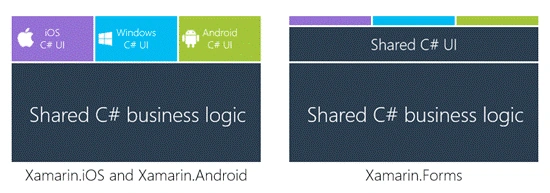
There are two main development approaches used to develop a xamarin app. These approaches are:
- Separate UI Approach
- Shared UI Approach
In shared UI approach all of your code is shared in all platforms. This code includes sharing of business logic and sharing of UI. That means in this approach you have to develop only one UI for all the platforms and it is shared in all the projects. In this approach all of your code is shared expect some of code that includes connection to DB and some other things related to this.
In Seprate UI approach all of your business logic is shared but you have to develop seprate UI for all applications. This approach is used to make pixel perfect UI for all applications.
As shown in figure blow.
Application Lifecycle
Let’s discuss about application lifecycle of xamarin forms.
Create a xamarin forms PCL project if you are going to create your first project than visit this link . After creating the project go solution explorer here you will see App.xmal file expand the file and open App.xaml.cs.
Here you will see three main methods
- On Start
- On Sleep
- On Resume
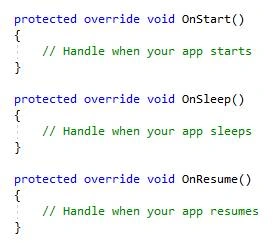
On Start method calls when your application is started at first. When your application starts, it reads all the code written in On Start method.
On SleepOn sleep method calls when your application goes to sleep. Sleep method calls when user hides the application. And, it is running in background, then all the code you write in sleep method is executed.
On ResumeThis method calls when your application comes from On Sleep method that means when you restart the application after hiding it. Then all the code that is written in OnResume method is executed.
You can see the code working by adding some breakpoints in you applications. Add break points in all methods and see your working according to the behavior of application.
Common UI Controls
From now on, you learn to make a new Xamarin.Forms app. And have basic understanding about Xamarin.Forms and application lifecycle. Now, move toward some common UI controls that are used in our application.
There are four main groups of Xamarin.Forms UI.
- Pages
- Layouts
- Views
- Cells
Pages
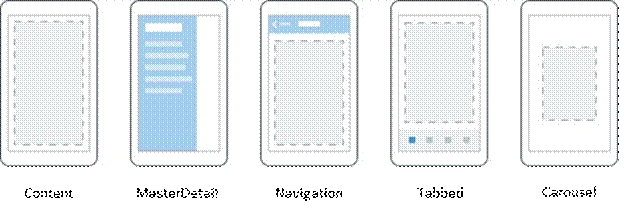
- Content Page
Content Page is used to display a single content on your application page.
- Master Detail Page
A page that contains two panes of information is a master detail page.
- Navigation Page
Navigation page is used for navigation when you have to make to other pages, then you can use navigation page to make navigations.
- Tabbed Page
Tabbed page is a single page that contains multiple tabs. Just like instagram is using tabbed page to make navigation in pages.
- Carousel Page
Carousel page is used to navigate between pages through swipe gesture. You can touch and swipe to navigate to other page.
Layouts
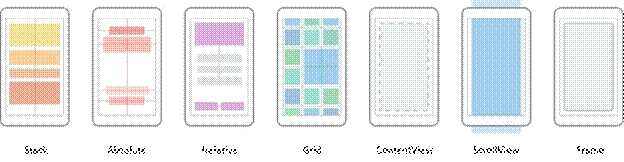
- Stack Layout
Stack layout is used to display information in stack. You can display both in vertical and horizontal orientation.
- Absolute Layout
We can use absolute and proportional values to set height, width, X-Axis and Y-Axis of an element.
- Relative Layout
Used to position its elements relative to other elements.
- Grid Layout
In Grid layout, you can divide the screen into rows and columns.
- Content View
It is used to display single content in its body.
- Scroll View
It is used when your page contains more data than the data displayed on single mobile screen. Then you use scroll View to make your app show more data with scrolling.
- Frame
It contains a single child with framing options. Frame has a default Layout.Padding of 20.
Useful Links
- C-sharp Corner
- Xamarin Forum
- Xamarin Live Player
- Open Source
- Xamarin Plug-ins
- Xamarin Support
- Xamarin University
- Developer Guide
What’s next?
Read the links given above and you will get very useful information. I hope you get a good start by reading this.
Alain NataliniPosted Aug 7, 2017, 5:56 AM
Great article. If you want, in the "Note Section", you can add the following link to my article about testing a Xamarin App without a Mac: http://www.c-sharpcorner.com/article/how-to-test-our-xamarin-ios-or-xamarin-forms-app-without-a-mac/.