

Introduction
The Xamarin.Forms code runs on multiple platforms - each of which has its own filesystem. This means that reading and writing files are most easily done using the native file APIs on each platform. Alternatively, embedded resources are a simpler solution to distribute data files with an app.
Xamarin.Essentials

Xamarin.Essentials plugin provides 20+ cross-platform APIs for mobile application development. Xamarin.Essentials API works with all Xamarin.Forms, Xamarin.Android, Xamarin.iOS, or UWP applications that can be accessed from shared code. We are developing Xamarin with Android, iOS and UWP apps but now Xamarin.Essentials overcomes this problem, and developers can access every native platform API using C#. This plugin provides many APIs so initially, there is no need for more plugins for Xamarin. Xamarin.Essentials plugin impacts your app's minimum size.
Platform Support
Xamarin.Essentials supports the following platforms and operating systems.
| Platform | Version |
| Android | 4.4 (API 19) or earlier |
| iOS | 10.0 or higher |
| UWP | 10.0.16299.0 or earlier |
Prerequisites
- Visual Studio 2017(Windows or Mac)
Setting up a Xamarin.Forms Project
Start by creating a new Xamarin.Forms project. You’ll learn more by going through the steps yourself.
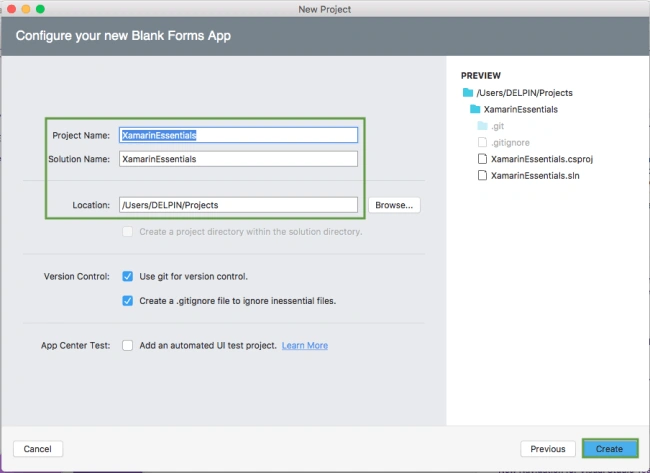
Choose the Xamarin.Forms App Project type under Cross-platform/App in the "New Project" dialog.
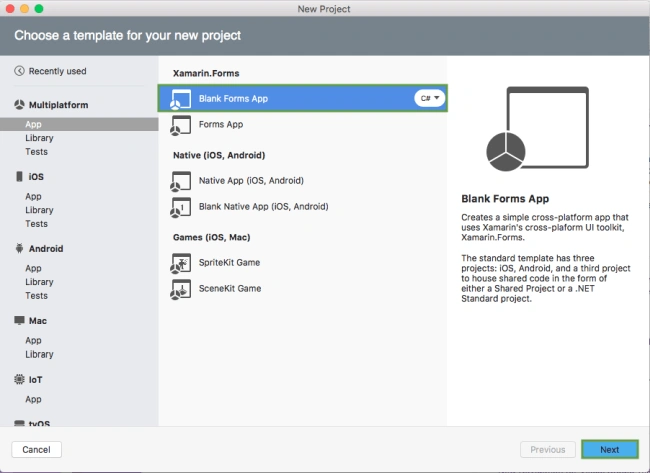
Name your app, select “Use Portable Class Library” for shared code, and target both - Android and iOS.
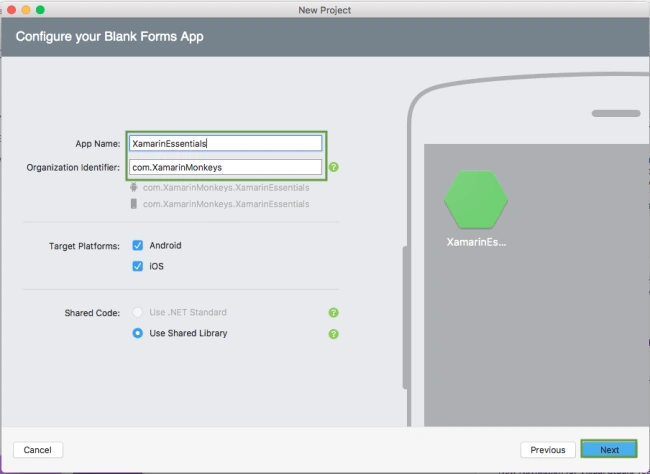
You probably want your project and solution to use the same name as your app. Put it in your preferred folder for projects and click Create.
You now have a basic Xamarin.Forms app. Click the play button to try it out.
Setting up the User Interface
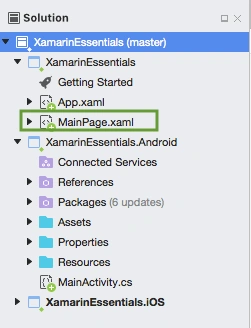
Go to MainPage.Xaml and write the following code.
MainPage.xaml
- <?xml version="1.0" encoding="utf-8" ?>
- <ContentPage xmlns="http://xamarin.com/schemas/2014/forms"
- xmlns:x="http://schemas.microsoft.com/winfx/2009/xaml"
- xmlns:local="clr-namespace:XamarinEssentials"
- x:Class="XamarinEssentials.MainPage">
- <StackLayout>
- <StackLayout HorizontalOptions="Center" VerticalOptions="Start">
- <Image Margin="0,50,0,0" x:Name="imgBanner" Source="banner.png" ></Image>
- <Image Margin="0,0,0,10" x:Name="imgXamarinEssential" Source="xamarinessential.png" ></Image>
- <Label Margin="0,0,0,10" Text="Geolocation" FontAttributes="Bold" FontSize="Large" TextColor="#CA6F1E" HorizontalTextAlignment="Center" ></Label>
- <Button x:Name="btnLocation" Text="Get Location" Clicked="btnLocation_Clicked"/>
- <Label HorizontalTextAlignment="Center" x:Name="lblLatitude"></Label>
- <Label HorizontalTextAlignment="Center" x:Name="lblLongitude"></Label>
- </StackLayout>
- </StackLayout>
- </ContentPage>
Add Xamarin Essentials
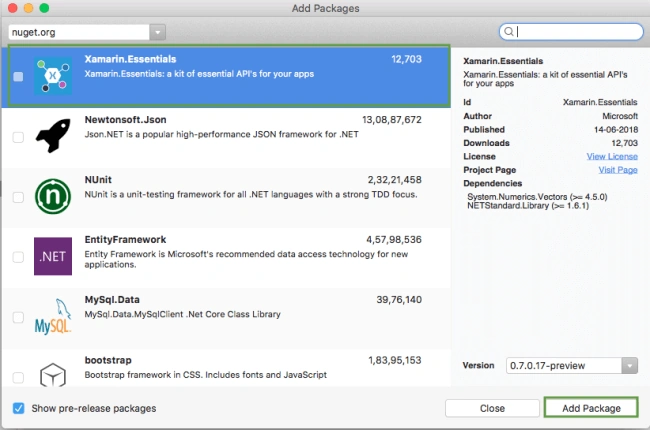
In this step, add Xamarin.Essentials to your project. You can install Xamarin.Essentials via NuGet, or you can browse the source code on GitHub.
Go to Solution Explorer and select your solution. Right-click and select "Manage NuGet Packages for Solution". Search "Xamarin.Essentials" and add Package. Remember to install it for each project (PCL, Android, iO, and UWP).
Xamarin.Essentials requires platform-specific setup
Android
The following steps are necessary for Android.
- Xamarin.Essentials supports a minimum Android version 4.4
- Target Android version for compiling must be 8.1, API level 27.
In the Android project's MainActivity that is launched Xamarin.Essentials must be initialized in the OnCreate method.
MainActivity.cs
- Xamarin.Essentials.Platform.Init(this, bundle);
Xamarin.Essentials must receive any OnRequestPermissionsResult. Write the following code for runtime permission.
MainActivity.cs
- public override void OnRequestPermissionsResult(int requestCode, string[] permissions, [GeneratedEnum] Android.Content.PM.Permission[] grantResults)
- {
- Xamarin.Essentials.Platform.OnRequestPermissionsResult(requestCode, permissions, grantResults);
- base.OnRequestPermissionsResult(requestCode, permissions, grantResults);
- }
iOS
No additional setup required.
UWP
No additional setup required.
Permissions - Android
AndroidManifest.xml
- <uses-permission android:name="android.permission.ACCESS_COARSE_LOCATION" />
- <uses-permission android:name="android.permission.ACCESS_FINE_LOCATION" />
- <uses-feature android:name="android.hardware.location" android:required="false" />
- <uses-feature android:name="android.hardware.location.gps" android:required="false" />
- <uses-feature android:name="android.hardware.location.network" android:required="false" />
Permissions - iOS
- Privacy - Location When In Use Usage Description
In this step, write the following code for getting current location using Xamarin.Essentials.
MainPage.xaml.cs
- using Xamarin.Forms;
- using Xamarin.Essentials;
- namespace XamarinEssentials
- {
- public partial class MainPage : ContentPage
- {
- public MainPage()
- {
- InitializeComponent();
- }
- protected override void OnAppearing()
- {
- base.OnAppearing();
- }
- async void btnLocation_Clicked(object sender, System.EventArgs e)
- {
- try
- {
- var location = await Geolocation.GetLastKnownLocationAsync();
- if (location != null)
- {
- lblLatitude.Text ="Latitude: "+location.Latitude.ToString();
- lblLongitude.Text = "Longitude:"+location.Longitude.ToString();
- }
- }
- catch (FeatureNotSupportedException fnsEx)
- {
- await DisplayAlert("Faild", fnsEx.Message, "OK");
- }
- catch (PermissionException pEx)
- {
- await DisplayAlert("Faild", pEx.Message, "OK");
- }
- catch (Exception ex)
- {
- await DisplayAlert("Faild", ex.Message, "OK");
- }
- }
- }
- }
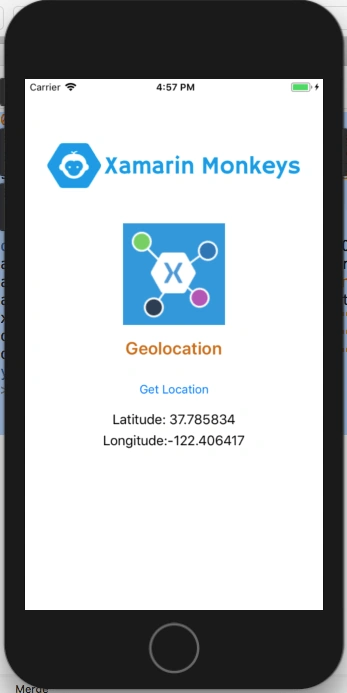
Click the play button to try it out.
I hope you have understood how to get current Location Using Xamarin Essentials in Xamarin.Forms.
Thanks for reading. Please share comments and feedback.
Man LokPosted Jan 24, 2020, 3:50 PM
How to capture (within time interval) GeoLocation without button click (run as background service) using Xamarin form )
Jaime StuardoPosted Jul 5, 2019, 11:50 AM
Hello, what is the difference between GeoLocation from Xamarin.Essentials and ILocationListener from Android.Locations? I have to combine both or can I opt only for GeoLocation?
Robert HellestraePosted Jul 1, 2019, 3:30 PM
Excellent sample on GeoLocation with Xamarin Essentials for Xamarin Forms;
Nadim HossenPosted May 16, 2019, 2:00 AM
Always showing latitude for united states but now i am living another country ..
Ranajit KoleyPosted Dec 19, 2018, 12:23 PM
Now, I want the location to be kept updating even if the user closes the app. What should I do ? (Sorry, I am a beginner)
xamarin developerPosted Oct 31, 2018, 2:48 AM
Hi i tried the above code. location is always null
Debendra DashPosted Oct 29, 2018, 10:39 AM
Sir i have used GeoLocator to get the lat and long but this Xamarin.Essentials seems to be the best one...will try this..Thanks for sharing.