

Introduction
Xamarin.Forms code runs on multiple platforms - each of which has its own filesystem. This means that reading and writing files is most easily done using the native file APIs on each platform. Alternatively, embedded resources are a simpler solution to distribute data files with an app.
Prerequisites
- Visual Studio 2017 or later (Windows or Mac)
Setting up a Xamarin.Forms Project
Start by creating a new Xamarin.Forms project. You wíll learn more by going through the steps yourself.
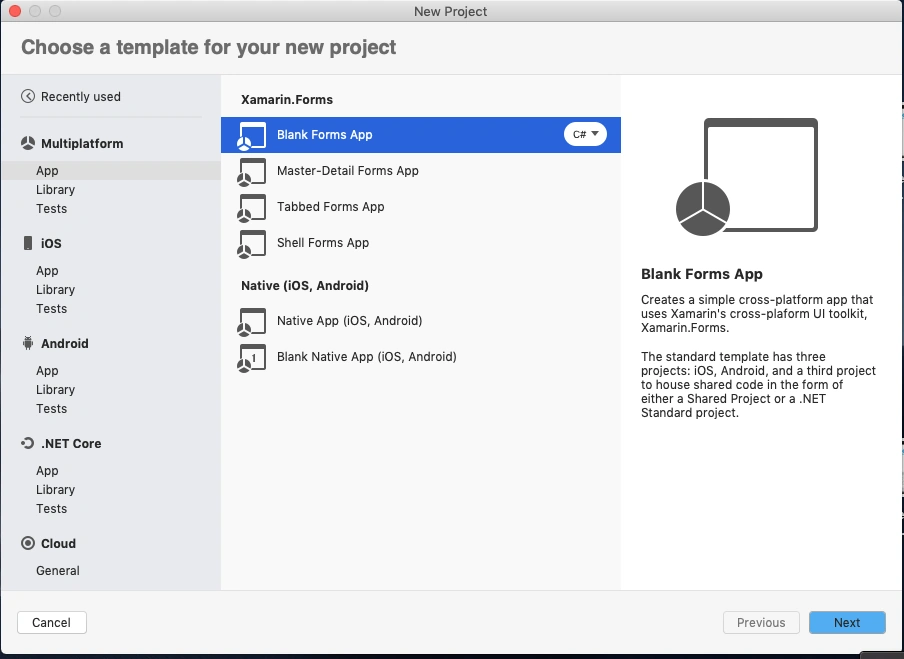
Create a new or existing Xamarin forms(.Net standard) Project with Android and iOS Platform.
Nuget
Install the following Nuget from Nuget Manager In your Visual Studio.
| Name | Xamarin.Plugin.FilePicker |
| Version | 2.1.41 |
| Url | https://www.nuget.org/packages/Xamarin.Plugin.FilePicker/ |
Xamarin.Essentials
Xamarin.Essentials also supports File Picker but it's in Preview. Once the FilePicker is moved to stable you can update Xamarin.Pulgin.FilePicker to Xamarin.Essentials from here.
Setup UI
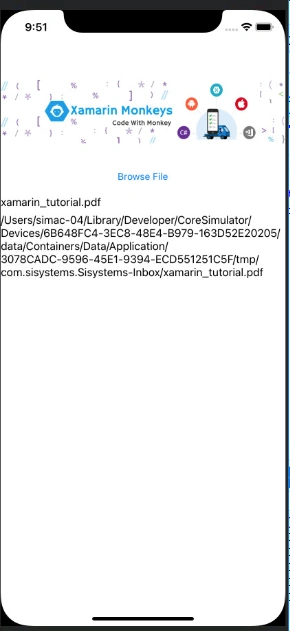
Now, I created a simple UI for file browser.
MainPage.xaml
- <?xml version="1.0" encoding="utf-8"?>
- <ContentPage xmlns="http://xamarin.com/schemas/2014/forms" xmlns:x="http://schemas.microsoft.com/winfx/2009/xaml" xmlns:d="http://xamarin.com/schemas/2014/forms/design" xmlns:mc="http://schemas.openxmlformats.org/markup-compatibility/2006" mc:Ignorable="d" x:Class="FileUploadPOC.MainPage">
- <StackLayout HorizontalOptions="Center">
- <!-- Place new controls here -->
- <Image Source="xamarinmonkeysbanner.png" HorizontalOptions="Center" Margin="0,100,0,0"/>
- <Button Margin="0,20,0,0" Text="Browse File" Clicked="Button_Clicked"></Button>
- <Label x:Name="lblName"/>
- <Label x:Name="lblFilePath"/>
- </StackLayout>
- </ContentPage>
File Browser
Below code is for file picker. Here we will get two values, FileName and FilePath.
- private async Task PickAndShow(string[] fileTypes)
- {
- try
- {
- var pickedFile = await CrossFilePicker.Current.PickFile(fileTypes);
- if (pickedFile != null)
- {
- lblName.Text = pickedFile.FileName;
- lblFilePath.Text = pickedFile.FilePath;
- }
- }
- catch (Exception ex)
- {
- }
- }
File Types
Note, you can define the file types for platform specific.
- if (Device.RuntimePlatform == Device.Android)
- {
- fileTypes = new string[] { "image/png", "image/jpeg" };
- }
- if (Device.RuntimePlatform == Device.iOS)
- {
- fileTypes = new string[] { "public.image" }; // same as iOS constant UTType.Image
- }
- if (Device.RuntimePlatform == Device.UWP)
- {
- fileTypes = new string[] { ".jpg", ".png" };
- }
- if (Device.RuntimePlatform == Device.WPF)
- {
- fileTypes = new string[] { "JPEG files (*.jpg)|*.jpg", "PNG files (*.png)|*.png" };
- }
Reference for other file types,
https://stackoverflow.com/questions/41797644/xamarin-ios-filtering-out-the-filetype-show-on-document-picker
MainPage.Xaml.cs
- using System;
- using System.Collections.Generic;
- using System.ComponentModel;
- using System.Linq;
- using System.Text;
- using System.Threading.Tasks;
- using Xamarin.Forms;
- using Plugin.FilePicker;
- using Xamarin.Essentials;
- using System.Security.Cryptography.X509Certificates;
- namespace FileUploadPOC
- {
- // Learn more about making custom code visible in the Xamarin.Forms previewer
- // by visiting https://aka.ms/xamarinforms-previewer
- [DesignTimeVisible(false)]
- public partial class MainPage : ContentPage
- {
- public MainPage()
- {
- InitializeComponent();
- }
- async void Button_Clicked(System.Object sender, System.EventArgs e)
- {
- try
- {
- string[] fileTypes = null;
- if (Device.RuntimePlatform == Device.iOS)
- {
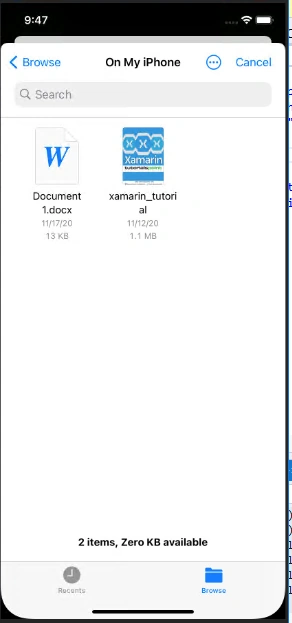
- fileTypes = new string[] {"com.adobe.pdf", "public.rft", "com.microsoft.word.doc", "org.openxmlformats.wordprocessingml.document" }; }
- await PickAndShow(fileTypes);
- }
- catch (Exception ex)
- {
- }
- }
- private async Task PickAndShow(string[] fileTypes)
- {
- try
- {
- var pickedFile = await CrossFilePicker.Current.PickFile(fileTypes);
- if (pickedFile != null)
- {
- lblName.Text = pickedFile.FileName;
- lblFilePath.Text = pickedFile.FilePath;
- }
- }
- catch (Exception ex)
- {
- }
- }
- }
- }
Debug your App
Download source code here.
I hope you have understood how to browse files in your device and drive in Xamarin.Forms.
Thanks for reading. Please share your comments and feedback. Happy Coding :)
gadda rajuPosted Dec 7, 2021, 4:31 PM
{Java.Lang.NullPointerException: uri at Java.Interop.JniEnvironment+InstanceMethods.CallNonvirtualObjectMethod (Java.Interop.JniObjectReference instance, Java.Interop.JniObjectReference type, Java.Interop.JniMethodInfo method, Java.Interop.JniArgumentValue* args) [0x0008e] in <bd6bd528a8784b7caf03e9f25c9f0d7b>:0 at Java.Interop.JniPeerMembers+JniInstanceMethods.InvokeNonvirtualObjectMethod (System.String encodedMember, Java.Interop.IJavaPeerable self, Java.Interop.JniArgumentValue* parameters) [0x0001f] in <bd6bd528a8784b7caf03e9f25c9f0d7b>:0 at Android.Content.ContentResolver.Query (Android.Net.Uri uri, System.String[] projection, System.String selection, System.String[] selectionArgs, System.String sortOrder) [0x000a0] in /Users/builder/azdo/_work/1/s/xamarin-android/src/Mono.Android/obj/Release/monoandroid10/android-28/mcw/Android.Content.ContentResolver.cs:1098 at Plugin.FilePicker.IOUtil.GetDataColumn (Android.Content.Context context, Android.Net.Uri uri, System.String selection, System.String[] selectionArgs) [0x00013] in D:\a\1\s\src\Plugin.FilePicker\Android\IOUtil.android.cs:154 at Plugin.FilePicker.IOUtil.GetPath (Android.Content.Context context, Android.Net.Uri uri) [0x0017d] in D:\a\1\s\src\Plugin.FilePicker\Android\IOUtil.android.cs:111 at Plugin.FilePicker.FilePickerActivity.OnActivityResult (System.Int32 requestCode, Android.App.Result resultCode, Android.Content.Intent data) [0x00054] in D:\a\1\s\src\Plugin.FilePicker\Android\FilePickerActivity.android.cs:168 --- End of stack trace from previous location where exception was thrown --- at Plugin.FilePicker.FilePickerImplementation.PickFile (System.String[] allowedTypes) [0x00028] in D:\a\1\s\src\Plugin.FilePicker\Android\FilePickerImplementation.android.cs:60 at FileUploadPOC.MainPage.PickAndShow (System.String[] fileTypes) [0x0002e] in C:\Users\Gadda.Raju\Downloads\XamarinForms-FilePicker-master\FileUploadPOC\MainPage.xaml.cs:47 --- End of managed Java.Lang.NullPointerException stack trace --- java.lang.NullPointerException: uri at java.util.Objects.requireNonNull(Objects.java:245) at android.content.ContentResolver.query(ContentResolver.java:1166) at android.content.ContentResolver.query(ContentResolver.java:1124) at android.content.ContentResolver.query(ContentResolver.java:1080) at crc64424a8adc5a1fbe28.FilePickerActivity.n_onActivityResult(Native Method) at crc64424a8adc5a1fbe28.FilePickerActivity.onActivityResult(FilePickerActivity.java:47) at android.app.Activity.dispatchActivityResult(Activity.java:8469) at android.app.ActivityThread.deliverResults(ActivityThread.java:5364) at android.app.ActivityThread.handleSendResult(ActivityThread.java:5412) at android.app.servertransaction.ActivityResultItem.execute(ActivityResultItem.java:51) at android.app.servertransaction.TransactionExecutor.executeCallbacks(TransactionExecutor.java:135) at android.app.servertransaction.TransactionExecutor.execute(TransactionExecutor.java:95) at android.app.ActivityThread$H.handleMessage(ActivityThread.java:2317) at android.os.Handler.dispatchMessage(Handler.java:106) at android.os.Looper.loop(Looper.java:255) at android.app.ActivityThread.main(ActivityThread.java:8192) at java.lang.reflect.Method.invoke(Native Method) at com.android.internal.os.RuntimeInit$MethodAndArgsCaller.run(RuntimeInit.java:632) at com.android.internal.os.ZygoteInit.main(ZygoteInit.java:1049) }
gadda rajuPosted Dec 7, 2021, 4:30 PM
Thank you very much for this article.When I attach pdf and doc files using Recent files I'm getting the following exception. Could you please help on this.
Daniel SarmientoPosted Jan 26, 2021, 6:58 PM
Hello man, Sorry but I have a Question, Is there a way to choose multiple files based on this?
Daniel SarmientoPosted Jan 21, 2021, 7:37 PM
Thank you very much for the article, it was the only one that worked for me on the whole internet