

Here are the steps,
Step 1
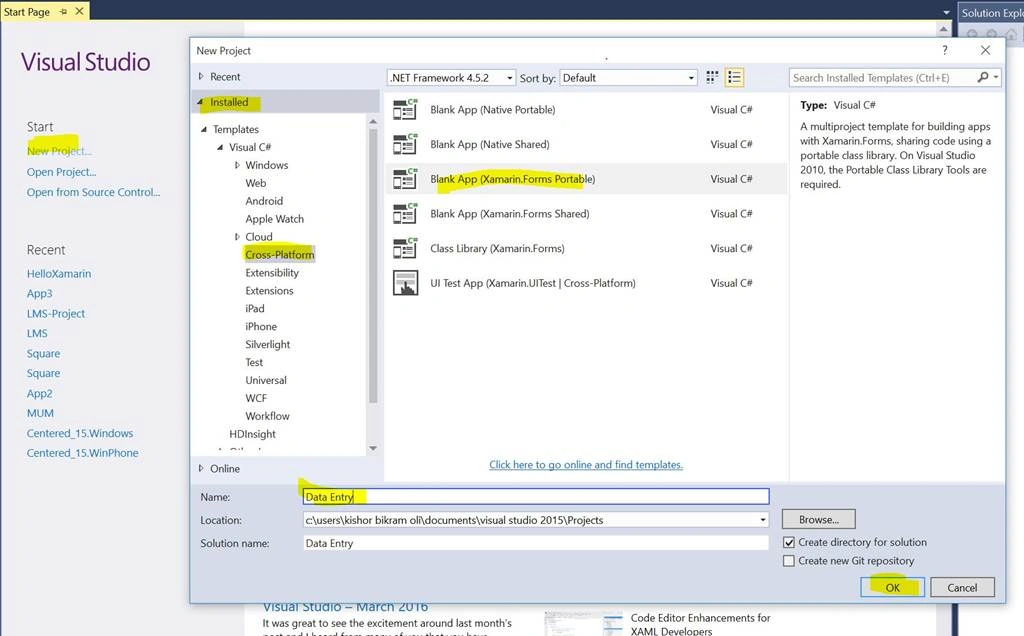
First of all, create a cross platform project using Portable Class Library (PCL) which is the common code base for all platforms.
Step 2
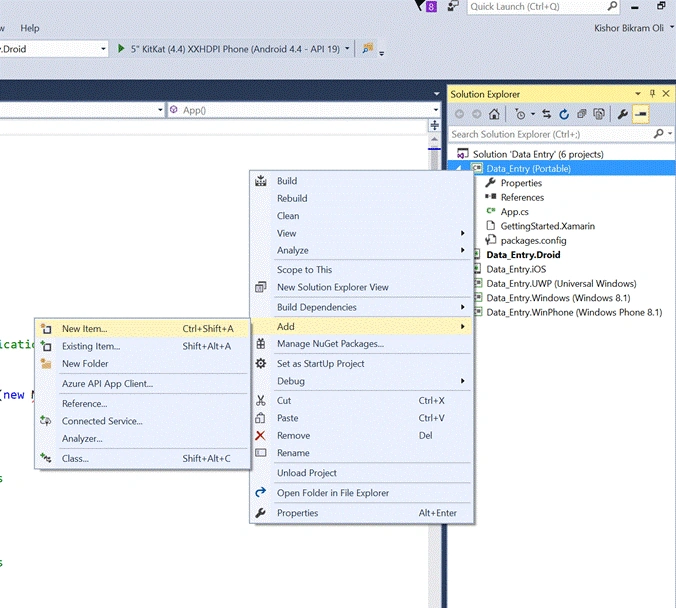
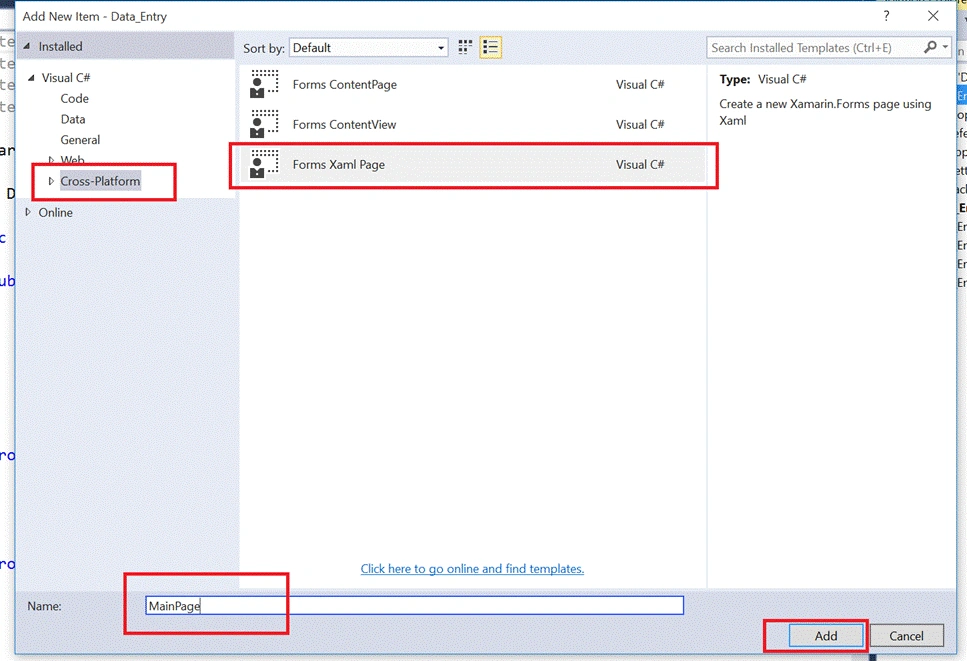
Add a XAML page in PCL project. Right click on PCL project > Add > New item > Cross Platform > Forms Xaml Page and Click Add.
Step 3
In the App.cs, update your code with this,
First of all, create a cross platform project using Portable Class Library (PCL) which is the common code base for all platforms.
Step 2
Add a XAML page in PCL project. Right click on PCL project > Add > New item > Cross Platform > Forms Xaml Page and Click Add.
Step 3
In the App.cs, update your code with this,
- using System;
- using System.Collections.Generic;
- using System.Linq;
- using System.Text;
- using Xamarin.Forms;
- namespace Data_Entry
- {
- public class App : Application
- {
- public App()
- {
- MainPage = new NavigationPage(new MainPage()); //Navigate to the MainPage we just added before
- }
- protected override void OnStart()
- {
- // Handle when your app starts
- }
- protected override void OnSleep()
- {
- // Handle when your app sleeps
- }
- protected override void OnResume()
- {
- // Handle when your app resumes
- }
- }
- }
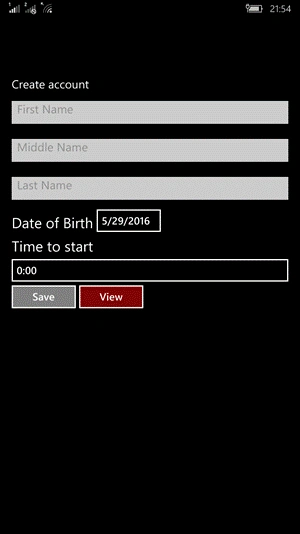
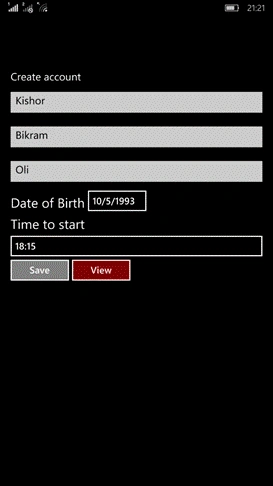
Now in the MainPage.xaml, we add the following elements inside the Content of ContentPage,
- Three Inputs for first name, middle name and last name
- Date Picker, Time Picker
- Save and View buttons
Complete XAML code will be,
- <?xml version="1.0" encoding="utf-8" ?>
- <ContentPage xmlns="http://xamarin.com/schemas/2014/forms"
- xmlns:x="http://schemas.microsoft.com/winfx/2009/xaml"
- x:Class="Data_Entry.MainPage">
- <ContentPage.Content>
- <StackLayout Padding="20">
- <Label Text="Create account" TextColor="White" FontSize="20"></Label>
- <Entry x:Name="FirstName" Placeholder="First Name" WidthRequest="150"></Entry>
- <Entry x:Name="MiddleName" Placeholder="Middle Name" WidthRequest="150"></Entry>
- <Entry x:Name="LastName" Placeholder="Last Name" WidthRequest="150"></Entry>
- <StackLayout Orientation="Horizontal">
- <Label Text="Date of Birth" FontSize="25" TextColor="White" VerticalOptions="End"/>
- <DatePicker x:Name="Date"/>
- </StackLayout>
- <StackLayout>
- <Label Text="Time to start" VerticalOptions="End" FontSize="25" TextColor="White"/>
- <TimePicker x:Name="Time" />
- </StackLayout>
- <StackLayout Orientation="Horizontal">
- <Button BackgroundColor="Gray" TextColor="White" Text="Save" Clicked="OnSave"/>
- <Button BackgroundColor="Maroon" TextColor="White" Text="View" Clicked="OnView"/>
- </StackLayout>
- </StackLayout>
- </ContentPage.Content>
- </ContentPage>
Step 5,
Next we create a Model class named “Member” class where we set the values from the XAML controls and display the same in a Dialog box.
Right Click on PCL Project and Click > Add > Class > Name it Member and Click Add.
Here, FirstName, MiddleName, LastName, DateTime are used to set and get the values. And in the Member constructor, we pass all the values as parameters and set the values to the respective ones.
Complete Code snippet for Member.cs
- using System;
- using System.Collections.Generic;
- using System.Linq;
- using System.Text;
- using System.Threading.Tasks;
- namespace Data_Entry
- {
- class Member
- {
- public string FirstName { get; set; }
- public string MiddleName { get; set; }
- public string LastName { get; set; }
- public DateTime DateTime { get; set; }
- public Member(string firstName, string middleName, string lastName, DateTime dateTime)
- {
- FirstName = firstName;
- MiddleName = middleName;
- LastName = lastName;
- DateTime = dateTime;
- }
- }
- }
Now in the code behind MainPage.xaml.cs, we add click event handlers that we created in XAML page.
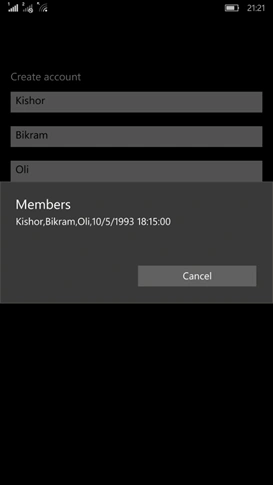
In the Save button event, we add all the data into a List. And in the View button event, we display the data from the list in a Dialog Box.
Complete Code Snippet
- using System;
- using System.Collections.Generic;
- using System.Linq;
- using System.Text;
- using System.Threading.Tasks;
- using Xamarin.Forms;
- namespace Data_Entry
- {
- public partial class MainPage : ContentPage
- {
- List<Member> member;
- public MainPage()
- {
- member = new List<Member>();
- InitializeComponent();
- }
- public void OnSave(object o, EventArgs e)
- {
- member.Add(new Member(
- FirstName.Text,
- MiddleName.Text,
- LastName.Text,
- SetDateTime(
- Date.Date,
- Time.Time.Hours,
- Time.Time.Minutes,
- Time.Time.Seconds
- )
- )
- );
- }
- public async void OnView(object o, EventArgs e)
- {
- await DisplayAlert("Members", member[0].FirstName + "," + member[0].MiddleName + "," + member[0].LastName + "," + member[0].DateTime, "Cancel");
- }
- private DateTime SetDateTime(DateTime date, int hour, int minute, int seconds)
- {
- return new DateTime(date.Year, date.Month, date.Day, hour, minute, seconds);
- }
- }
- }
Run the application in your android or windows devices/emulators. When you save and then view, you will see the following output.
Note - Since the whole project has very large size download the Portable Class Library (PCL) only from GitHub.
Arvind ChourasiyaPosted Dec 15, 2017, 9:54 AM
@Kishor nice tutorial.
Aegan JoshuaPosted Aug 22, 2017, 3:47 AM
Good day sir, last question is your project possible to connect in ms sql server ?
Aegan JoshuaPosted Aug 17, 2017, 2:05 AM
Noob question , is this have database ? and which connected with ? sqlite or sql server ?
Muniappan SubramanianPosted Jul 17, 2017, 7:08 AM
Nice bro..........................
Ritesh KumarPosted Apr 13, 2017, 8:13 AM
Nice one...........!!
Roshan GuragainPosted Oct 16, 2016, 8:36 AM
Nice bro....
Kashif Ahmad KhanPosted Sep 16, 2016, 2:02 AM
Very Helpful information... Thanks alot
Kuppurasu NagarajPosted Jun 6, 2016, 12:09 PM
Nice Sharing..
Sonu ChaudharyPosted Jun 6, 2016, 9:52 AM
good one...
Debasis SahaPosted Jun 6, 2016, 12:23 AM
Good One..
Shridhar SharmaPosted Jun 2, 2016, 6:08 AM
nice share
Vignesh ManiPosted Jun 2, 2016, 6:01 AM
Nice
Humayun Kabir MamunPosted Jun 2, 2016, 5:15 AM
Nice...
Ketak BhalsingPosted Jun 2, 2016, 12:44 AM
Helpful information....
Ajay MalikPosted Jun 2, 2016, 12:27 AM
Nice...
Thiruppathi RPosted Jun 1, 2016, 10:16 PM
Nice..
Pradeep SahooPosted Jun 1, 2016, 8:41 PM
Nice share
Debasis SahaPosted Jun 1, 2016, 2:07 PM
Nice one..