

Let’s start our discussion by learning about Xamarin and its application life cycle.
What Xamarin.Forms is
Xamarin.Forms is a platform to develop cross platform mobile applications by using XAML for front-end and C# for backend of the application. In Xamarin.Forms applications, all your code is shared . Also, it gives 100% API coverage of Android and iOS native APIs. So, you can develop native Android, iOS and Windows apps.
If you are going to make your first Xamarin app, this link can be helpful to you.
Life cycle of Xamarin.Forms application
When you create your Xamarin.Forms application, you will see 4 projects
- Portable Project
This is the project where you are going to code 95 percent of your application code and this code is shared in all three platforms.
- Android
This is the Android project where you are going to set Android application icon and splash screen. And all the other code comes from the potable project.
- iOS
In this project, you are going to set iOS application icon and splash screen.
- Universal Windows
Universal Windows Platform is the application platform to build both, Windows mobile and Windows desktop applications.
You can see all four projects here.
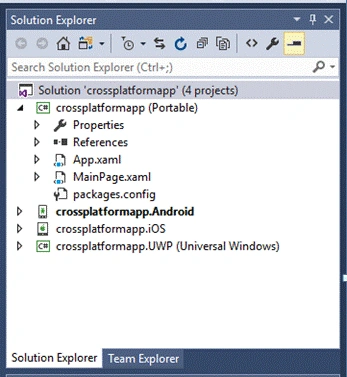
Start here with Xamarin.Forms application lifecycle.
Xamarin Forms application life cycle consists of three virtual methods that are overridden to handle lifecycle methods. These methods are present in App.xaml.cs class in Portable project.
You’ll find this file here.
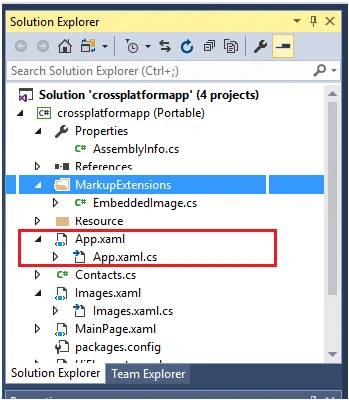
The three methods include-
- OnStart()
- OnSleep()
- OnResume()
These three methods are called when application is in start, sleep or resume state respectively. There is no method for application termination. Application is terminated from OnSleep method without any additional notification.
You can see all of these methods in App.xaml.cs file in your Xamarin.Forms portable project.
On Start MethodOnStart() method calls when your application is started at first. When the application starts, it reads all the code written in OnStart method.
Code
- protected override void OnStart() {
- // Handle when your app starts
- }
On Sleep Method
OnSleep() method calls when your application is in sleep state, i.e., there is no work going on in your application. Sleep method calls when user hides the application. In this form, your application is open in background and is in sleep state.
Code
- protected override void OnSleep() {
- // Handle when your app sleeps
- }
OnResume() Method is called when user comes back into application after sleep state.
Code
- protected override void OnResume() {
- // Handle when your app resumes
- }
Let’s put break points on all these methods and you will see all of these methods called when application is in one of these state.
- protected override void OnStart() {
- Debug.WriteLine("OnStart");
- }
- protected override void OnSleep() {
- Debug.WriteLine("OnSleep");
- }
- protected override void OnResume() {
- Debug.WriteLine("OnResume");
- }
The code is simple. I have written the text according to the state of the application.
Join the conversation! Your thoughts help the community grow.