

What is SQLite?
SQLite database has methods to create, delete, and execute SQL commands, and perform other common database management tasks. More details.
Let’s start,
Step 1
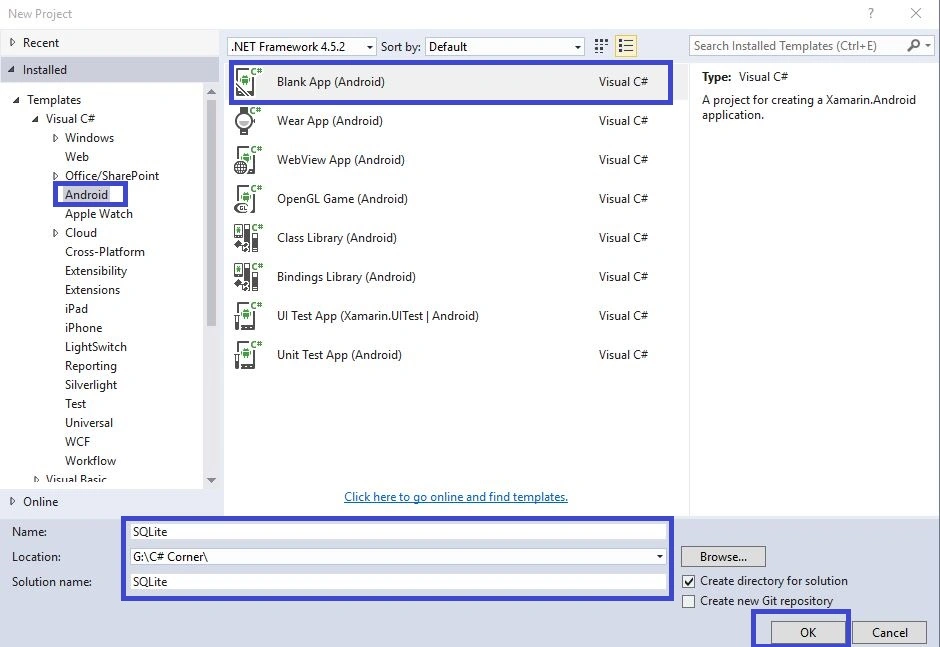
Open Visual Studio->New Project->Templates->Visual C#->Android->Blank App.
Select the Blank App. Give the project name and the project location.
 Step 2
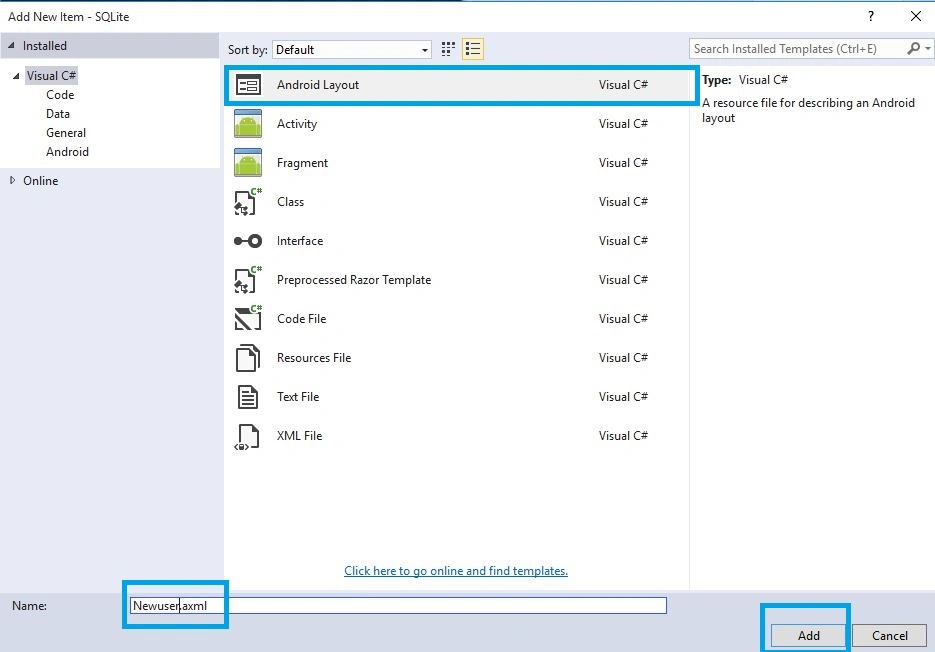
Next, go to Solution Explorer-> Project Name-> Resouces->layout. Right-click on Add. A new dialog box will open. Select Android layout, give name for Newuser.axml and add the New Layout Page.
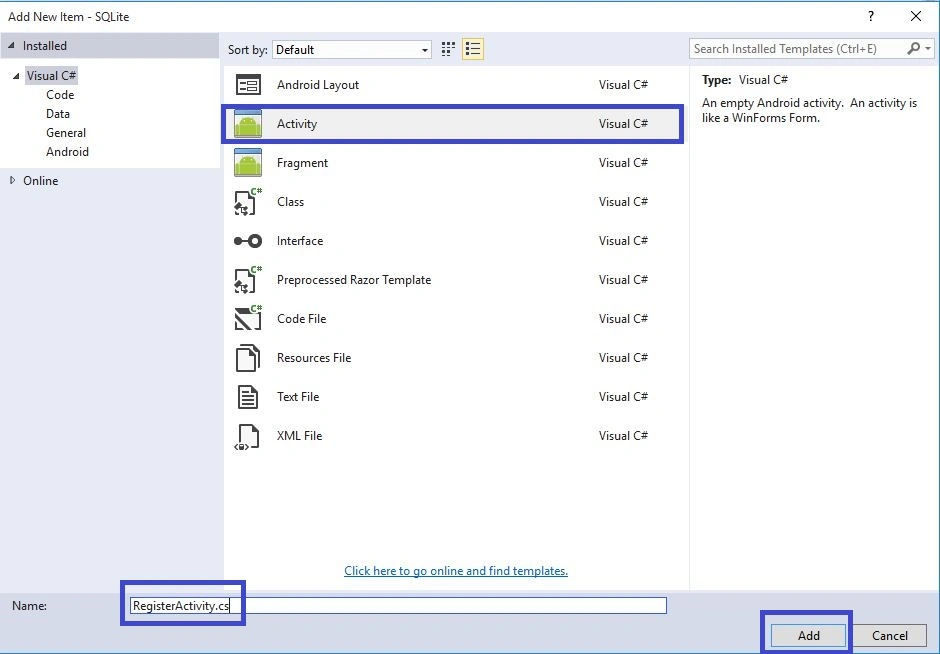
Go to Solution Explorer-> Project Name. Right-click on Add. Open new dialog box. Select Activity and give name for RegisterActivity.cs. Now, add the New Activity Class.
 Step 4
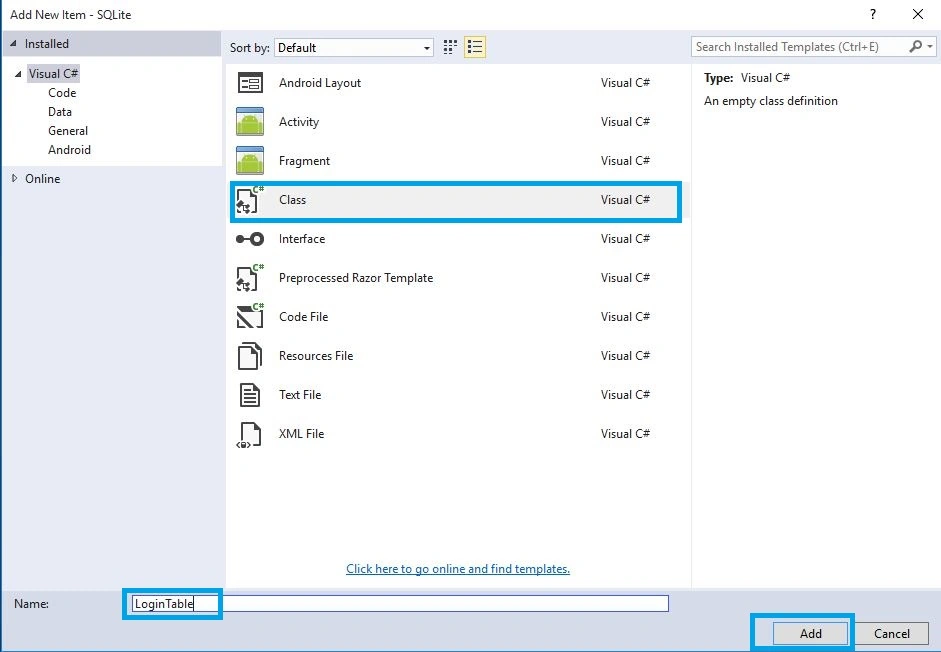
Next, we need to create the database table, so we create one Data Layer class. Go to Solution Explorer-> Project Name. Right-click to Add. Open a new dialog box. Select Class, give a name for LoginTable.cs and after it, add New Class.
 Step 5
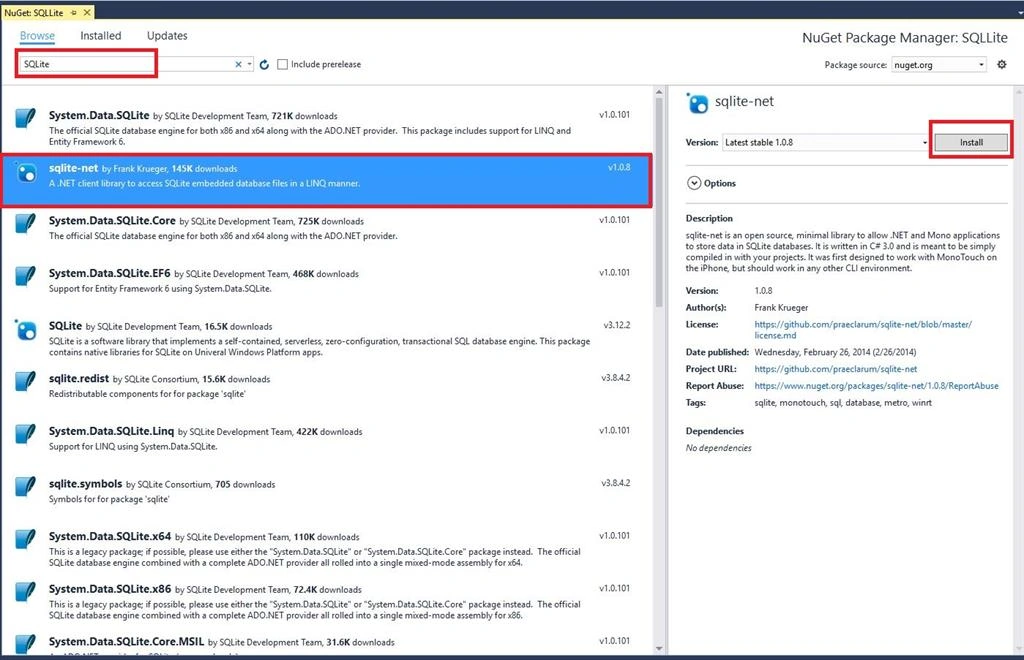
Go to Solution Explorer-> Project Name-> References. Right-Click to manage Nuget Packages and open a new dialog box. This dialog box searches SQLite. Install SQLite-Net Packages.
Step 6
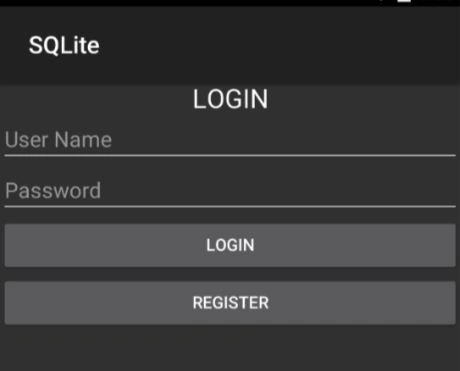
Next, Open the Solution Explorer-> Project Name->Resources->Layout->Main.axml. Click Open Design View. Here, create large text, two plain text, and two buttons.
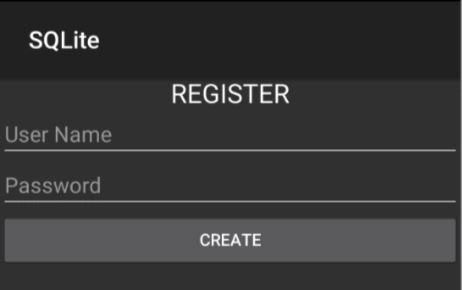
Next step is to Open Solution Explorer-> Project Name->Resources->Layout->Newuser.axml, click Open Design View. Here, create large text, two plain texts, and one button.
Step 8
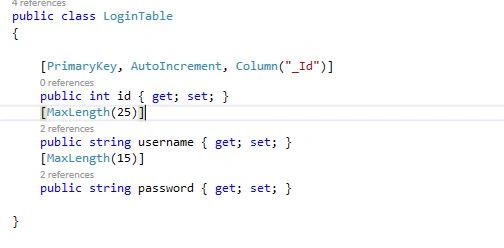
Next is to open Solution Explorer-> Project Name->LoginTable.cs, click Open CS code Page View and create table columns.
C# Code
- [PrimaryKey, AutoIncrement, Column("_Id")]
- public int id { get; set; } // AutoIncrement and set primarykey
- [MaxLength(25)]
- public string username { get; set; }
- [MaxLength(15)]
- public string password { get; set; }
Step 9
Now, open Solution Explorer-> Project Name->MainActivity.cs, click Open CS code Page view and add the following namespaces. First, we create a database. So, after OnCreate(), create new method with name of CreateDB().
C# Code
- public class MainActivity: Activity
- {
- EditText txtusername;
- EditText txtPassword;
- Button btncreate;
- Button btnsign;
- protected override void OnCreate(Bundle bundle)
- {
- base.OnCreate(bundle);
- // Set our view from the "main" layout resource
- SetContentView(Resource.Layout.Main);
- // Get our button from the layout resource,
- // and attach an event to it
- btnsign = FindViewById < Button > (Resource.Id.btnlogin);
- btncreate = FindViewById < Button > (Resource.Id.btnregister);
- txtusername = FindViewById < EditText > (Resource.Id.txtusername);
- txtPassword = FindViewById < EditText > (Resource.Id.txtpwd);
- btnsign.Click += Btnsign_Click;
- btncreate.Click += Btncreate_Click;
- CreateDB();
- }
- private void Btncreate_Click(object sender, EventArgs e)
- {
- StartActivity(typeof(RegisterActivity));
- }
- private void Btnsign_Click(object sender, EventArgs e)
- {
- try
- {
- string dpPath = Path.Combine(System.Environment.GetFolderPath(System.Environment.SpecialFolder.Personal), "user.db3"); //Call Database
- var db = new SQLiteConnection(dpPath);
- var data = db.Table < LoginTable > (); //Call Table
- var data1 = data.Where(x => x.username == txtusername.Text && x.password == txtPassword.Text).FirstOrDefault(); //Linq Query
- if (data1 != null)
- {
- Toast.MakeText(this, "Login Success", ToastLength.Short).Show();
- }
- else
- {
- Toast.MakeText(this, "Username or Password invalid", ToastLength.Short).Show();
- }
- }
- catch (Exception ex)
- {
- Toast.MakeText(this, ex.ToString(), ToastLength.Short).Show();
- }
- }
- public string CreateDB()
- {
- var output = "";
- output += "Creating Databse if it doesnt exists";
- string dpPath = Path.Combine(System.Environment.GetFolderPath(System.Environment.SpecialFolder.Personal), "user.db3"); //Create New Database
- var db = new SQLiteConnection(dpPath);
- output += "\n Database Created....";
- return output;
- }
- }
Here, the database name is “user.db3”.
Step 10
Next, open Solution Explorer-> Project Name-> RegisterActivity.cs. Click Open CS code Page view, then add the below namespaces. Next, write the following code.
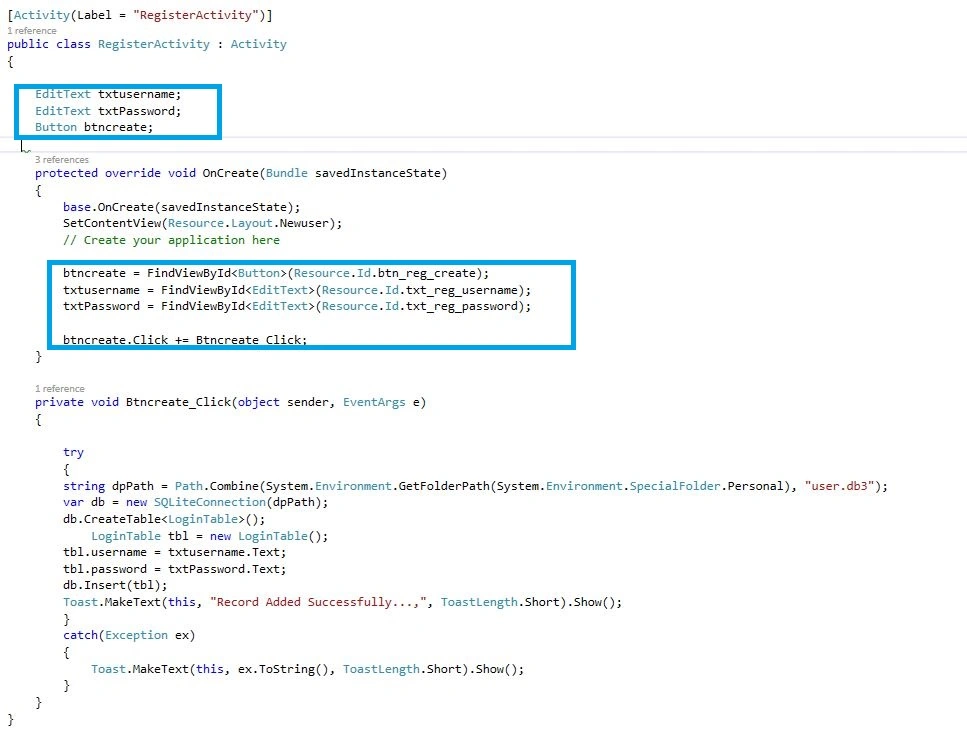
C# Code
- public class RegisterActivity: Activity
- {
- EditText txtusername;
- EditText txtPassword;
- Button btncreate;
- protected override void OnCreate(Bundle savedInstanceState)
- {
- base.OnCreate(savedInstanceState);
- SetContentView(Resource.Layout.Newuser);
- // Create your application here
- btncreate = FindViewById < Button > (Resource.Id.btn_reg_create);
- txtusername = FindViewById < EditText > (Resource.Id.txt_reg_username);
- txtPassword = FindViewById < EditText > (Resource.Id.txt_reg_password);
- btncreate.Click += Btncreate_Click;
- }
- private void Btncreate_Click(object sender, EventArgs e)
- {
- try
- {
- string dpPath = Path.Combine(System.Environment.GetFolderPath(System.Environment.SpecialFolder.Personal), "user.db3");
- var db = new SQLiteConnection(dpPath);
- db.CreateTable < LoginTable > ();
- LoginTable tbl = new LoginTable();
- tbl.username = txtusername.Text;
- tbl.password = txtPassword.Text;
- db.Insert(tbl);
- Toast.MakeText(this, "Record Added Successfully...,", ToastLength.Short).Show();
- } catch (Exception ex) {
- Toast.MakeText(this, ex.ToString(), ToastLength.Short).Show();
- }
- }
- }
Step 11
Press F5 or build and run the Application. The first image is to register the new user and then, the next image is to log in to the user.
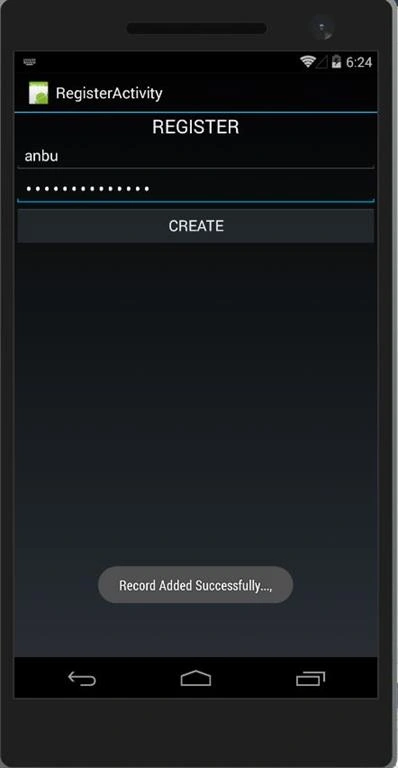
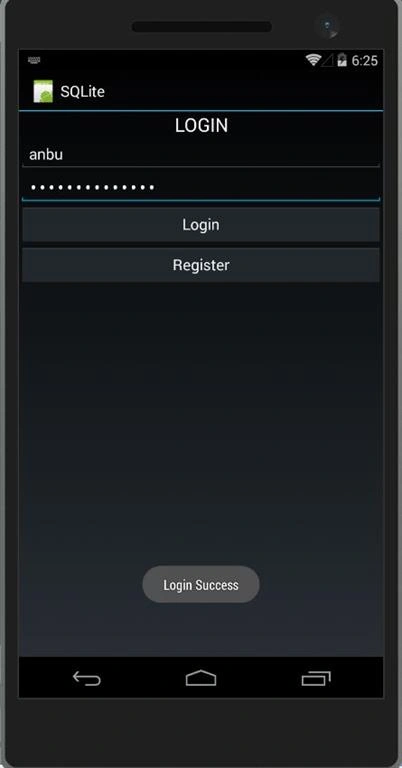 Finally, we successfully created a login using the SQLite database.
Rence RencePosted May 25, 2021, 1:17 PM
Why i am getting a red line under the Where ->>> var data1 = data.Where(x => x.username == username.Text && x.password == Password.Text).FirstOrDefault();
Bhavesh GhulPosted Jun 25, 2018, 8:18 AM
Hi Sir, at Which Place Create user.db3 is located, How to Open Db in Db Browser For Sq Lite And can i create my database at a specific path ??
Vinoth Kumar ThangaveluPosted Mar 21, 2018, 7:32 PM
Hi Anbu Mani It is a good tutorial as a beginner in Xamarin Like me . But when I deploy the application in my mobile some of errors getting like "Detected problems with app native libraries unauthorized access to system/lib64/libsqlite.so"
Wendell RamosPosted Mar 2, 2018, 3:42 AM
How to pass database data to another activity?
ghazalPosted Jan 7, 2018, 11:55 AM
Hi i cant find .db ? my android device monitor doesnt open.
Dan DickersonPosted Sep 28, 2017, 8:25 PM
Great tutorial. Finally, someone posts a recipe that actually works! Too many other samples don't build for some mysterious reason. Thanks!
MEGHANATH BHAVANAMPosted Sep 16, 2017, 8:22 AM
Can anyone please tel me where "user.db3" will be stored??
anil yadavPosted Aug 24, 2017, 4:13 AM
Any project with remote database and menu after login
Aegan JoshuaPosted Jul 10, 2017, 4:46 AM
Answer me please :'(
Aegan JoshuaPosted Jul 5, 2017, 11:05 PM
Anbu Mani , where can i find the database ? "user.db3"
Aegan JoshuaPosted Jun 29, 2017, 8:27 PM
Hi Anbu Mani . it is posible to merge the login and xamarin android CRUD you created ?
Vincent NwonahPosted Apr 25, 2017, 10:50 AM
One question, this code will create a new database every time the main activity is run? Overwriting the old one?
K DPosted Apr 5, 2017, 3:14 PM
Useful post. Thanks.
Mauricio BranuxPosted Mar 7, 2017, 1:46 PM
Excelente artigo, COOL!!!
Kashif Ahmad KhanPosted Sep 16, 2016, 2:12 AM
Nice Article
Vivek KumarPosted Aug 9, 2016, 11:34 AM
Nice one
ankit SRIVASTAVAPosted Jul 29, 2016, 3:20 PM
Thanks
Bhavik PatelPosted Jul 20, 2016, 10:06 PM
Good article. Anbu Mani can you share generic sqllite.net generic wrappers which works for all.?
kalu singh raoPosted Jul 20, 2016, 8:39 AM
Good Article
Bhavik PatelPosted Jul 10, 2016, 11:58 AM
NICE
Vignesh ManiPosted Jun 11, 2016, 4:43 PM
Nice
Asad AliPosted Jun 10, 2016, 4:26 AM
good post
Debasis SahaPosted Jun 10, 2016, 12:18 AM
Good one..
Santhakumar MunuswamyPosted Jun 9, 2016, 11:55 PM
Thank you for sharing