

Let’s start,
We already created a Google Map with Marker in my article. If you did not create this please follow this link,
After creating Google Map with Marker App in Xamarin Android, then follow the below steps,
Step 1: Open MainActivity.cs page, then give following code,
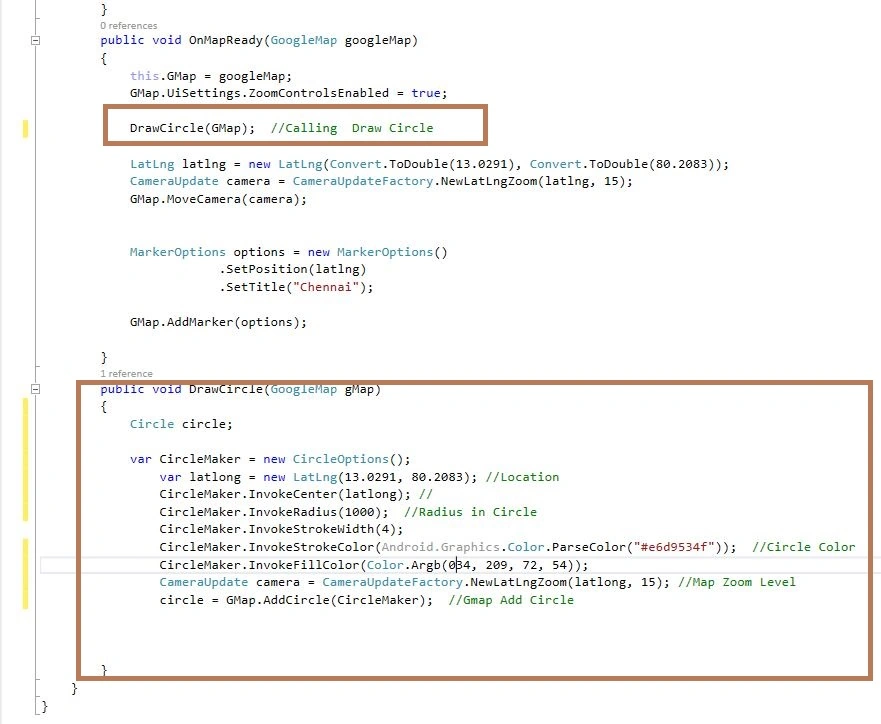
Name Space:
- using Android.Gms.Maps.Model; // Add this Two Name Space
- using Android.Graphics;
C# Code:
- public void OnMapReady(GoogleMap googleMap)
- {
- this.GMap = googleMap;
- GMap.UiSettings.ZoomControlsEnabled = true;
- DrawCircle(GMap); //Calling Draw Circle
- LatLng latlng = new LatLng(Convert.ToDouble(13.0291), Convert.ToDouble(80.2083));
- CameraUpdate camera = CameraUpdateFactory.NewLatLngZoom(latlng, 15);
- GMap.MoveCamera(camera);
- MarkerOptions options = new MarkerOptions()
- .SetPosition(latlng)
- .SetTitle("Chennai");
- GMap.AddMarker(options);
- }
- public void DrawCircle(GoogleMap gMap)
- {
- Circle circle;
- var CircleMaker = new CircleOptions();
- var latlong = new LatLng(13.0291, 80.2083); //Location
- CircleMaker.InvokeCenter(latlong); //
- CircleMaker.InvokeRadius(1000); //Radius in Circle
- CircleMaker.InvokeStrokeWidth(4);
- CircleMaker.InvokeStrokeColor(Android.Graphics.Color.ParseColor("#e6d9534f")); //Circle Color
- CircleMaker.InvokeFillColor(Color.Argb(034, 209, 72, 54));
- CameraUpdate camera = CameraUpdateFactory.NewLatLngZoom(latlong, 15); //Map Zoom Level
- circle = GMap.AddCircle(CircleMaker); //Gmap Add Circle
- }
Step 2: Next Run the app showing Drawing Circle in Around Marker with Google Map,
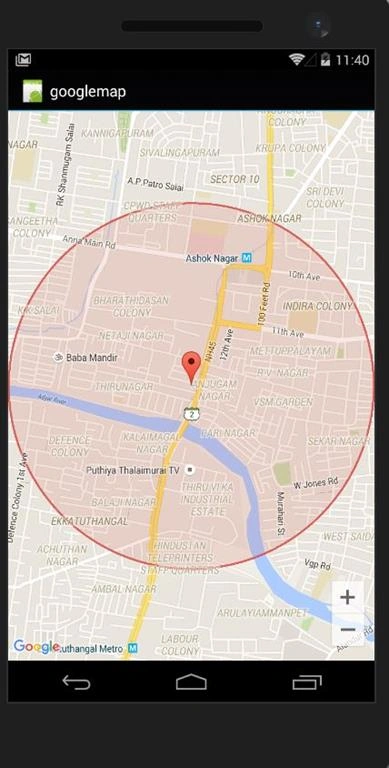
Finally, we have successfully created Xamarin Android Google Map Draw Circle around Marker App.
Read more articles on Xamarin:
Edgar LepelPosted Jun 4, 2020, 11:13 PM
Hi Anbu, hi from Paraguay, it's posible pin marker with radius like this example but in xamarin forms? using sdk google maps?
Prasanna MuraliPosted May 20, 2016, 9:32 PM
Nice one...