

Introduction
In this article, we will understand how to write Test Scripts using Postman Tool.
Pre-requisite
- Postman collection with API request should be created.
Writing Tests in postman
In postman, we can write automation scripts as well with help of Tests section.
In Postman, Test Scripts are the lines of code that allow you to automate an API test.
We can write Pre-Request and Test Scripts.
- Pre-Request script - Before sending a request, a Pre-Request script will run and,
- Tests Script - After receiving a response, Test Scripts will run.
In Postman, we can write the tests, pass the data between the requests, and change the parameters.
Postman allows adding test script and pre-request script to the following levels,
- Collection Level - Tests can be written for all the API Request created inside the collection.
- Folder Level - Tests can be written for all the API Request created inside the Particular folder present inside the collection.
- Request Level - Tests can be written for all the individual API Request that is created inside or outside the collection.
In Postman, the order of script execution for a single request is as follows,
- Pre-Request script
- Request
- Response
- Tests
The scripts should always run according to the following hierarchy for every request in a collection,
- Collection level Test script
- Folder level Test script
- Request level Test script
- Before every request in the collection, a pre-request script associated with a collection will run.
- Before every request in the folder, a pre-request script associated with a folder will run.
- After every request in the collection, a test script associated with a collection will run.
- After a request in the folder, a test script associated with a folder will run.
If you are familiar with any Javascript related Test Automation Frameworks then it is easy to write tests.
It is very similar to writing Mocha/Jasmine Tests.
Here pm is the postman object.
Using this pm object we call the test function to write tests
Test function takes two arguments
- One Test Name
- Another one is again the call back function in which you are going to write the actual tests.
Sample code with example,
pm.test("Test titel", function () {
    //Actual test code
});
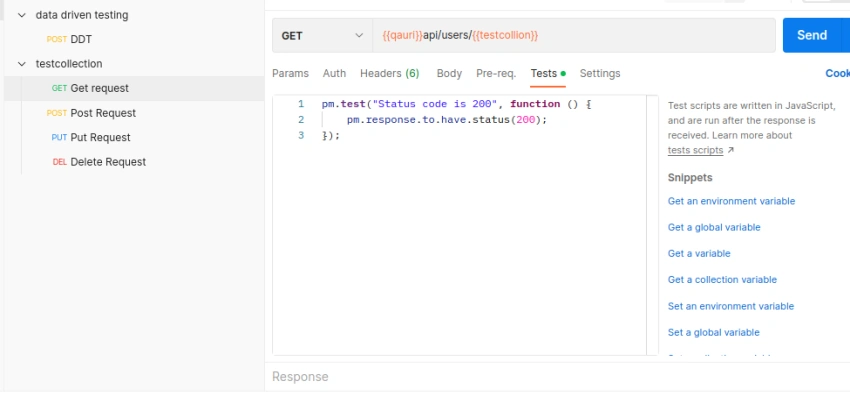
pm.test("Status code is 200", function () {
    pm.response.to.have.status(200);
});
Assertion are applied for the tests using the chai test library.
Look at the below examples of few tests
In order to verify status code 201 when a resource is created then use the below code,
pm.test("Successful POST request", function () {
    pm.expect(pm.response.code).to.be.oneOf([201, 202]);
});
We can also put assertions using expect keyword as well.
pm.test("Status code is 200", function () {
   expect(pm.response).to.have.status(200);
});
In order to send API request through script then we need using the sendrequest function, which takes the API URI as an argument, and the callback function which takes two arguments through which we can read the error or response of the API Request.
 pm.sendRequest('https://reqres.in/api/users/2',(err,response)=>{
     console.log(response.json());
 })
In order to work with cookies then use cookies property from the postman object.
pm.cookies.get('test')).
Even if you are not familiar with these frameworks on how to write tests. Postman gives you the code snippets which you can just click on code snippets then the code will get automatically added to your test section.
Writing tests inside postman is must since you never know whether your API worked as per the expected functionality after you ran your collection.
Screenshot of code snippet,
We can also get and set the Environment variables, Global and Local variables using these scripts as well.
In order to set environment variable use the below code,
pm.environment.set("variable_key", "variable_value");
In order to get environment variable use the below code,
pm.environment.get("variable_key");
Note
All the logs of your test run will be displayed in the bottom logs section.
An amazing trick,
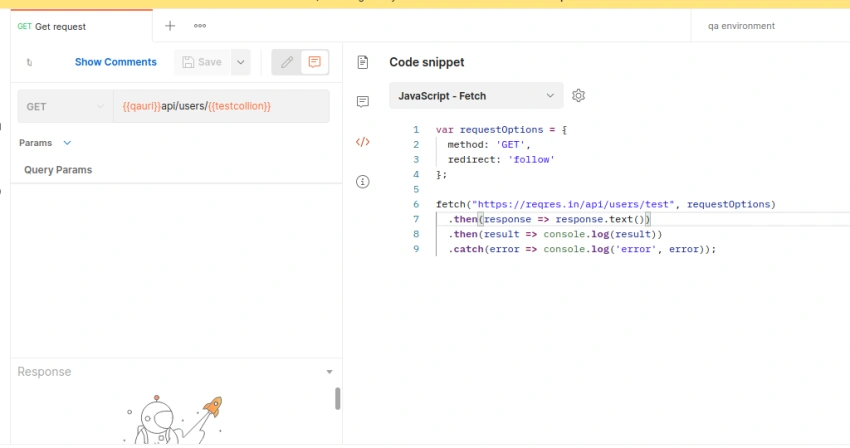
If you are developing Automation Test Script using any Programming Languages, then we can create API Request in Postman and get your code for the request you have created automatically.
Steps
- Create an API Request.
- Click the switch to comment mode toggle button that is present near to the save button.
- Click the code section.
- You will find the dropdown with all the API test library with the corresponding programming language.
- Select any library.
- Your code will automatically be created for the API request, Just copy the code and use it in your respective Test automation project.
- Note: Kindly Apply assertions since assertions will not auto-generated in this section by postman.
- But your main functionality hitting the API Request and getting the response from the API will get covered.
- But don't use it frequently we need to write code from scratch and then only we will be able to remember the concepts in future.
Screenshot of automatic code feature
Summary
This article will help you with writing tests scripts in postman and hope this trick will be helpful.
Thanks.............
Join the conversation! Your thoughts help the community grow.