

Introduction
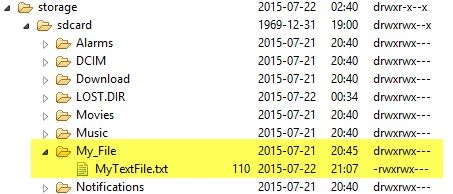
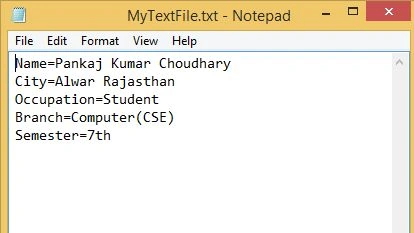
First, we will create a simple text file and then write some data into this file and finally, we will read the data from the text file.
Now we move to the coding part of this article.
XML Code of Activity
- <FrameLayout
- xmlns:android="http://schemas.android.com/apk/res/android"
- xmlns:tools="http://schemas.android.com/tools"
- android:id="@+id/container"
- android:layout_width="match_parent"
- android:layout_height="match_parent"
- tools:context="com.example.readwritedataonsdcard.MainActivity"
- tools:ignore="MergeRootFrame" >
- <LinearLayout
- android:layout_width="match_parent"
- android:layout_height="match_parent"
- android:orientation="vertical" >
- <Button
- android:id="@+id/btnWrite"
- android:layout_width="222dp"
- android:layout_height="wrap_content"
- android:text="@string/Write" />
- <Button
- android:id="@+id/btnRead"
- android:layout_width="222dp"
- android:layout_height="wrap_content"
- android:text="@string/Read" />
- <TextView
- android:id="@+id/textView1"
- android:layout_width="304dp"
- android:layout_height="900dp"
- android:layout_weight="0.06"
- android:textAppearance="?android:attr/textAppearanceLarge" />
- </LinearLayout>
- </FrameLayout>
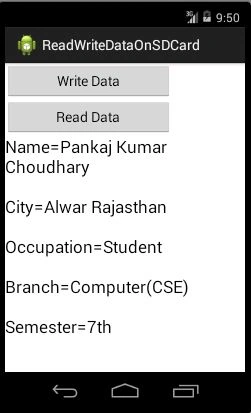
After using the preceding XML code our activity will look as in the following:
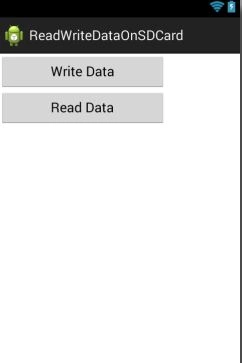
In this activity we use two buttons and a TextView (Label),
- The first button is “Write Data”. We will use this button to create a file and write some data in that text file
- The second button is “Read Data”. We will use this button to read the data from the file and show the data in a TextView (Label).
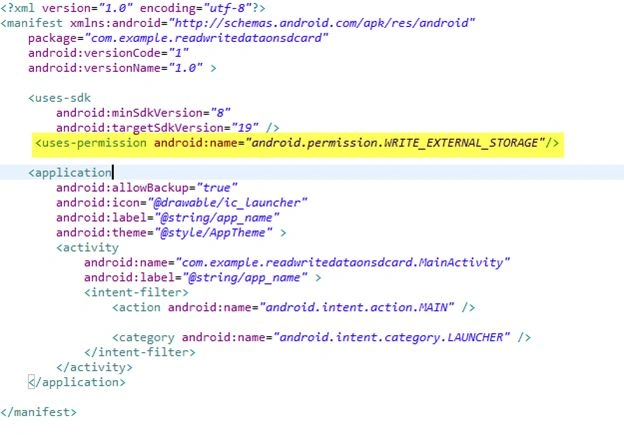
This is very important. If we are using an SDCard (Storage Device) in our project, then we must have user-permission, otherwise, the system will throw an error of permission denied. We can take user permission using the following code:
- <uses-permission android:name="android.permission.WRITE_EXTERNAL_STORAGE"/>
Write this code in your AndroidMainfest.xml file like the following:
- public class MainActivity extends ActionBarActivity {
- Button Read;
- Button Write;@Override
- protected void onCreate(Bundle savedInstanceState) {
- super.onCreate(savedInstanceState);
- setContentView(R.layout.activity_main);
- Read = (Button) findViewById(R.id.btnRead);
- Write = (Button) findViewById(R.id.btnWrite);
- Write.setOnClickListener(new View.OnClickListener() {
- @Override
- public void onClick(View arg0) {
- // TODO Auto-generated method stub
- String state = Environment.getExternalStorageState();
- if (state.equals(Environment.MEDIA_MOUNTED)) {
- Toast.makeText(getApplicationContext(), "Media Is Mounted", Toast.LENGTH_SHORT).show();
- File f = Environment.getExternalStorageDirectory();
- File dir = new File(f.getAbsolutePath() + "/My_File");
- dir.mkdirs();
- File myfile = new File(dir, "MyTextFile.txt");
- try {
- myfile.createNewFile();
- try {
- FileOutputStream fout = new FileOutputStream(myfile);
- PrintWriter pw = new PrintWriter(fout);
- pw.println("Name=Pankaj Kumar Choudhary");
- pw.println("\r\n" + "City=Alwar Rajasthan");
- pw.println("\r\n" + "Occupation=Student");
- pw.println("\r\n" + "Branch=Computer(CSE)");
- pw.println("\r\n" + "Semester=7th");
- pw.flush();
- pw.close();
- fout.close();
- Toast.makeText(getApplicationContext(), "File Written successfully", Toast.LENGTH_LONG).show();
- } catch (Exception e) {
- Toast.makeText(getApplicationContext(), e.toString(), Toast.LENGTH_LONG).show();
- //tv.setText(e.toString());
- }
- } catch (IOException e1) {
- // TODO Auto-generated catch block
- e1.printStackTrace();
- }
- } else {
- Toast.makeText(getApplicationContext(), "Media is not mounted", Toast.LENGTH_SHORT).show();
- }
- }
- });
- Read.setOnClickListener(new View.OnClickListener() {
- @Override
- public void onClick(View arg0) {
- // TODO Auto-generated method stub
- File f = Environment.getExternalStorageDirectory();
- //f.getAbsolutePath()
- File finalPath = new File(f.getAbsolutePath(), "/My_File/MyTextFile.txt");
- String lines = null;
- TextView t = (TextView) findViewById(R.id.textView1);
- try {
- FileInputStream fin = new FileInputStream(finalPath);
- BufferedReader myReader = new BufferedReader(new InputStreamReader(fin));
- while ((lines = myReader.readLine()) != null) {
- t.append(lines + "\r\n");
- }
- myReader.close();
- Toast.makeText(getApplicationContext(), "File has been read successfully", Toast.LENGTH_LONG).show();
- } catch (Exception e) {
- t.append(finalPath.getPath() + "\n" + e.toString());
- Toast.makeText(getApplicationContext(), e.toString(), Toast.LENGTH_LONG).show();
- }
- }
- });
- }
- }
- String state = Environment.getExternalStorageState();
- if (state.equals(Environment.MEDIA_MOUNTED)) {
- Toast.makeText(getApplicationContext(), "Media Is Mounted", Toast.LENGTH_SHORT).show();
- File f = Environment.getExternalStorageDirectory();
- File dir = new File(f.getAbsolutePath() + "/My_File");
- dir.mkdirs();
- }
In the preceding code, we get the information about the external storage of our device using the getExternalStorageState() method. This method returns the information about the primary external storage directory like whether the external storage device is mounted. If the external storage device is mounted then we will show a message that “Media Is Mounted” using the Toast.makeText() method like the following:

Code Section 2
- File myfile = new File(dir, "MyTextFile.txt");
- try {
- myfile.createNewFile();
- try {
- FileOutputStream fout = new FileOutputStream(myfile);
- PrintWriter pw = new PrintWriter(fout);
- pw.println("Name=Pankaj Kumar Choudhary");
- pw.println("\r\n" + "City=Alwar Rajasthan");
- pw.println("\r\n" + "Occupation=Student");
- pw.println("\r\n" + "Branch=Computer(CSE)");
- pw.println("\r\n" + "Semester=7th");
- pw.flush();
- pw.close();
- fout.close();
- Toast.makeText(getApplicationContext(), "File Written successfully", Toast.LENGTH_LONG).show();
- }
- }
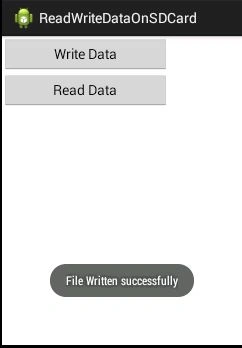
In the preceding code, we create a new TextFile using the createNewFile method. We use an object of the FileOutputStream class. FileOutputStream creates an OutputStream that we can use to write bytes to a file. In other words, FileOutputStream is used to write binary data to a file. We use a parameterized constructor of the FileOutputStream class and pass the name of the file as parameter. So the object of the FileOutputStream class will create an OutputStream for the “MyTextFile.txt” file. We create an object of PrintWriter class. This class provides a convenient method for printing common data types in a human-readable format. We write some data into our text file using the “println” method. Finally, we will show a message of file successfully written.
Conclusion
- File f = Environment.getExternalStorageDirectory();
- //f.getAbsolutePath()
- File finalPath = new File(f.getAbsolutePath(), "/My_File/MyTextFile.txt");
- String lines = null;
- TextView t = (TextView) findViewById(R.id.textView1);
- try {
- FileInputStream fin = new FileInputStream(finalPath);
- BufferedReader myReader = new BufferedReader(new InputStreamReader(fin));
- while ((lines = myReader.readLine()) != null) {
- t.append(lines + "\r\n");
- }
- myReader.close();
- Toast.makeText(getApplicationContext(), "File has been read successfully", Toast.LENGTH_LONG).show();
- }
Pankaj Kumar ChoudharyPosted Jul 24, 2015, 7:50 AM
Thanks Sibeesh Sir.......
Sibeesh VenuPosted Jul 24, 2015, 4:14 AM
Nice Share. Thank you
Pankaj Kumar ChoudharyPosted Jul 23, 2015, 8:00 PM
Thanks Santhakumar Sir..........
Santhakumar MunuswamyPosted Jul 23, 2015, 2:42 PM
Thanks for nice article:)
Pankaj Kumar ChoudharyPosted Jul 23, 2015, 12:45 PM
Thanks Gopi Sir Sir.....
Gopi ChandPosted Jul 23, 2015, 11:33 AM
Excellent work
Pankaj Kumar ChoudharyPosted Jul 23, 2015, 11:31 AM
Thanks Nipesh Sir.....
Nipesh JanghelPosted Jul 23, 2015, 9:51 AM
Nice!!
RakeshPosted Jul 23, 2015, 9:47 AM
Good one
Rajeesh MenothPosted Jul 23, 2015, 9:15 AM
Good Pankaj Kumar Choudhary....
Pankaj Kumar ChoudharyPosted Jul 23, 2015, 5:42 AM
Thanks Sibeesh Sir.........
Sibeesh VenuPosted Jul 23, 2015, 5:26 AM
Nice Share.
Nilesh JadavPosted Jul 23, 2015, 5:14 AM
Really nice one sir Pankaj Kumar Choudhary
Pankaj Kumar ChoudharyPosted Jul 23, 2015, 3:33 AM
Thanks Vipul..........
Vipul MalhotraPosted Jul 23, 2015, 3:27 AM
nice Article.Thanks for sharing
Pankaj Kumar ChoudharyPosted Jul 23, 2015, 3:25 AM
Thanks Sharad Sir..........
SharadPosted Jul 23, 2015, 3:17 AM
good one...
Pankaj Kumar ChoudharyPosted Jul 23, 2015, 3:15 AM
Thanks Upendra Sir...........
Upendra Pratap ShahiPosted Jul 23, 2015, 3:05 AM
nice one @Pankaj Kumar Chaudhary