

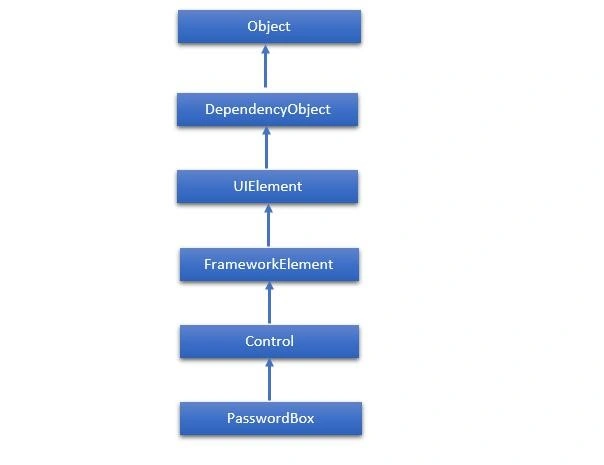
PasswordBox is a control that allows the user to enter masked passwords. When the user enters a password, it will be displayed as password characters. You can change the Password character by setting the PasswordChar property. The hierarchical inheritance of PasswordBox class is as follows:
| Commonly Used Properties of PasswordBox Class
Commonly Used Events of PasswordBox Class
1 ContextMenuOpening
Occurs when the system processes an interaction that displays a context menu.
2 GotFocus
Occurs when a UIElement receives focus. (Inherited from UIElement)
3 PasswordChanged
Occurs when the value of the Password property changes.
4 Paste
Occurs when text is pasted into the control. Below are the commonly used Methods of PasswordBox class.
1 OnLostFocus
Called before the LostFocus event occurs. (Inherited from Control)
2 SelectAll
Selects all the characters in the PasswordBox.
3 SetBinding
Attaches a binding to a FrameworkElement, using the provided binding object. (Inherited from FrameworkElement)
4 SetValue
Sets the local value of a dependency property on a DependencyObject. (Inherited from DependencyObject) The following example shows the PasswordBox, labels, and button. Here is the XAML code in which all these controls are created and initialized. <Window x:Class="PasswordBox.MainWindow" xmlns="http://schemas.microsoft.com/winfx/2006/xaml/presentation" xmlns:x="http://schemas.microsoft.com/winfx/2006/xaml" Title="MainWindow" Height="350" Width="604"> <Grid > <PasswordBox x:Name="pwBox" Height="35" Width="200" MaxLength="8" Margin="159,55,158,229" /> <Label Content="Password" HorizontalAlignment="Left" Margin="108,61,0,0" VerticalAlignment="Top" Width="70" /> <Button Content="Ok" HorizontalAlignment="Left" Margin="406,64,0,0" VerticalAlignment="Top" Width="75" Click="Button_Click"/> <Label Name="statusText" HorizontalAlignment="Left" Margin="159,128,0,0" VerticalAlignment="Top" Width="200" Height="38"/> </Grid> </Window> Here is the button click event implementation in C# in which the program compares if the entered password is “wpf12345” then it will display the correct password message on the textblock. using System.Windows; namespace WPFPasswordBoxControl { /// <summary> /// Interaction logic for MainWindow.xaml /// </summary> public partial class MainWindow : Window { public MainWindow() { InitializeComponent(); } private void Button_Click(object sender, RoutedEventArgs e) { if (pwBox.Password.ToString() == "wpf12345") statusText.Text = "Password Accepted"; else statusText.Text = "Wrong Password"; } } } When the above code is compiled and executed, it will produce the following window: | |||||||||||||||||||||||||||||||||||||||||||||||||||||||||||||||||||||||||||||||||||
Rushi MehtaPosted Sep 19, 2018, 5:27 AM
Fantastic Article
Mahesh RajolePosted Feb 10, 2014, 5:23 AM
What is the way for Show password Checkbox