

Telerik is a Bulgarian company offering software tools for web, mobile, desktop application development, tools, and subscription services for cross-platform application development. Here, in this article, I will explain how to use Telerik Grid in ASP. NET MVC.

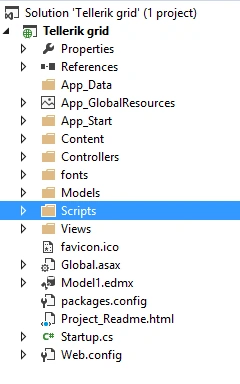
To use the Telerik UI, here, I have created a new MVC project. Look at my Solution Explorer.
I have added an entity data model to connect with the database as follows.
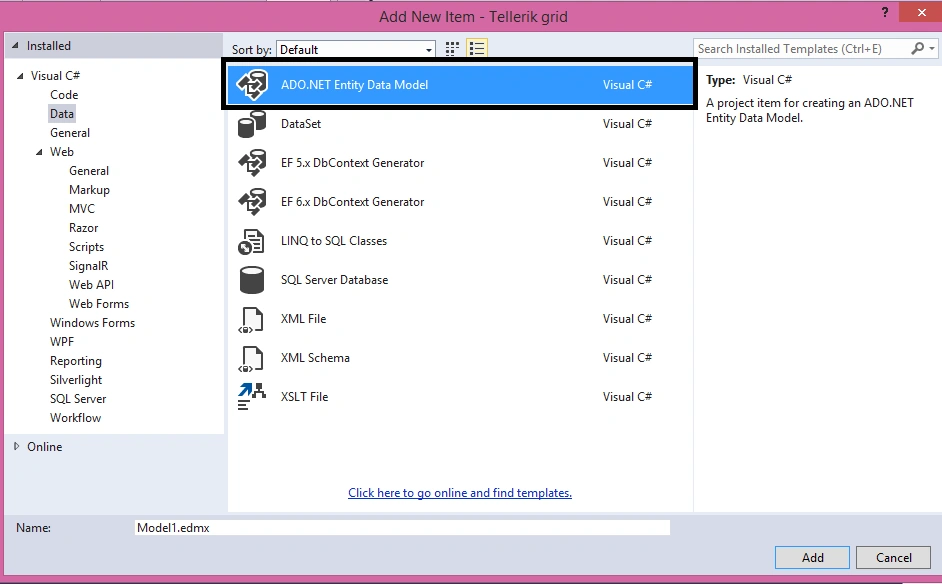
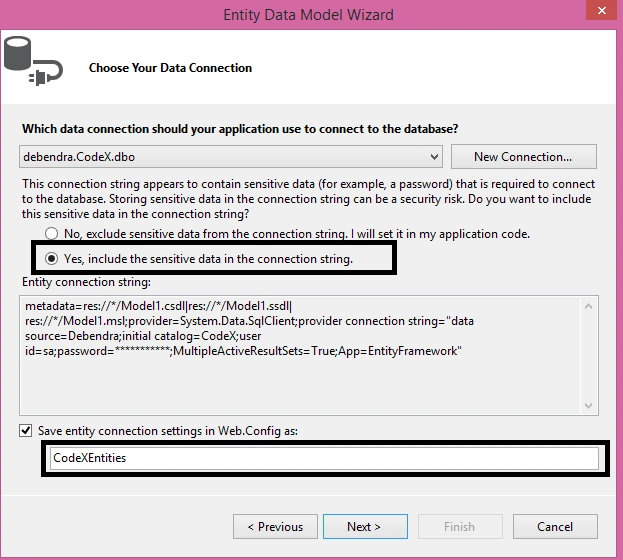
Here is my connection string and context.
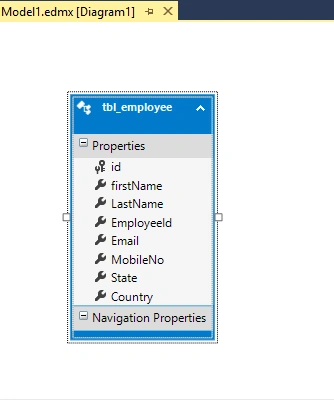
Here is my table in ORM window.
To use the Telerik UI, here, I have created a new MVC project. Look at my Solution Explorer.
I have added an entity data model to connect with the database as follows.
Here is my connection string and context.
Here is my table in ORM window.
In case anyone needs the table structure and data, here is my table script:
- USE [CodeX]
- GO
- /****** Object: Table [dbo].[tbl_employee] Script Date: 23/07/2016 1:29:43 AM ******/
- SET ANSI_NULLS ON
- GO
- SET QUOTED_IDENTIFIER ON
- GO
- CREATE TABLE [dbo].[tbl_employee](
- [id] [int] NOT NULL,
- [firstName] [nvarchar](50) NULL,
- [LastName] [nvarchar](50) NULL,
- [EmployeeId] [int] NULL,
- [Email] [nvarchar](50) NULL,
- [MobileNo] [nvarchar](10) NULL,
- [State] [nvarchar](30) NULL,
- [Country] [nvarchar](50) NULL,
- CONSTRAINT [PK_tbl_employee] PRIMARY KEY CLUSTERED
- (
- [id] ASC
- )WITH (PAD_INDEX = OFF, STATISTICS_NORECOMPUTE = OFF, IGNORE_DUP_KEY = OFF, ALLOW_ROW_LOCKS = ON, ALLOW_PAGE_LOCKS = ON) ON [PRIMARY]
- ) ON [PRIMARY]
- GO
- INSERT [dbo].[tbl_employee] ([id], [firstName], [LastName], [EmployeeId], [Email], [MobileNo], [State], [Country]) VALUES (1, N'Debendra', N'Dash', 10090, N'[email protected]', N'8123371257', N'Odisha', N'India')
- INSERT [dbo].[tbl_employee] ([id], [firstName], [LastName], [EmployeeId], [Email], [MobileNo], [State], [Country]) VALUES (2, N'Sridhar', N'Dash', 10090, N'[email protected]', N'808900099', N'karnataka', N'India')
- INSERT [dbo].[tbl_employee] ([id], [firstName], [LastName], [EmployeeId], [Email], [MobileNo], [State], [Country]) VALUES (11, N'Manas', N'sing', 56, N'[email protected]', N'8090705545', N'UP', N'India')
- INSERT [dbo].[tbl_employee] ([id], [firstName], [LastName], [EmployeeId], [Email], [MobileNo], [State], [Country]) VALUES (40, N'Tushar', N'Jena', 78, N'[email protected]', N'676789990', N'MP', N'India')
- INSERT [dbo].[tbl_employee] ([id], [firstName], [LastName], [EmployeeId], [Email], [MobileNo], [State], [Country]) VALUES (67, N'Rubi', N'singh', 90, N'[email protected]', N'8018070999', N'Ap', N'India')
- INSERT [dbo].[tbl_employee] ([id], [firstName], [LastName], [EmployeeId], [Email], [MobileNo], [State], [Country]) VALUES (99, N'Sujit', N'Tiwari', 80, N'[email protected]', N'7894290976', N'UP', N'India')
- INSERT [dbo].[tbl_employee] ([id], [firstName], [LastName], [EmployeeId], [Email], [MobileNo], [State], [Country]) VALUES (120, N'Kabita', N'Kumari', 129, N'[email protected]', N'7894290765', N'MP', N'India')
- INSERT [dbo].[tbl_employee] ([id], [firstName], [LastName], [EmployeeId], [Email], [MobileNo], [State], [Country]) VALUES (123, N'Dinesh', N'Kumar', 234, N'[email protected]', N'8012345678', N'Bihar', N'India')
- INSERT [dbo].[tbl_employee] ([id], [firstName], [LastName], [EmployeeId], [Email], [MobileNo], [State], [Country]) VALUES (150, N'Sachin', N'Tendulkar', 2345, N'[email protected]', N'8909900008', N'Assam', N'India')
- INSERT [dbo].[tbl_employee] ([id], [firstName], [LastName], [EmployeeId], [Email], [MobileNo], [State], [Country]) VALUES (190, N'Sourav', N'Ganguli', 234, N'[email protected]', N'7894270987', N'WB', N'India')
- INSERT [dbo].[tbl_employee] ([id], [firstName], [LastName], [EmployeeId], [Email], [MobileNo], [State], [Country]) VALUES (191, N'Pankaj', N'sahu', 188, N'[email protected]', N'7894270987', N'WB', N'India')
- INSERT [dbo].[tbl_employee] ([id], [firstName], [LastName], [EmployeeId], [Email], [MobileNo], [State], [Country]) VALUES (192, N'Kisan', N'agrawal', 177, N'[email protected]', N'7894270989', N'AP', N'India')
- INSERT [dbo].[tbl_employee] ([id], [firstName], [LastName], [EmployeeId], [Email], [MobileNo], [State], [Country]) VALUES (193, N'Ravi', N'kumar', 199, N'[email protected]', N'7894270989', N'ODISHA', N'India')
- INSERT [dbo].[tbl_employee] ([id], [firstName], [LastName], [EmployeeId], [Email], [MobileNo], [State], [Country]) VALUES (194, N'Kumar', N'dora', 100, N'[email protected]', N'3494270987', N'JHARKHAND', N'India')
- INSERT [dbo].[tbl_employee] ([id], [firstName], [LastName], [EmployeeId], [Email], [MobileNo], [State], [Country]) VALUES (195, N'Prakash', N'jha', 30, N'[email protected]', N'7894270987', N'BIHAR', N'India')
- INSERT [dbo].[tbl_employee] ([id], [firstName], [LastName], [EmployeeId], [Email], [MobileNo], [State], [Country]) VALUES (196, N'Jeetu', N'nayak', 34, N'[email protected]', N'7894270987', N'PUNJAB', N'India')
- INSERT [dbo].[tbl_employee] ([id], [firstName], [LastName], [EmployeeId], [Email], [MobileNo], [State], [Country]) VALUES (197, N'Rani', N'sahu', 35, N'[email protected]', N'7894270987', N'GOA', N'India')
- INSERT [dbo].[tbl_employee] ([id], [firstName], [LastName], [EmployeeId], [Email], [MobileNo], [State], [Country]) VALUES (198, N'Bharat', N'das', 67, N'[email protected]', N'7894279900', N'GOA', N'India')
- INSERT [dbo].[tbl_employee] ([id], [firstName], [LastName], [EmployeeId], [Email], [MobileNo], [State], [Country]) VALUES (199, N'OM', N'prakash', 68, N'[email protected]', N'8090907090', N'AP', N'India')
- INSERT [dbo].[tbl_employee] ([id], [firstName], [LastName], [EmployeeId], [Email], [MobileNo], [State], [Country]) VALUES (200, N'Sujata', N'sahu', 29, N'[email protected]', N'709087690', N'KARNATAKA', N'India')
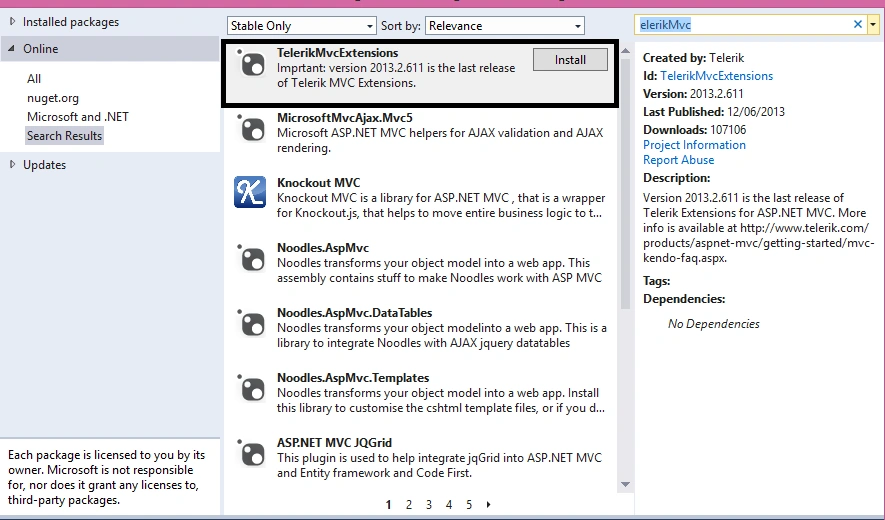
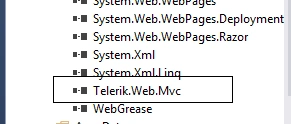
It will add the following dll and scripts into my project, as follow.
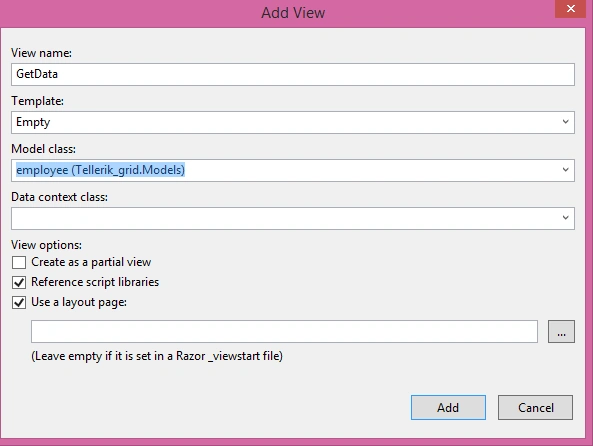
Now, I will add an Employee model, as shown below.
- using System;
- using System.Collections.Generic;
- using System.Linq;
- using System.Web;
- namespace Tellerik_grid.Models
- {
- public class employee
- {
- public int Id { get; set; }
- public string FirstName { get; set; }
- public string LastName { get; set; }
- public string Email { get; set; }
- public int EmployeeId { get; set; }
- public string MobileNo { get; set; }
- public string State { get; set; }
- public string Country { get; set; }
- }
- }
Now, I will go to Home Controller and add an action method in it.
- public class HomeController : Controller
- {
- public ActionResult Index()
- {
- return View();
- }
- public ActionResult GetData()
- {
- List<employee> li = new List<employee>();
- CodeXEntities CX = new CodeXEntities();
- var det = CX.tbl_employee;
- foreach(var x in det)
- {
- employee emp = new employee();
- emp.Id = x.id;
- emp.FirstName = x.firstName;
- emp.LastName = x.LastName;
- emp.MobileNo = x.MobileNo;
- emp.State = x.State;
- emp.Country = x.Country;
- emp.Email = x.Email;
- emp.EmployeeId =Convert.ToInt32(x.EmployeeId);
- li.Add(emp);
- }
- return View(li);
- }
Now, here is my View where I have bound the controller data in Telerik Grid.
- @model IEnumerable<Tellerik_grid.Models.employee>
- @using Telerik.Web.Mvc.UI;
- @{
- ViewBag.Title = "GetData";
- }
- </br>
- <div>
- @{
- Html.Telerik().Grid(Model)
- .Name("Grid")
- .DataKeys(keys => keys.Add(c => c.Id))
- .Footer(true)
- .Sortable()
- .Filterable()
- .Scrollable(scr => scr.Height(330))
- .Columns(x =>
- {
- x.Bound(m => m.Id).Width(120).HeaderTemplate("UserId").Title("User ID").Groupable(false);
- x.Bound(m => m.FirstName).Width(120).Groupable(false).Filterable(true).Groupable(true);
- x.Bound(m => m.LastName).Width(120).Groupable(true).Filterable(true).Groupable(true);
- x.Bound(m => m.MobileNo).Width(120).HeaderTemplate("UserId").Filterable(true);
- x.Bound(m => m.Email).Width(120).Groupable(false).Filterable(true);
- x.Bound(m => m.State).Width(120).Groupable(true).Filterable(true);
- x.Bound(m => m.Country).Width(120).Groupable(false).Filterable(true);
- })
- .Pageable(x => x.PageSize(10))
- .Render();
- @(Html.Telerik().StyleSheetRegistrar().DefaultGroup(group => group.Add("telerik.common.css").Add("telerik.windows7.css").Add("telerik.hay.min.css").Combined(true).Compress(true)))
- @(Html.Telerik().ScriptRegistrar())
- }
- </div>
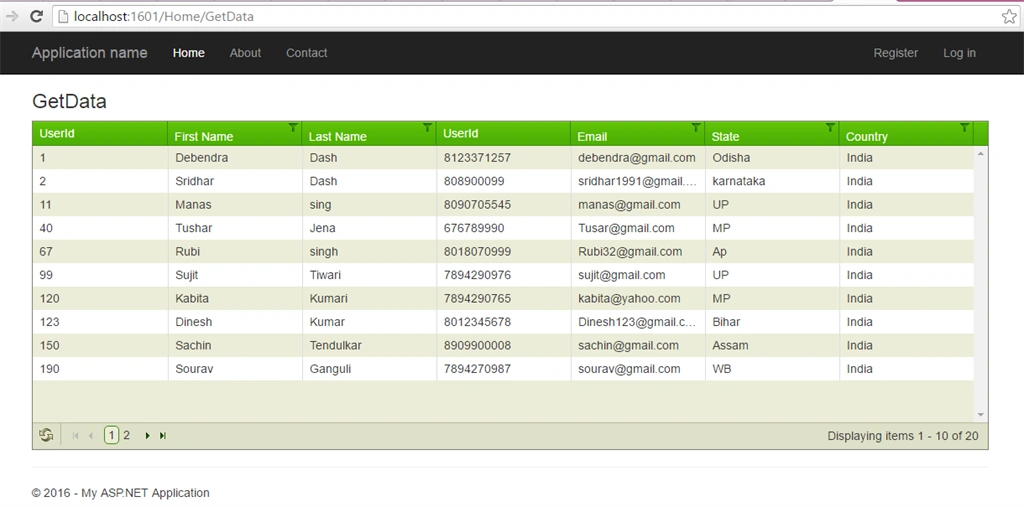
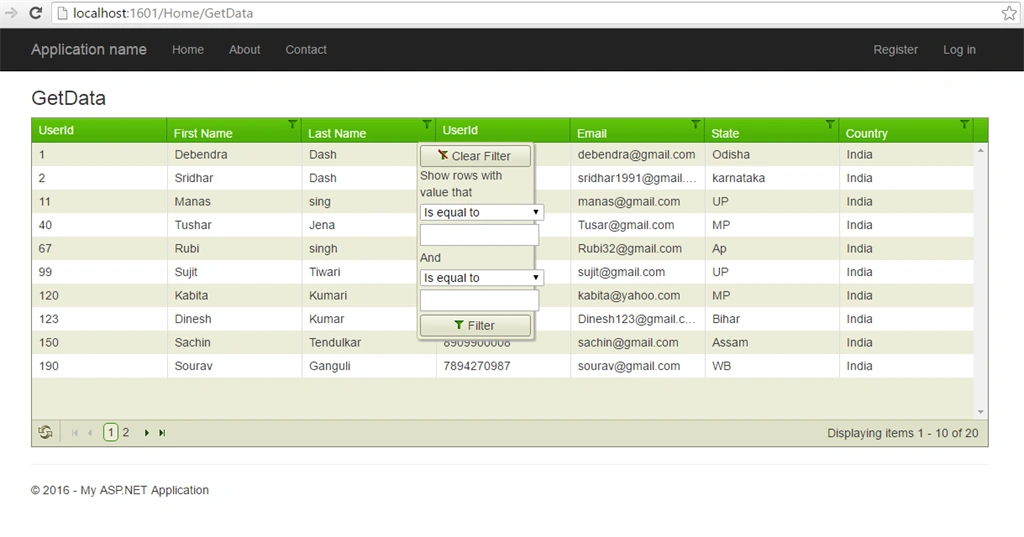
As we have defined filterable, it will filter the data, as shown below:
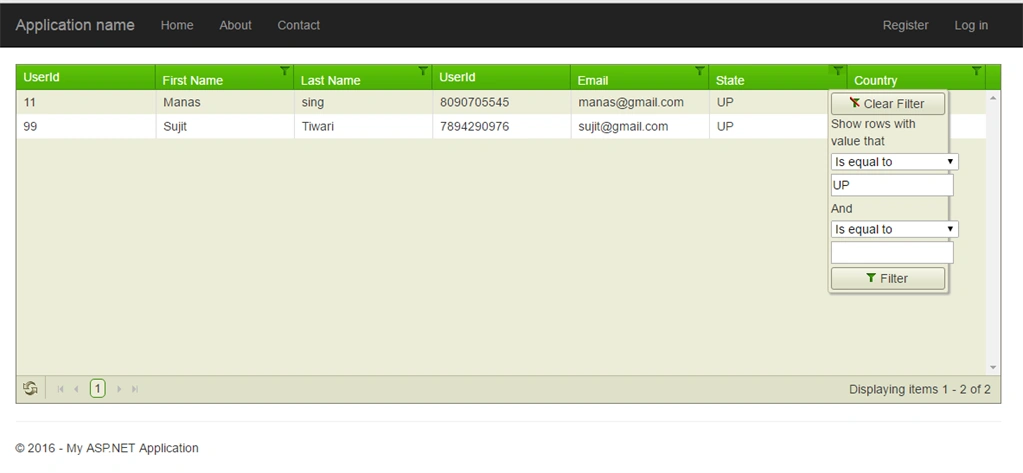
Now, if you want to filter, it will filter it.
NOTE: The Telerik Grid contains various properties, like -
- HeaderTemplate: This is the string which will appear in the header of the Grid.
- Name: We can say it's the Id of the Telerik Grid.
- Footer: This is a boolean property. True indicates that we need a footer.
- Filterable: By using this property, the filter option in the Grid is enabled.
- Pageable: Used for enabling the paging where you have to give the page size.
- @(Html.Telerik().StyleSheetRegistrar().DefaultGroup(group => group.Add("telerik.common.css").Add("telerik.windows7.css").Add("telerik.hay.min.css").Combined(true).Compress(true)))
- @(Html.Telerik().ScriptRegistrar())
Piyush MahurkarPosted Aug 2, 2016, 2:07 AM
Nice and simple
Vignesh ManiPosted Aug 1, 2016, 7:04 AM
NIce one
Ravi KandelPosted Aug 1, 2016, 7:04 AM
Nice
kalu singh raoPosted Aug 1, 2016, 1:32 AM
Nice share
Bhavik PatelPosted Jul 31, 2016, 11:27 PM
Nice