

Introduction
Xamarin is a Microsoft-owned San Francisco, California based software company founded in May 2011. Xamarin helps in creating cross-platform mobile applications. Here, in this tutorial, we will focus on the following things.
Xamarin is a Microsoft-owned San Francisco, California based software company founded in May 2011. Xamarin helps in creating cross-platform mobile applications. Here, in this tutorial, we will focus on the following things.
- Creating a simple registration form.
- Connecting to the SQLite database.
- Using SQLite to save the data from UI.
- Retrieving and showing data using a ListView in the UI.
To work with Xamarin, you need to install Xamarin Components on your machine. There are mainly two editors to work with Xamarin (Visual Studio and Xamrin Studio). For this demo, I have chosen Visual Studio 2017.
Let us get started with designing a form like this.
Let us get started with designing a form like this.
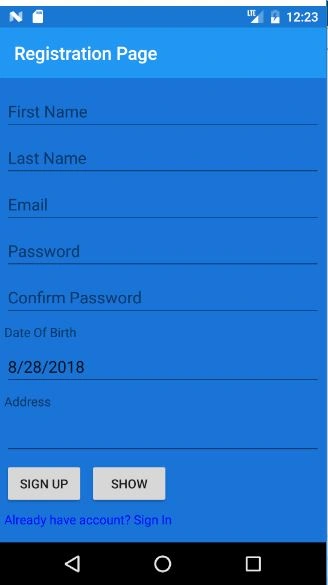
We have used 4 types of controls to design the form. Let's learn each of them.
Entry
The Xamarin.Forms Entry is used for single-line text input. It exposes a text property. This property can be used to set and read the text presented by the entry.
The Xamarin.Forms Entry is used for single-line text input. It exposes a text property. This property can be used to set and read the text presented by the entry.
- <Entry x:Name="FirstName" Placeholder="First Name"></Entry>
- <Entry x:Name="Password" Placeholder="Password" IsPassword="True"></Entry>
To input a date into an Android application, the Xamrin provides the DatePicker widget and the DatePickerDialog. The DatePicker allows users to select the year, month, and day in a consistent interface across devices and applications.
- <DatePicker x:Name="DOB"></DatePicker>
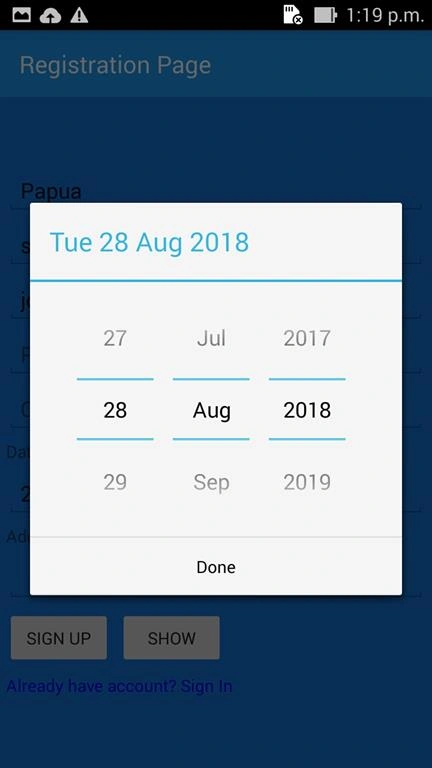
Now, here is the full code for designing the Registration View.
- <?xml version="1.0" encoding="utf-8" ?>
- <ContentPage xmlns="http://xamarin.com/schemas/2014/forms"
- xmlns:x="http://schemas.microsoft.com/winfx/2009/xaml"
- xmlns:local="clr-namespace:SqliteReg"
- x:Class="SqliteReg.MainPage" BackgroundColor="#1A73D7" Title="Registration Page">
- <StackLayout VerticalOptions="CenterAndExpand" Padding="5">
- <Entry x:Name="FirstName" Placeholder="First Name" ></Entry>
- <Entry x:Name="LastName" Placeholder="Last Name"></Entry>
- <Entry Keyboard="Chat" />
- <Entry x:Name="Email" Placeholder="Email"></Entry>
- <Entry x:Name="Password" Placeholder="Password" IsPassword="True"></Entry>
- <Entry Placeholder="Confirm Password" IsPassword="True"></Entry>
- <Label Text="Date Of Birth"></Label>
- <DatePicker x:Name="DOB"></DatePicker>
- <Label Text="Address"></Label>
- <Editor x:Name="Address"></Editor>
- <StackLayout Orientation="Horizontal">
- <Button Text="Sign Up" Clicked="Signed_Clicked"></Button>
- <Button Text="show" Clicked="Show_Clicked"></Button>
- </StackLayout>
- <Label Text="Already have account? Sign In" TextColor="Blue"></Label>
- </StackLayout>
- </ContentPage>
Now, let's start learning how to work with the SQLite Database.
SQLite is an open source and relational database management system contained in a C programming library.
In contrast to many other database management systems, SQLite is not a client server database engine this is mainly used as a local storage program and the data will be saved and retrieved within the mobile device. SQLite is a popular choice for embedded database software for local/client storage in application software such as web browsers. This mainly uses C/C++ API to communicate with other 3rd party devices.
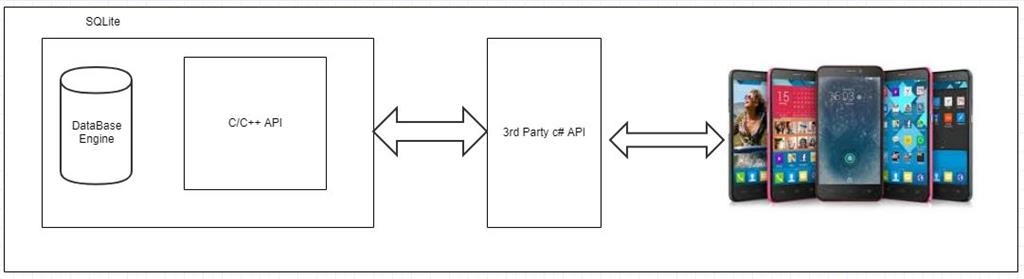
To use in Xamrin, we need to use the following references in our project.
In contrast to many other database management systems, SQLite is not a client server database engine this is mainly used as a local storage program and the data will be saved and retrieved within the mobile device. SQLite is a popular choice for embedded database software for local/client storage in application software such as web browsers. This mainly uses C/C++ API to communicate with other 3rd party devices.
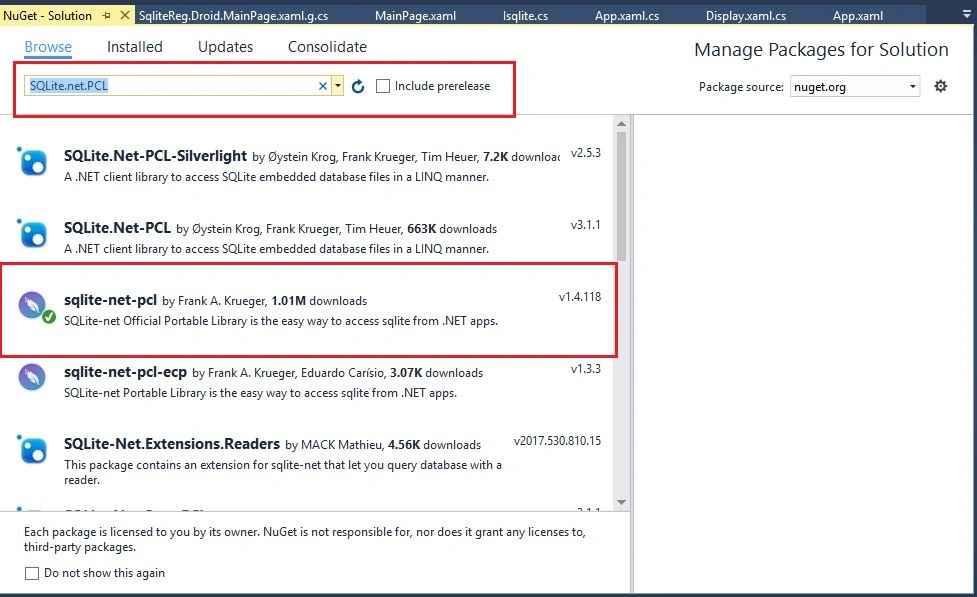
To use in Xamrin, we need to use the following references in our project.
This SQL.Net-PCL.dll does the following things.
- Gives support to define the data entity.
- Helps in interacting with SQLite Engine synchronously or asynchronously.
For connecting with SQLite, we need the following steps.
Add the following statement to the C# files where data access is required.
- using SQLite;
The first step is to create an interface for ISQLite in your PCL with an abstract method returning SQLiteConnection.
Now, create a new SQliteDroid class which will be inherited from the interface Isqlite.
- using SQLite;
- using System;
- using System.Collections.Generic;
- using System.Text;
- namespace App7
- {
- public interface Isqlite
- {
- SQLiteConnection GetConnection();
- }
- }
- using System;
- using System.Collections.Generic;
- using System.Linq;
- using System.Text;
- using Android.App;
- using Android.Content;
- using Android.OS;
- using Android.Runtime;
- using Android.Views;
- using Android.Widget;
- using SQLite;
- using SQLitePCL;
- using System.IO;
- using Xamarin.Forms;
- using App7.Droid;
- [assembly:Dependency(typeof(SQliteDroid))]
- namespace App7.Droid
- {
- public class SQliteDroid : Isqlite
- {
- public SQLiteConnection GetConnection()
- {
- var dbase = "Mydatabase";
- var dbpath = System.Environment.GetFolderPath(System.Environment.SpecialFolder.ApplicationData);
- var path = Path.Combine(dbpath, dbase);
- var connection = new SQLiteConnection(path);
- return connection;
- }
- }
- }
- using System;
- using System.Collections.Generic;
- using System.Linq;
- using System.Text;
- using Android.App;
- using Android.Content;
- using Android.OS;
- using Android.Runtime;
- using Android.Views;
- using Android.Widget;
- using SQLite;
- namespace App7.Droid.Model
- {
- public class Registration
- {
- [PrimaryKey,AutoIncrement]
- public int id { get; set; }
- public string FirstName { get; set; }
- public string LastName { get; set; }
- public string Dob { get; set; }
- public string Email{ get; set; }
- public string Password { get; set; }
- public string Address { get; set; }
- }
- }
Here is the MainPage.cs where you have to call GetConnection via DependencyService.
Once you define the connection, just create the Database as the Model Name.
Once you define the connection, just create the Database as the Model Name.
- public partial class MainPage : ContentPage
- {
- public SQLiteConnection conn;
- public Registration regmodel;
- public MainPage()
- {
- InitializeComponent();
- conn = DependencyService.Get<Isqlite>().GetConnection();
- conn.CreateTable<Registration>();
- }
- private void Signed_Clicked(object sender, EventArgs e)
- {
- Registration reg = new Registration();
- reg.FirstName = FirstName.Text;
- reg.LastName = LastName.Text;
- reg.Dob = DOB.Date.ToString();
- reg.Email = Email.Text;
- reg.Password = Password.Text;
- reg.Address = Address.Text;
- int x=0;
- try
- {
- x = conn.Insert(reg);
- }
- catch(Exception ex)
- {
- throw ex;
- }
- if (x == 1)
- {
- DisplayAlert("Registration", "Thanks for Registration", "Cancel");
- }
- else
- {
- DisplayAlert("Registration Failled!!!", "Please try again", "ERROR");
- }
- }
Now, to implement the retrieval functionality, here is the code. We need to redirect to a specific page and perform the retrieval operation.
For this, add a new page and name it as mentioned below.
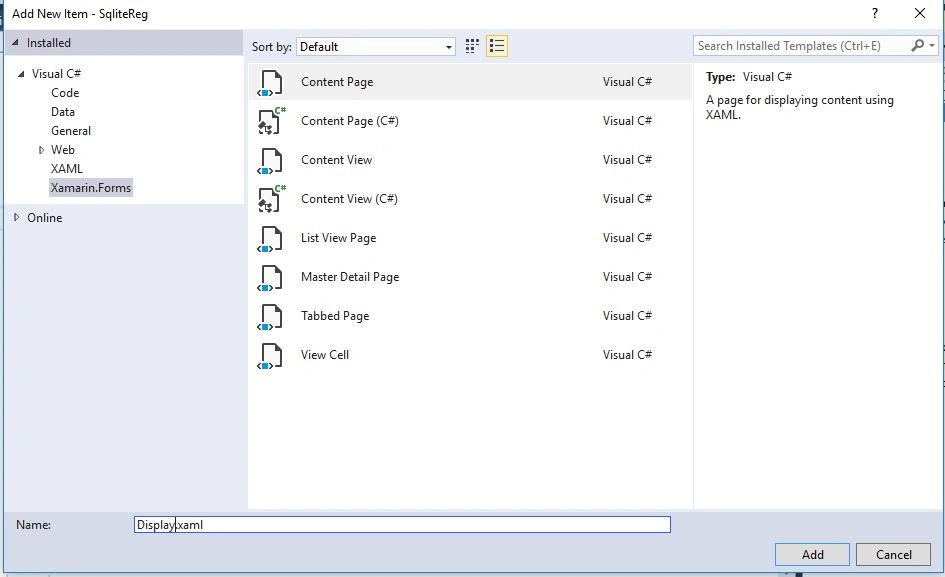
Here is the Show Button Click which will redirect to the Display page.
- private void Show_Clicked(object sender, EventArgs e)
- {
- try
- {
- Navigation.PushAsync(new Display());
- }
- catch(Exception ex)
- {
- throw ex;
- }
- }
- <?xml version="1.0" encoding="utf-8" ?>
- <ContentPage xmlns="http://xamarin.com/schemas/2014/forms"
- xmlns:x="http://schemas.microsoft.com/winfx/2009/xaml"
- x:Class="SqliteReg.Display">
- <ContentPage.Content>
- <StackLayout>
- <StackLayout Orientation="Horizontal">
- <ListView x:Name="myListView" HasUnevenRows="True" >
- <ListView.ItemTemplate>
- <DataTemplate>
- <TextCell Text="{Binding FirstName}" Detail="{Binding Address}"/>
- </DataTemplate>
- </ListView.ItemTemplate>
- </ListView>
- </StackLayout>
- </StackLayout>
- </ContentPage.Content>
- </ContentPage>
- using App7.Droid.Model;
- using System;
- using System.Collections.Generic;
- using System.Linq;
- using System.Text;
- using System.Threading.Tasks;
- using Xamarin.Forms;
- using Xamarin.Forms.Xaml;
- using SQLite;
- using App7;
- namespace SqliteReg
- {
- [XamlCompilation(XamlCompilationOptions.Compile)]
- public partial class Display : ContentPage
- {
- public SQLiteConnection conn;
- public Registration regmodel;
- public Display()
- {
- InitializeComponent();
- conn = DependencyService.Get<Isqlite>().GetConnection();
- conn.CreateTable<Registration>();
- DisplayDetails();
- }
- public void DisplayDetails()
- {
- var details = (from x in conn.Table<Registration>() select x).ToList();
- myListView.ItemsSource = details;
- }
- }
- }
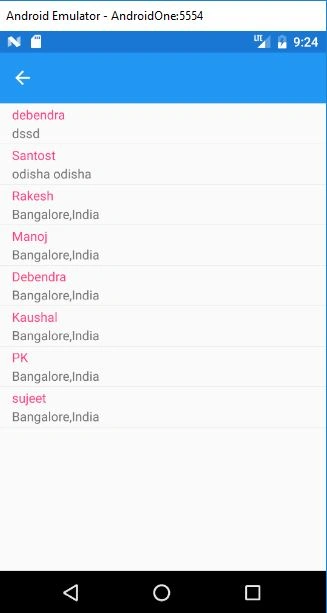
So, in this way, we can save and retrieve the data from the SQLite DB using Xamarin.Forms.
Conclusion
Hope this article will help all the new members who are learning Xamarin. If there is any doubt or any issue in understanding, please feel free to comment or write to me.
Conclusion
Hope this article will help all the new members who are learning Xamarin. If there is any doubt or any issue in understanding, please feel free to comment or write to me.
vijay tiwariPosted Dec 6, 2021, 5:10 PM
Hi, deb thanks for this code, please send me the source code in my email "[email protected]"
Man LokPosted Jan 17, 2020, 3:20 PM
I am developing an data collection cross platform app for both offline/online mode. so how can i put my offline collected data (using SQLite local database) to the server side database (any) automatically, when internet connection/network is available.Please suggest me.
Karina DíazPosted Jun 17, 2019, 10:01 AM
Hola como puedo hacer par consultar un usuario de la bd
Thành Phu?c Ph?mPosted May 6, 2019, 12:06 PM
@Debendra Dash please, share source code to [email protected], please
zeeshan akramPosted Oct 24, 2018, 12:47 PM
I am facing error Navigation.PushAsync(new Display());
Hadshana KamalanathanPosted Sep 7, 2018, 12:03 PM
Thanks for sharing....
Pratik ShirsePosted Aug 30, 2018, 1:01 AM
Good one article for beginner, where to store data store??