
Introduction
Hi guys. In this article we are going to understand the concept of PHP Expat
parser & XML DOM. First of all we need to know about XML. XML is used to
describe data and to focus on what data is. An XML file describes the structure
of the data. There are only user defined tags in XML.
XML Expat Parser with PHP
Here in this section we will understand the use of Xml Expat parser. To read
and update - create and manipulate - an XML document, for this purpose you
required an XML parser.
Two basic types of XML parsers
- Tree-based parser.
- Event-based parser.
Tree-based parser
This parser transforms an XML document into a tree structure. It analyzes the
whole document, and provides access to the tree elements. e.g. the Document
Object Model (DOM).
Event-based parser
Views an XML document as a series of events. When a specific event occurs, it
calls a function to handle it
Expat parser is an event-based parser
- Event-based parsers focus on the content of the XML documents
- Event-based parsers not focus on their structure.
- Event-based parsers can access data faster than tree-based parsers.
Lets have a concept with example
<from>Deepak</from>
Description of above tag
An event-based parser reports the XML above as a series of 3 events
- Start element: from
- Start CDATA section, value: Deepak
- Close element: from
Note : The XML Expat parser functions are part of the PHP core. There is no installation needed to use these functions.
XML File
<?xml
version="1.0"
encoding="ISO-8859-1"?>
<note>
<to>Prerna
kaul</to>
<from>Deepak
dwij</from>
<heading>Reminder</heading>
<body>Happy
new year 2012!</body>
</note>
Save it by xm.xml
PHP script for using the concept
<html>
<body
bgcolor="lightgreen">
<center>
<h4>
XML Expat Parser ! <h4>
<hr>
<?php
//Initialize the XML
parser
$parser=xml_parser_create();
//Function to use at
the start of an element
function
start($parser,$element_name,$element_attrs)
{
switch($element_name)
{
case
"NOTE":
echo
"-- Note --<br />";
break;
case
"TO":
echo
"To: ";
break;
case
"FROM":
echo
"From: ";
break;
case
"HEADING":
echo
"Heading: ";
break;
case
"BODY":
echo
"Message: ";
}
}
//Function to use at
the end of an element
function
stop($parser,$element_name)
{
echo
"<br />";
}
//Function to use when
finding character data
function
char($parser,$data)
{
echo
$data;
}
//Specify element
handler
xml_set_element_handler($parser,"start","stop");
//Specify data handler
xml_set_character_data_handler($parser,"char");
//Open XML file
$fp=fopen("xm.xml","r");
//Read data
while
($data=fread($fp,4096))
{
xml_parse($parser,$data,feof($fp)) or
die
(sprintf("XML
Error: %s at line %d",
xml_error_string(xml_get_error_code($parser)),
xml_get_current_line_number($parser)));
}
//Free the XML parser
xml_parser_free($parser);
?>
</center>
</body>
</html>
Save it by xmlp.php
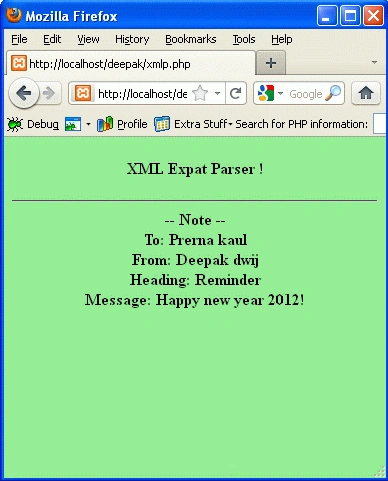
Output
To run the code, Open the XAMPP server and start the services like Apache and
MySQL. Open the browser type: http://localhost/yourfoldername/xmlp.php
XML DOM with PHP
In this section we are going a have XML DOM concept. The concept is based on the
built-in DOM parser that makes it possible to process XML documents in PHP.
Lets have a meaning of DOM in brief.
DOM provides a standard set of objects for HTML and XML documents, and a
standard interface for accessing and manipulating them. DOM is separated
into different parts (Core, XML, and HTML) and different DOM Levels.
- Core DOM - defines a standard set of objects for any structured document.
- XML DOM - defines a standard set of objects for XML documents.
- HTML DOM - defines a standard set of objects for HTML documents.
PHP script for the DOM concept
<html>
<body
bgcolor="lightgreen">
<center>
<h4>
PHP XML DOM ! <h4>
<hr>
<?php
$xmlDoc =
new
DOMDocument();
$xmlDoc->load("xm.xml");
print
$xmlDoc->saveXML();
?>
</center>
</body>
</html>
Save it as dom.php.
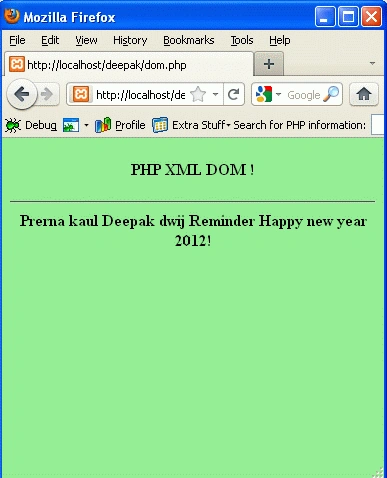
Output
To run the code, Open the XAMPP server and start the services like Apache and
MySQL. Open the browser type: http://localhost/yourfoldername/dom.php
Thanks !
Vikas MishraPosted Jan 4, 2012, 10:39 AM
Hi Mike you explained in a very nice way. Thanks for sharing.....