

Introduction
This article explains JavaScript native timers. We will see how to work with these timers. This article covers the following timer methods:
- Set Interval
- Clear Interval
- Set Timeout
- Clear Timeout
Of the above four methods, only two are used for setting the timers and the other two are used for canceling their effect.
How timers work?
To understand how timers work we need to understand how JavaScript works.
- JavaScript is single-threaded. (Strictly speaking it is not!)
- It executes synchronously, which is line-by-line.
- JavaScript maintains an execution queue and processes each item in a First In First Out (FIFO) order.
- The execution queue contains various methods or code snippets to be executed.
- All the events of JavaScript work asynchronously. In other words, when we perform a click its handler is not executed immediately. The execution of the click handler depends upon its order in the event queue. How the event queue is maintained is a pat of the implementation and all browsers have various ways of managing this event queue.
- What timers do basically is they push the functions in an execution queue.
- If the browser is free for executing the module then it executes the function otherwise it remains in a queue.
- Set interval and Set timeout behave differently with the execution queue.
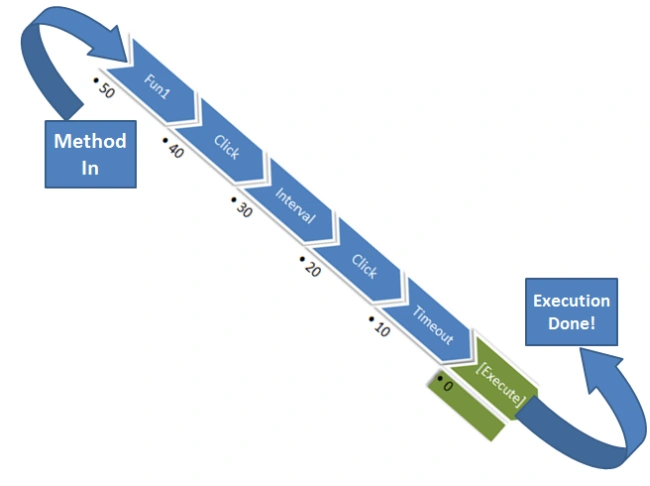
- Each time any new function wants to execute it is placed in a queue and upon its completion it is removed from the queue.
Just look at the following image to get a better understanding:
Using Set Timeout
Set timeout is used for executing a specific code snippet or function after a specific amount of delay.
Syntax
- var timeoutID = window.setTimeout(func, delay, [param1, param2, ...]); var timeoutID = window.setTimeout(code, delay);
- timeoutID is a unique id that can be used to cancel the timer using "clear timeout".
- func is a function to be executed after a specific amount of time.
- delay is the time after which the function is to be called.
An important note is that this function assures a minimum amount of delay of the amount given in the parameter but the actual delay may be greater depending on the status of the execution queue.
Using Clear Timeout
Clear timeout is used for canceling the effect of the "setTimeout()" method. This method cancels the scheduled call of the snippet scheduled by "setTimeout()".
Syntax
- window.clearTimeout(timeoutID)
timeoutID is the same id generated by "setTimeout()".
This id helps in canceling the specific timeout method call.
Using Set Interval
This function precedes "setTimeout()" to provide a repeated call of a specific code snippet after some interval.
Syntax
- var intervalID = window.setInterval(func, delay[, param1, param2, ...]); var intervalID = window.setInterval(code, delay);
- intervalID is a unique id that can be used to cancel the timer using "clearInterval()".
- func is a function to be executed repeatedly after a specific amount of time.
- delay is the interval between successive function calls.
As with "setTimeout()", "setInterval()" assures a minimum delay but the actual delay depends on the execution queue.
The minimum value of delay that the user can use is 4 milliseconds.
In an execution queue it's not possible for two interval calls to be adjacent. Until a last interval call in the queue is processed all the remaining interval calls are dropped from being queued in the execution queue.
Using Clear Interval
Clear interval is used for canceling the effect of "setInterval()". This method stops the "setInterval()" timer but it has no effect on calls that are already in the execution queue.
Syntax
- window.clearInterval(intervalID)
intervalID is an identifier of the repeated action to be canceled. It is generated by the "setInterval()" method.
Examples
Set Timeout with Clear Timeout
- $(document).ready(function(){
- var doFun1=function(){
- console.log("doFun1 is done!");
- clearTimeout(intervalID2);
- console.log("doFun2 is canceled!");
- };
- var doFun2=function(){
- console.log("doFun2 is done!");
- };
- var intervalID1 = window.setTimeout(doFun1, 1000);
- var intervalID2 = window.setTimeout(doFun2, 1200);
- });
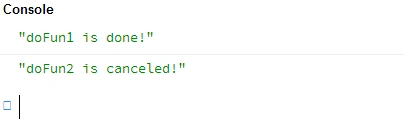
Output
Set Interval with Clear Interval
- $(document).ready(function(){
- var fun=2;
- var doFun1=function(){
- console.log("fun is increased by "+fun+++ " times");
- if(fun>7){
- clearInterval(intervalID1);
- console.log("No more fun please!");
- }
- };
- var doFun2=function(){
- console.log("doFun2 is done!");
- };
- var intervalID1 = window.setInterval(doFun1, 1000);
- });
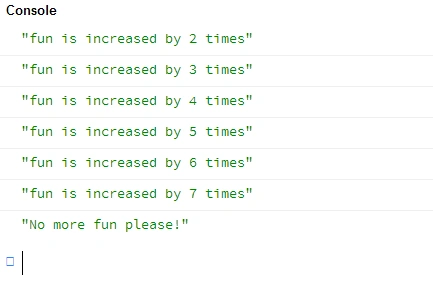
Output
Summary
That's all for this article. The concept is a bit tricky but it must be understood for every JavaScripter. I hope you have found this article useful and enjoyed reading it. In case of any questions feel free to ask your questions in the comment section.
Join the conversation! Your thoughts help the community grow.