

Before reading this article, please go through the article links given below.
- Quick Start On Apache Cordova Using Visual Studio 2015
- Using Ionic Blank App Using Visual Studio 2015
- Using Ionic Side Menu App Using Visual Studio 2015
- Using Ionic Tabs App Using Visual Studio 2015
- Working With Color Classes In Ionic Blank App Using Visual Studio 2015
- Working With Button Class In Ionic Blank App Using Visual Studio 2015
- Working With Ionic List Item Class In Ionic Blank App using Visual Studio 2015
Apache Cordova
Apache Cordova is an open source project that aims at letting mobile developers build applications for all major mobile platforms, using HTML, CSS and JavaScript technologies.
Ionic Framework
Ionic is a powerful HTML5 SDK that helps you build native-feeling mobile apps using web technologies. like HTML, CSS, and JavaScript.
Building Ionic Blank App with different Toggle Classes in Visual Studio 2015
Let's see how Ionic Framework makes the use of Toggle class with different Styles.
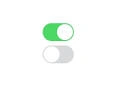
A toggle button allows the user to change a setting between two states. It displays checked/unchecked states as a button. It is basically an on/off button with a light indicator.
It is beneficial if the user has to change the setting between two states. It can be used to On/Off Sound, Wi-Fi, Bluetooth etc.
Prerequisites
- Visual Studio 2015
- Visual Studio Tools for Apache Cordova
Follow the below steps.
Step 1 Create an Ionic Blank app
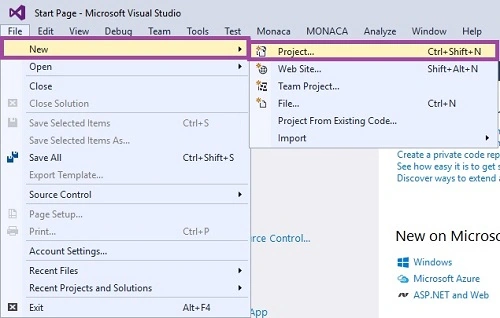
Let’s get started with creating New Project. Open Visual Studio 2015 and click File -> New -> Project option for creating Ionic Blank apps using Ionic Framework.
Step 2 Giving the Project Name
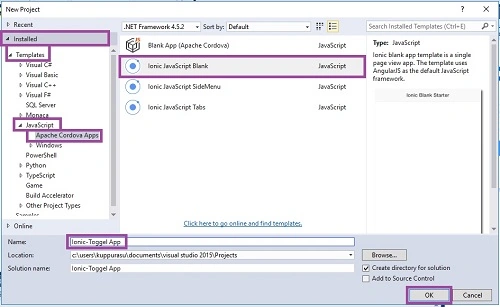
Then, New Project window will open. There, you can select an Installed -> Template -> Java Script -> Apache Cordova Apps -> Ionic JavaScript Blank.
Type project name as Ionic-Toggle app and click the OK button.
Step 3 Main Screen
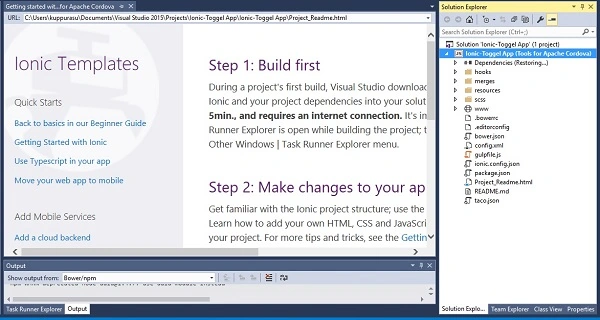
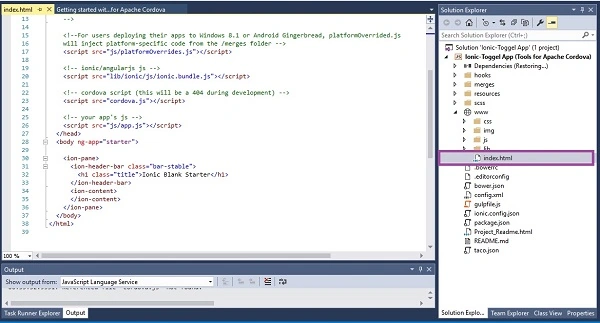
Go to the Solution bar and choose the index.html. This is the starting screen of your app. We can add our HTML coding here.
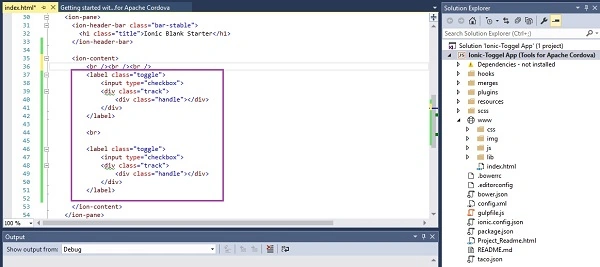
Toggle can be implemented using two Ionic classes. We need to create label and assign toggle class to it. Track class will add background styling to our checkbox and color will change when toggle is tapped. Handle class is used to add circle button to it.
- Creating the Ionic Toggle
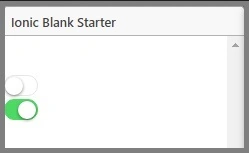
In HTML, we use input tag and Toggle Class for using Toggle button.
Coding- <label class="toggle">
- <input type="checkbox">
- <div class="track">
- <div class="handle"></div>
- </div>
- </label>
- <br>
- <label class="toggle">
- <input type="checkbox">
- <div class="track">
- <div class="handle"></div>
- </div>
- </label>
- Creating Multiple Ionic Toggle button
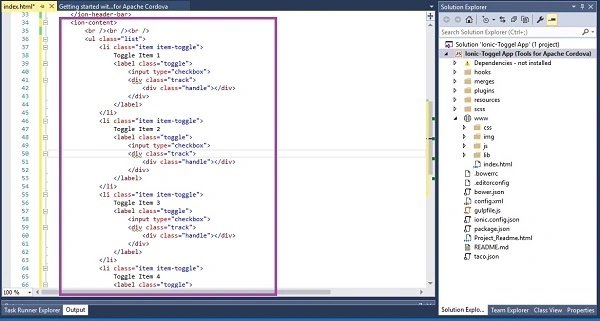
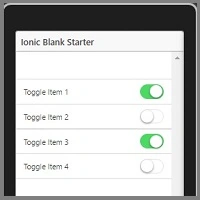
We can add multiple Ionic toggle buttons using the Item Class. With the help of Item class, we make item list for each and every toggle button.
Coding- <ul class="list">
- <li class="item item-toggle">
- Toggle Item 1
- <label class="toggle">
- <input type="checkbox">
- <div class="track">
- <div class="handle"></div>
- </div>
- </label>
- </li>
- <li class="item item-toggle">
- Toggle Item 2
- <label class="toggle">
- <input type="checkbox">
- <div class="track">
- <div class="handle"></div>
- </div>
- </label>
- </li>
- <li class="item item-toggle">
- Toggle Item 3
- <label class="toggle">
- <input type="checkbox">
- <div class="track">
- <div class="handle"></div>
- </div>
- </label>
- </li>
- <li class="item item-toggle">
- Toggle Item 4
- <label class="toggle">
- <input type="checkbox">
- <div class="track">
- <div class="handle"></div>
- </div>
- </label>
- </li>
- </ul>
- Adding Color to the Ionic Toggle Button
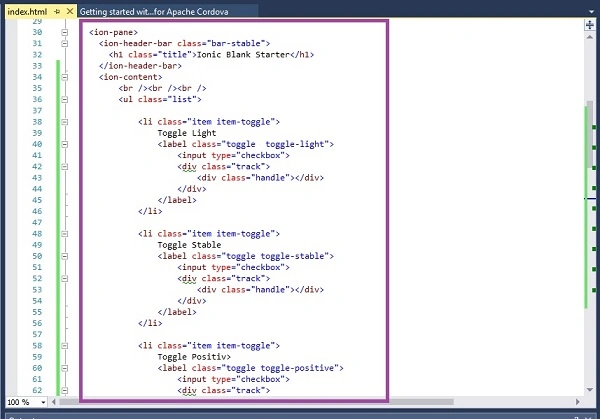
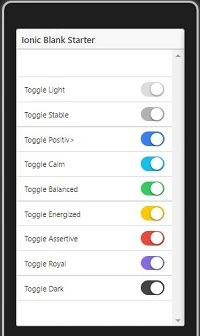
We can also use the color class for each element. For example, here we apply the color class to the Ionic Toggle element. Ionic framework gives us set of nine predefined color classes. You can use these colors or you can override it with your own styling. The following list shows default set of 9 colors provided by Ionic.
Coding- <ul class="list">
- <li class="item item-toggle">
- Toggle Light
- <label class="toggle toggle-light">
- <input type="checkbox">
- <div class="track">
- <div class="handle"></div>
- </div>
- </label>
- </li>
- <li class="item item-toggle">
- Toggle Stable
- <label class="toggle toggle-stable">
- <input type="checkbox">
- <div class="track">
- <div class="handle"></div>
- </div>
- </label>
- </li>
- <li class="item item-toggle">
- Toggle Positiv>
- <label class="toggle toggle-positive">
- <input type="checkbox">
- <div class="track">
- <div class="handle"></div>
- </div>
- </label>
- </li>
- <li class="item item-toggle">
- Toggle Calm
- <label class="toggle toggle-calm">
- <input type="checkbox">
- <div class="track">
- <div class="handle"></div>
- </div>
- </label>
- </li>
- <li class="item item-toggle">
- Toggle Balanced
- <label class="toggle toggle-balanced">
- <input type="checkbox">
- <div class="track">
- <div class="handle"></div>
- </div>
- </label>
- </li>
- <li class="item item-toggle">
- Toggle Energized
- <label class="toggle toggle-energized">
- <input type="checkbox">
- <div class="track">
- <div class="handle"></div>
- </div>
- </label>
- </li>
- <li class="item item-toggle">
- Toggle Assertive
- <label class="toggle toggle-assertive">
- <input type="checkbox">
- <div class="track">
- <div class="handle"></div>
- </div>
- </label>
- </li>
- <li class="item item-toggle">
- Toggle Royal
- <label class="toggle toggle-royal">
- <input type="checkbox">
- <div class="track">
- <div class="handle"></div>
- </div>
- </label>
- </li>
- <li class="item item-toggle">
- Toggle Dark
- <label class="toggle toggle-dark">
- <input type="checkbox">
- <div class="track">
- <div class="handle"></div>
- </div>
- </label>
- </li>
- </ul>
Now, we are ready to run our Project. So, click the Ripple – Nexus (Galaxy) for running the application (Apache Ripple is a free mobile simulator).

Output Main Screen
Output 1 After Mutiple Ionic Toggle button control
Output 2 With Color Classes
Conclusion
I hope you understood how to use the Ionic Toggle classes in the Ionic blank app, using Visual Studio 2015 and how to run it.
manikandan PalanisamyPosted Aug 15, 2019, 8:13 PM
nice article thank for your sharing knowledge do well
Vijay GuptaPosted Dec 3, 2017, 1:28 AM
Can we do this ionic program in visual studio 2010
Anu VPosted Nov 23, 2016, 11:20 PM
Nice article.. Thanks for sharing.