

Introduction
Menus are a common user interface component in many types of applications which are used to provide a familiar and consistent user experience.
A context menu is a floating menu that appears when the user performs a long-click on an element. It provides actions that affect the selected content or context frame.
It can also be used for navigation in your application.
To work with Context Menu lets create a new Xamarin Cross-platform application as follows.
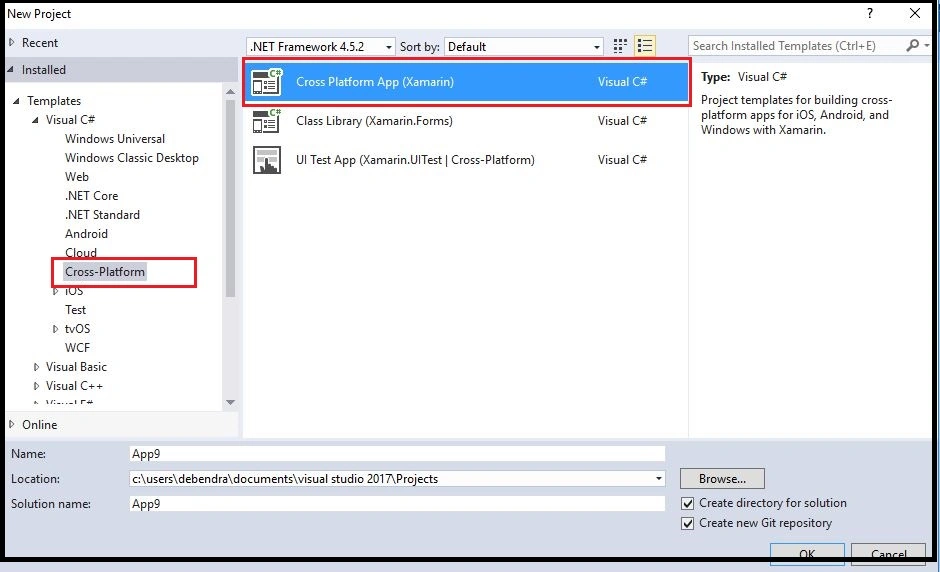
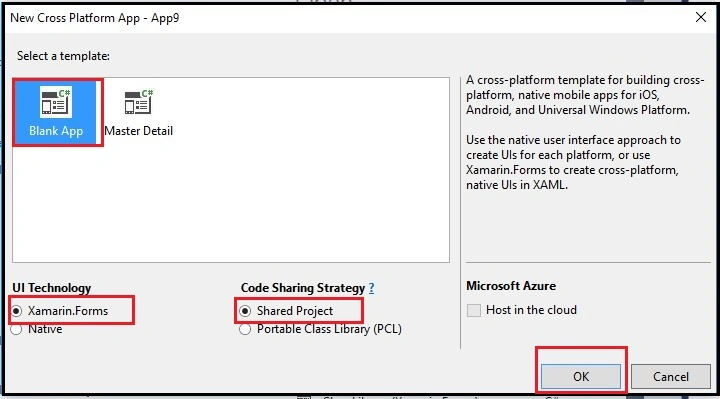
Now, select the Blank App Template and other options as shown in the below picture.
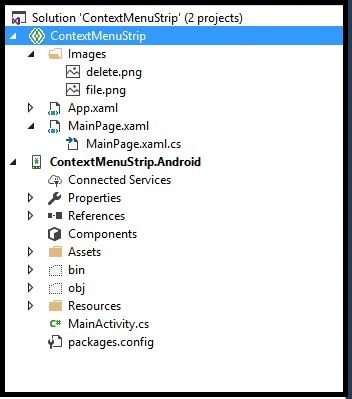
Basically, I have designed this tutorial for Android Application, so I have deleted the IOS project from the Solution Explorer. Here, is the Solution Explorer as shown below.
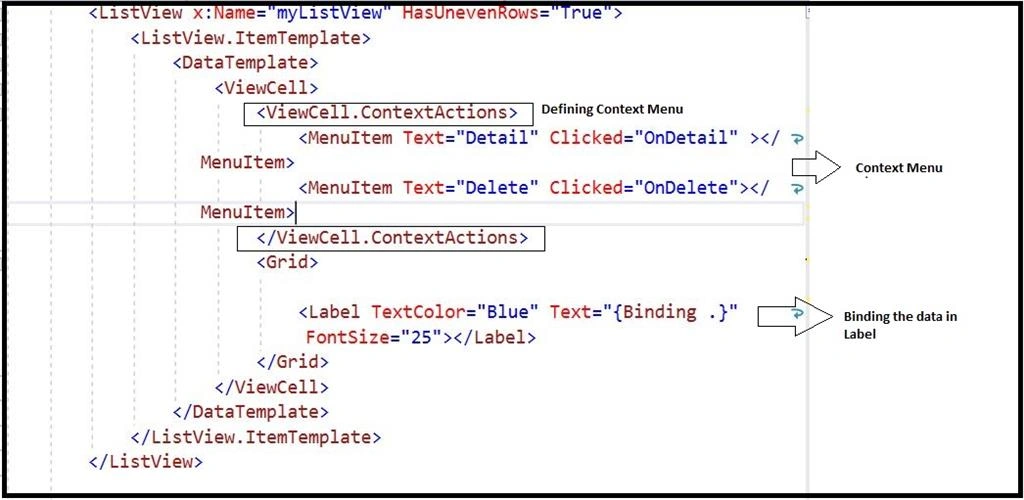
Now, in MainPage.Xaml add a ListView to bind some data and create a context menu as follows.
- <?xml version="1.0" encoding="utf-8" ?>
- <ContentPage xmlns="http://xamarin.com/schemas/2014/forms"
- xmlns:x="http://schemas.microsoft.com/winfx/2009/xaml"
- xmlns:local="clr-namespace:ContextMenuStrip"
- x:Class="ContextMenuStrip.MainPage" BackgroundColor="#AED6F1">
- <Label Text="Welcome to Xamarin Forms!"
- VerticalOptions="Center"
- HorizontalOptions="Center" />
- <StackLayout>
- <Label Text="Email Details" FontSize="30" TextColor="#1C2833"></Label>
- <ListView x:Name="myListView" HasUnevenRows="True">
- <ListView.ItemTemplate>
- <DataTemplate>
- <ViewCell>
- <ViewCell.ContextActions>
- <MenuItem Text="Detail" Clicked="OnDetail" ></MenuItem>
- <MenuItem Text="Delete" Clicked="OnDelete"></MenuItem>
- </ViewCell.ContextActions>
- <Grid>
- <Label TextColor="Blue" Text="{Binding .}" FontSize="25"></Label>
- </Grid>
- </ViewCell>
- </DataTemplate>
- </ListView.ItemTemplate>
- </ListView>
- </StackLayout>
- <!--Popup view-->
- </ContentPage>
Here is the Model for the Data.
- public class EmployeeDet
- {
- public string EmailId { get; set; }
- public string FirstName { get; set; }
- public string LastName { get; set; }
- public string Address { get; set; }
- }
Now, here is the .cs code for Binding the data in the List View.
- public static List<EmployeeDet> Details()
- {
- List<EmployeeDet> Li = new List<EmployeeDet>();
- Li.Add(new EmployeeDet { EmailId = "[email protected]", FirstName = "Debendra", LastName = "Dash", Address = "Bangalore India" });
- Li.Add(new EmployeeDet { EmailId = "[email protected]", FirstName = "Sujit", LastName = "Tiwari", Address = "WhitField,Bangalore,India" });
- Li.Add(new EmployeeDet { EmailId = "[email protected]", FirstName = "OmPrakash", LastName = "Dash", Address = "BTM LayOut,Bangalore, India" });
- Li.Add(new EmployeeDet { EmailId = "[email protected]", FirstName = "Naresh Yadav", LastName = "Dash", Address = "BTM LayOut,Bangalore, India" });
- Li.Add(new EmployeeDet { EmailId = "[email protected]", FirstName = "Sneha hudge", LastName = "Dash", Address = "Marathalli,Bangalore, India" });
- Li.Add(new EmployeeDet { EmailId = "[email protected]", FirstName = "Mohmadd", LastName = "Dash", Address = "Electronic City,Bangalore, India" });
- Li.Add(new EmployeeDet { EmailId = "[email protected]", FirstName = "Harish Rawat", LastName = "Dash", Address = "BTM LayOut,Bangalore, India" });
- return Li;
- }
- public void BindData()
- {
- var details = MainPage.Details().Where(p => p.FirstName != null);
- lielements = new List<string>();
- foreach (var x in details)
- {
- lielements.Add(x.EmailId);
- }
- myListView.ItemsSource = lielements;
- }
- public partial class MainPage : ContentPage
- {
- List<string> lielements;
- public static List<string> deletedli = new List<string>();
- public MainPage()
- {
- InitializeComponent();
- BindData();
- }

This is how the Context menu appears on a long keypress on any item of the List.
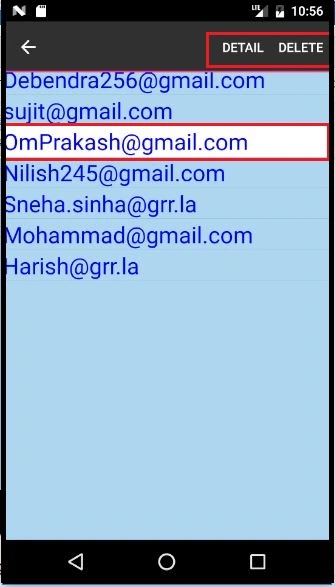
So, here the 2 context menu appears in the app.
Now, let us perform some operation while clicking on any context menu. Let us click on Detail menu to see the details.
Now, let us perform some operation while clicking on any context menu. Let us click on Detail menu to see the details.
- private void OnDetail(object sender, EventArgs e)
- {
- var menuitem = sender as MenuItem;
- if (menuitem != null)
- {
- string name = menuitem.BindingContext as string;
- var details = MainPage.Details().Where(p => p.EmailId == name).FirstOrDefault();
- DisplayAlert("Details", "Name:" + details.FirstName + "\n" + "Adress:" + details.Address + "\n" + "Email:" + details.EmailId, "Cancel");
- }
- }
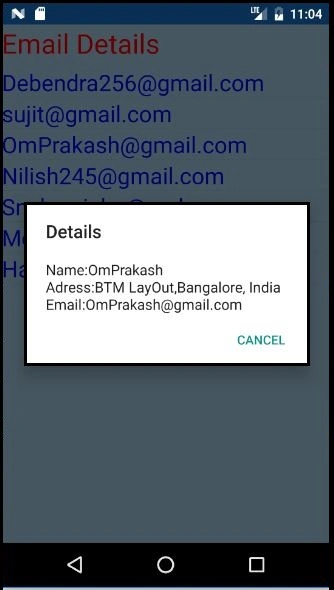
Now, just implement the Delete menu logic to temporarily remove the list.
- private async void OnDelete(object sender, EventArgs e)
- {
- var result = await this.DisplayAlert("Alert!", "Do you really want to Delete?", "Yes", "No");
- if (result)
- {
- var menuitem = sender as MenuItem;
- string name = menuitem.BindingContext as string;
- RefreshList(name);
- }
- else
- {
- }
- }
- public void RefreshList(string name)
- {
- deletedli.Add(name);
- var details = MainPage.Details().ToList();
- lielements = new List<string>();
- foreach (var x in details)
- {
- lielements.Add(x.EmailId);
- }
- foreach (var x in deletedli)
- {
- lielements.Remove(x);
- }
- myListView.ItemsSource = null;
- myListView.ItemsSource = lielements;
- }
- public partial class MainPage : ContentPage
- {
- List<string> lielements;
- public static List<string> deletedli = new List<string>();
- public MainPage()
- {
- InitializeComponent();
- BindData();
- }
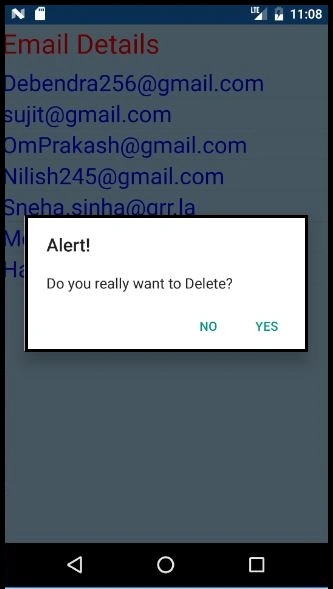
Once you click on yes it will delete the following list.
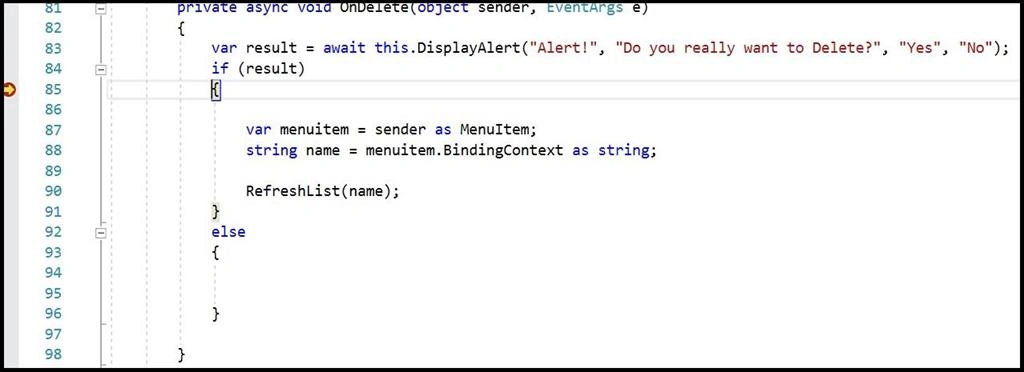
And finally, the item will be temporarily removed from the list and shows as below.

Conclusion
So, in this way we can implement Context Menu in Xamarin forms applications.
So, in this way we can implement Context Menu in Xamarin forms applications.
Fabrice TayouPosted Nov 13, 2019, 6:27 AM
Why not using an ObservableCollection<T> instead of List<T> ?
Gudelli PoojithaPosted Sep 18, 2019, 5:11 AM
How to change white color into some other color on long press.
Matteo PiccioniPosted Sep 17, 2018, 7:28 AM
ContextMenu for Android is really unattractive, and also Android user used to use 'swipe to del' row, like iOS. I hope in a tutorial that show how to implement ios-like context menu into Android
Hadshana KamalanathanPosted Sep 3, 2018, 1:31 PM
Nice article thank you for sharing...
Hadshana KamalanathanPosted Sep 3, 2018, 1:31 PM
Nice article thank you for sharing...
Hadshana KamalanathanPosted Sep 3, 2018, 1:30 PM
Nice article thank you for sharing...