

Introduction
In this article, we discuss the Collection Framework in Java and start working with the ArrayList class.
Collection Framework
The Collection Framework provides an architecture to manipulate and store a group of objects. It is a set of classes and interfaces that implement commonly reusable collection data structures. Every operation performed on the data, like sorting, searching, insertion, deletion, etcetera can be done by the Java Collection Framework.
The Collection Framework was designed to meet the following goals:
- It allows various types of data types to work in a similar manner.
- It is easy to adapt or extend a group of data.
- It provides a high rate of performance.
Collection
It represents a single unit of objects.
Framework
The Framework:
- represents the set of classes and interfaces.
- is optional in nature.
- provides a specified architecture.
Collection Framework
The Collection Framework represents a predefined architecture for storing and manipulating the group of objects.
It has:
- Interfaces and it implements, in other words, classes
- Algorithms
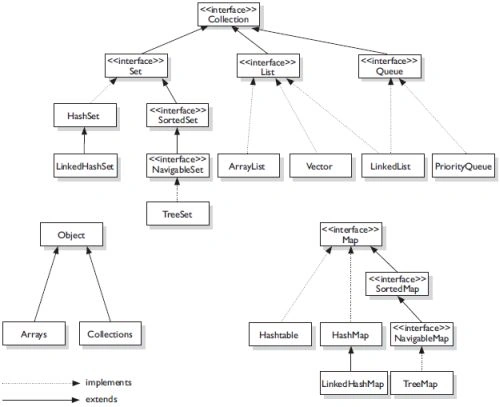
Hierarchy of Collection Framework
Let us see the hierarchy of the Collection Framework.
Some commonly used public methods are:
- boolean remove (Object element)
- used to delete an element from this collection.
- boolean removeAll (Collection cln)
- used to delete all the elements of the specified collection from the invoking collection.
- boolean retainAll (Collection cln)
- used to delete all the elements of an invoking collection except the specified column.
- boolean add (object element)
- used to insert an element in this collection.
- boolean addAll (collection cln)
- used to insert the specified collection elements in the invoking collection.
- int size()
- returns the total number of elements from the collection.
- void clear()
- removes the total number of elements from the collection.
- boolean contains (object elements)
- used to search an element.
- boolean containsAll (collection cln)
- used to search the specified collection in the collection.
- Iterator iterator()
- returns an iterator.
Iterator interface
The Iterator interface enables moving through the elements in a forward direction only.
The Iterator interface contains only three public methods in the Iterator interface. They are:
- void remove()
- removes the last elements returned by the iterator. It is rarely used.
- boolean hasNext()
- return true if the iterator has more elements.
- object next()
- returns the elements and moves the cursor pointer to the next elements.
Now, to start working with the ArrayList class:
- it provides random access because the array uses indexes.
- it gives slow manipulation because many shifts need to be done.
- for storing elements it uses a dynamic array.
- also contains duplicate data.
- used to maintain insertion order.
- not synchronized in nature.
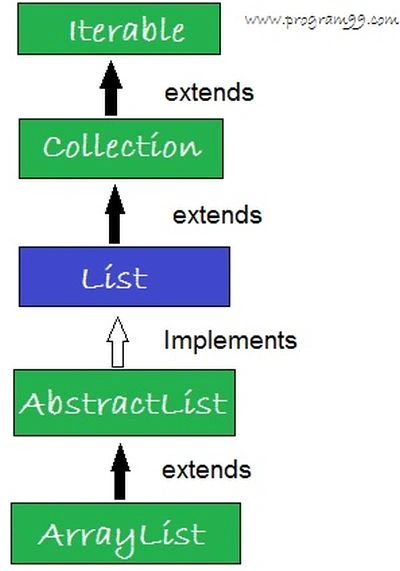
Hierarchy of an ArrayList class
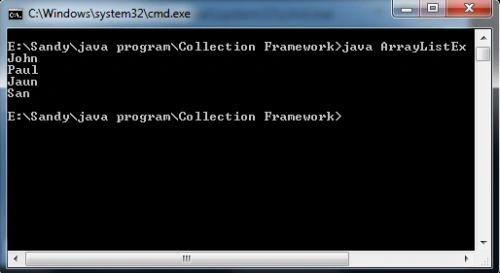
Example
- import java.util.*;
- class ArrayListEx
- {
- public static void main(String args[])
- {
- ArrayList arylst = new ArrayList();
- arylst.add("John");
- arylst.add("Paul");
- arylst.add("Jaun");
- arylst.add("San");
- Iterator itrtr = arylst.iterator();
- while (itrtr.hasNext())
- {
- System.out.println(itrtr.next());
- }
- }
- }
Join the conversation! Your thoughts help the community grow.