

Introduction
Let us look at a basic sample which retrieves the Azure table data into the applications using Node JS.
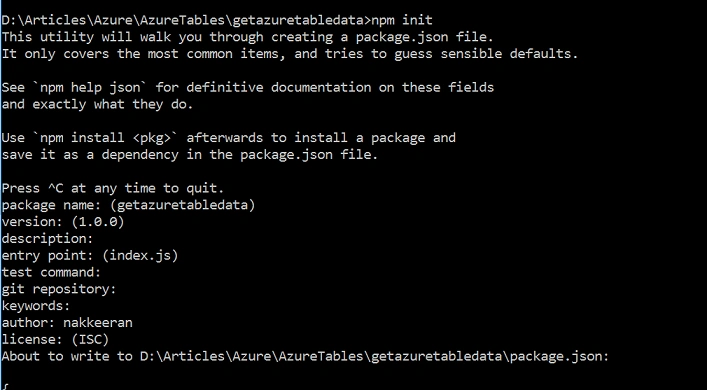
Start creating a node application by running npm init. Create the main file (JavaScript file) for writing the core functionality. In my case, index.js will be used.
The dependency files need to be imported. To access the Azure Table Storage data, Azure Storage functions and objects will be used. The npm package called azure-storage package is available for working with Azure Storage. This needs to be imported and installed using npm command.
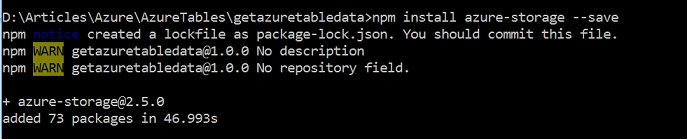
The following code snippet shows the package.json file created for this project.
- {
- "name": "getazuretabledata",
- "version": "1.0.0",
- "description": "",
- "main": "index.js",
- "scripts": {
- "test": "echo \"Error: no test specified\" && exit 1"
- },
- "author": "nakkeeran",
- "license": "ISC",
- "dependencies": {
- "azure-storage": "^2.5.0"
- }
- }
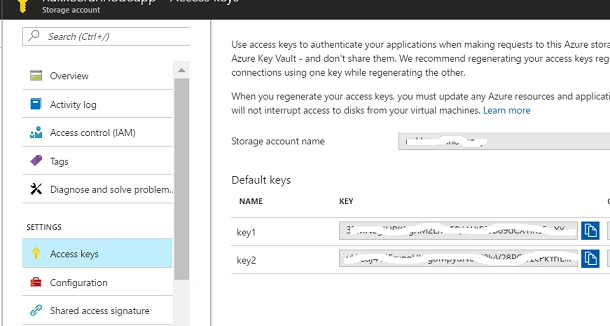
From the Azure Table Storage, account name and access keys need to be noted and used in the node application for accessing the Azure Storage data.
- Navigate to https://portal.azure.com. Go to the Azure Storage account created.
- Navigate to Access keys under Settings option. Copy the storage account name and any one of the keys available.
Create a port and import necessary packages.
- var port = process.env.PORT || 8000;
- var http = require('http');
- var azure = require('azure-storage');
- Access the table service using azure.createTableService(accountName,accessKey) method.
- var port = process.env.PORT || 8000;
- var http = require('http');
- var azure = require('azure-storage');
- Table query is built. In the query, a necessary condition should be built using the filters available. In this sample, we are going to see how we are filtering the Azure Table data using partition keys.
- var accountName = "accountname copied from azure portal";
- var accessKey = "access key copied from azure portal";
- Then, when the table service initialized, the necessary query is made using queryEntities method. The necessary parameters are - Azure table name, query, token, and the call back method.
- var server = http.createServer(function(request, response) {
- //response.end("Listening on port %s...", server.address().port);
- var tableService = azure.createTableService(accountName,accessKey); // explicit
- var TableQuery = azure.TableQuery;
- var TableUtilities = azure.TableUtilities;
- var queryCondition = TableQuery.stringFilter('PartitionKey', TableUtilities.QueryComparisons.EQUAL, "Grade 1");
- var query = new azure.TableQuery().where(queryCondition);
- tableService.queryEntities('azuretesttable', query, null, function(error, result, res) {
- if (!error) {
- response.end(JSON.stringify(result));
- }
- else{
- console.log(error);
- }
- });
- });
The following code snippet shows the entire main function logic.
- var port = process.env.PORT || 8000;
- var http = require('http');
- var azure = require('azure-storage');
- var accountName = "accountname copied from azure portal";
- var accessKey = "access key copied from azure portal";
- var server = http.createServer(function(request, response) {
- var tableService = azure.createTableService(accountName,accessKey);
- var TableQuery = azure.TableQuery;
- var TableUtilities = azure.TableUtilities;
- var queryCondition = TableQuery.stringFilter('PartitionKey', TableUtilities.QueryComparisons.EQUAL, "Grade 1");
- var query = new azure.TableQuery().where(queryCondition);
- tableService.queryEntities('azuretesttable', query, null, function(error, result, res) {
- if (!error) {
- response.end(JSON.stringify(result));
- }
- else{
- console.log(error);
- }
- });
- });
- server.listen(port);

Summary
In this article, you have seen the basic example of retrieving the Azure Storage Table data into Node.js application.
Join the conversation! Your thoughts help the community grow.