

As a web developer creating a form is a very common task for us. AngularJS enhances the user experience and validation. AngularJS makes two-way binding easy, in other words bind data from a model object ($scope) to form an input control and vice-versa.
In the following example we have created a simple form with one field and bound it with User.firstName.
- <body ng-app="myapp">
- <div ng-controller="MyFromController" >
- <form>
- <table border="1px solid">
- <tr>
- <td>First name :</td>
- <td>
- <input type="text" name="firstName" ng-model="User.firstName">
- </td>
- </tr>
- </table>
- </form>
- <div>
- Hello {{User.firstName}} !!!
- </div>
- </div>
- <script>
- angular.module("myapp", [])
- .controller("MyFromController", function ($scope)
- {
- $scope.User = {};
- $scope.User.firstName = "Ratnesh";
- });
- </script>
- </body>
- <input type="radio" ng-model="User.Gender" value="Male">Male
- <input type="radio" ng-model="User.Gender" value="Female">Female
- <select ng-model="User.Position" ng-options="obj.id as obj.name for obj in Positions">
- <option value="">--Select--</option>
- </select>
- <select multiple="true" ng-model="User.Languages" ng-options="obj.id as obj.name for obj in Languages"></select>
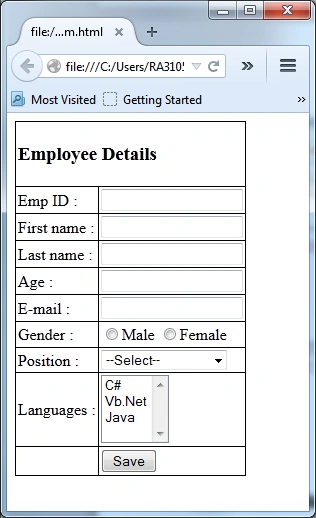
Validation
AngularJS comes with a set of validation directives. It validates the form's control value before assigning to the $scope properties. If any control's value is invalid, it is not assigned into the $scope and the corresponding $scope property is cleared.
Some of the validation directives that we will use in our employee details page are as follows.
- ng-minlength to validate the length of the data entered
- ng-maxlength to validate the length of the data entered
- ng-pattern to validate the value of an input field against a regular expression
- ng-required to make a field requuired
We have set our validation rule for each control. So our HTML file would look as:
- <!DOCTYPE html>
- <html>
- <head>
- <script src="https://ajax.googleapis.com/ajax/libs/angularjs/1.2.5/angular.min.js"></script>
- <style type="text/css">
- table.myTable { border-collapse:collapse; }
- table.myTable td, table.myTable th { border:1px solid black;padding:2px; }
- </style>
- </head>
- <body ng-app="myapp">
- <div ng-controller="MyFromController" >
- <form>
- <table class="myTable">
- <tr>
- <td colspan=3>
- <h3>Employee Details</h3>
- </td>
- </tr>
- <tr>
- <td>Emp ID :</td>
- <td>
- <input name="EmployeeID" ng-model="User.EmpID" required="">
- </td>
- <td></td>
- </tr>
- <tr>
- <td>First name :</td>
- <td>
- <input type="text" name="firstName" ng-model="User.firstName" required ng-minlength="5" ng-maxlength="8">
- </td>
- <td></td>
- </tr>
- <tr>
- <td>Last name :</td>
- <td>
- <input type="text" name="lastName" ng-model="User.lastName" ng-minlength="5" ng-maxlength="8">
- </td>
- <td></td>
- </tr>
- <tr>
- <td>Age :</td>
- <td>
- <input type="text" name="age" ng-model="user.age" type="number"/>
- </td>
- <td></td>
- </tr>
- <tr>
- <td>E-mail :</td>
- <td>
- <input name="email" ng-model="User.Email" type="email">
- </td>
- <td></td>
- </tr>
- <tr>
- <td>Gender :</td>
- <td>
- <input type="radio" ng-model="User.Gender" value="Male" >Male
- <input type="radio" ng-model="User.Gender" value="Female">Female
- </td>
- <td></td>
- </tr>
- <tr>
- <td>Position :</td>
- <td>
- <select ng-model="User.Position" ng-options="obj.id as obj.name for obj in Positions">
- <option value="">--Select--</option>
- </select>
- </td>
- <td></td>
- </tr>
- <tr>
- <td>Languages :</td>
- <td>
- <select multiple="true" ng-model="User.Languages" ng-options="obj.id as obj.name for obj in Languages"></select>
- </td>
- <td></td>
- </tr>
- <tr>
- <td></td>
- <td></td>
- <td>
- <input type="submit" ng-click="update(User)" value="Save" />
- </td>
- </tr>
- </table>
- </form>
- </div>
- <script>
- angular.module("myapp", [])
- .controller("MyFromController", function ($scope) {
- $scope.User = {};
- $scope.Positions = [
- { id: "1", name: "Developer" }
- , { id: "2", name: "Team Lead" }
- , { id: "3", name: "Project Manager" }
- ];
- $scope.Languages = [
- { id: "1", name: "C#" }
- , { id: "2", name: "Vb.Net" }
- , { id: "3", name: "Java" }
- ];
- $scope.update = function (user) {
- alert(JSON.stringify(user));
- };
- });
- </script>
- </body>
- </html>
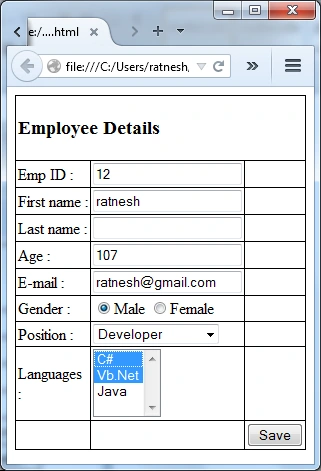
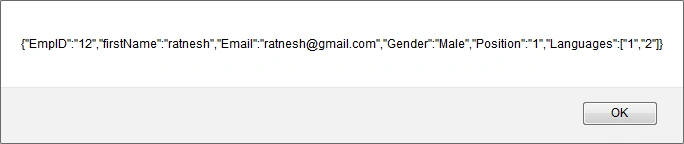
Now change the values for some field as invalid and submit as in the following:
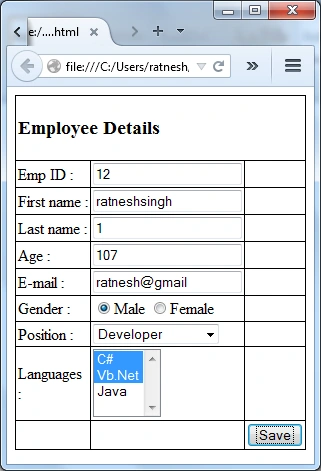
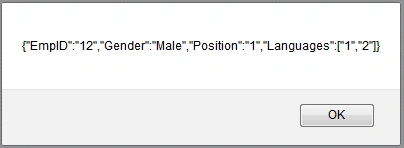
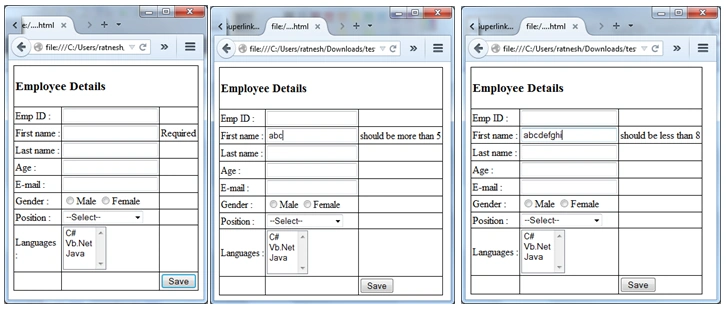
We can see that all the invalid values and properties have been removed from the user object by Angular. Until now we have not shown any message to our form user about validation. For this we need to use form and control state. If we had added a name attribute to our form then it would be added to $scope as a property. In our case we would add “EmpForm” as name. Now we access the model property with the form name. For example we can access the firstName as:
- $scope.EmpForm.firstName
- <form name="EmpForm" ng-submit="submit()" novalidate>
- $scope.submit = function() { $scope.submitted = true; };
- <tr>
- <td>First name :</td>
- <td>
- <input type="text" name="firstName" ng-model="User.firstName" required ng-minlength="5" ng-maxlength="8">
- </td>
- <td>
- <span ng-if="submitted">
- <span ng-if="EmpForm.firstName.$error.required">Required</span>
- <span ng-if="EmpForm.firstName.$error.minlength">should be more than 5</span>
- <span ng-if="EmpForm.firstName.$error.maxlength">should be less than 8</span>
- </span>
- </td>
- </tr>
Kuppurasu NagarajPosted Apr 9, 2016, 10:43 AM
Nice article..
AntarikshPosted Mar 21, 2015, 5:22 AM
Very nice Article :)
Sourabh SomaniPosted Mar 20, 2015, 9:20 PM
nice one :)
Tom MohanPosted Mar 20, 2015, 9:24 AM
good one
Praveen KumarPosted Mar 20, 2015, 6:11 AM
nice!
Manish Kumar ChoudharyPosted Mar 20, 2015, 5:02 AM
Nice one.
Gowtham RajamanickamPosted Mar 20, 2015, 4:52 AM
Awesome...
Ratnesh SinghPosted Mar 20, 2015, 2:53 AM
thanks nitin
NitinPosted Mar 20, 2015, 2:51 AM
AngularJS made easy :)