

Introduction
This is the content list of this article:
- Indroduction
- A - What is PowerShell
- Command-line Shell
- Scripting language
- Automation platform
- Configuration management
- B - The Windows PowerShell ISE
- Key Features
- Elements
- C - Cmdlets
- D - Scripting
- How To Run A PowerShell Script
- E - Difference Between Command prompt and PowerShell
A - What is PowerShell? [ref]
PowerShell is a cross-platform task automation solution made up of
- a command-line shell,
- a scripting language, and
- a configuration management framework.
PowerShell runs on Windows, Linux, and macOS.
-
Command-line Shell
- PowerShell is a modern command shell that includes the best features of other popular shells. Unlike most shells that only accept and return text, PowerShell accepts and returns .NET objects. The shell includes the following features:
- Robust command-line history
- Tab completion and command prediction (See about_PSReadLine)
- Supports command and parameter aliases
- Pipeline for chaining commands
- In-console help system, similar to Unix
manpages
-
Scripting language
- As a scripting language, PowerShell is commonly used for automating the management of systems. It is also used to build, test, and deploy solutions, often in CI/CD environments. PowerShell is built on the .NET Common Language Runtime (CLR). All inputs and outputs are .NET objects. No need to parse text output to extract information from output. The PowerShell scripting language includes the following features:
- Extensible through functions, classes, scripts, and modules
- Extensible formatting system for easy output
- Extensible type system for creating dynamic types
- Built-in support for common data formats like CSV, JSON, and XML
-
Automation platform
- The extensible nature of PowerShell has enabled an ecosystem of PowerShell modules to deploy and manage almost any technology you work with. For example:
-
Configuration management
- PowerShell Desired State Configuration (DSC) is a management framework in PowerShell that enables you to manage your enterprise infrastructure with configuration as code. With DSC, you can:
- Create declarative configurations and custom scripts for repeatable deployments
- Enforce configuration settings and report on configuration drift
- Deploy configuration using push or pull models
B - The Windows PowerShell ISE
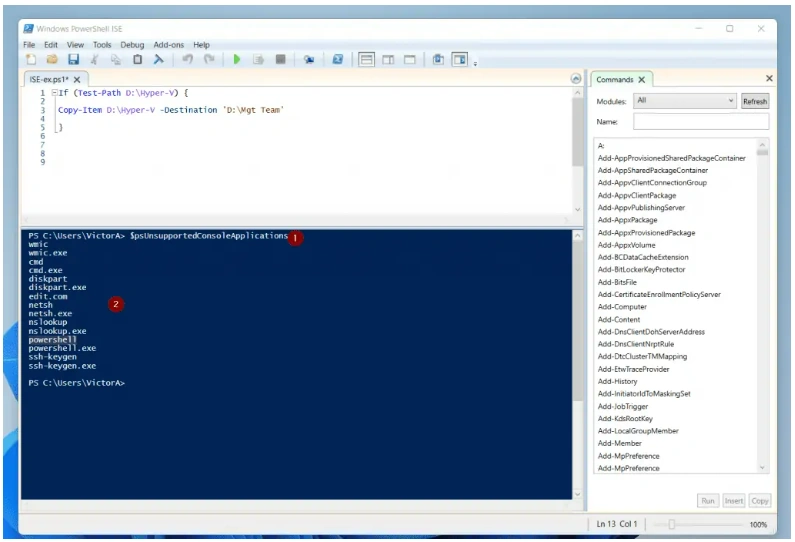
Windows PowerShell ISE (Integrated Scripting Environment) is a GUI tool for building and debugging PowerShell scripts, functions, and modules.
Key Features
- Multiline editing: To insert a blank line under the current line in the Command pane, press SHIFT+ENTER.
- Selective execution: To run part of a script, select the text you want to run, and then click the Run Script button. Or, press F5.
- Context-sensitive help: Type
Invoke-Item, and then press F1. The Help file opens to the article for theInvoke-Itemcmdlet.
The Windows PowerShell ISE lets you customize some aspects of its appearance. It also has its own Windows PowerShell profile script.
Elements
- Menu bar
- Toolbar
- PowerShell tabs
- Script tabs
- Console pane
- Script pane
- Status bar
- Text-size slider
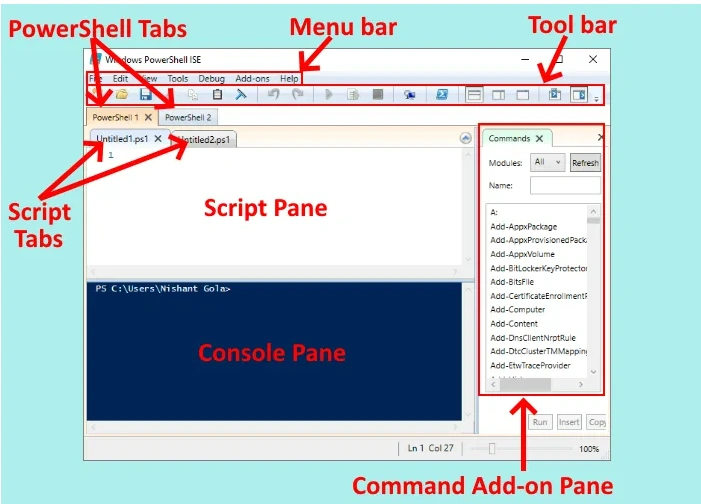
from How to use Windows PowerShell ISE - Beginners Tutorial (thewindowsclub.com)
These elements make it easy for a user to run, edit, and execute the commands and scripts.
C - Cmdlets
PowerShell commands are known as cmdlets.
- Basic PowerShell Cmdlets
- PowerShell Commands for Getting Things Done
- Cmdlets for Performance Monitoring, Testing, and Debugging
Here are 25 basic PowerShell comlets,
| Command name | Alias | Description |
| Set-Location | cd, chdir, sl | Sets the current working location to a specified location. |
| Get-Content | cat, gc, type | Gets the content of the item at the specified location. |
| Add-Content | ac | Adds content to the specified items, such as adding words to a file. |
| Set-Content | sc | Writes or replaces the content in an item with new content. |
| Copy-Item | copy, cp, cpi | Copies an item from one location to another. |
| Remove-Item | del, erase, rd, ri, rm, rmdir | Deletes the specified items. |
| Move-Item | mi, move, mv | Moves an item from one location to another. |
| Set-Item | si | Changes the value of an item to the value specified in the command. |
| New-Item | ni | Creates a new item. |
| Start-Job | sajb | Starts a Windows PowerShell background job. |
| Compare-Object | compare, dif | Compares two sets of objects. |
| Group-Object | group | Groups objects that contain the same value for specified properties. |
| Invoke-WebRequest | curl, iwr, wget | Gets content from a web page on the Internet. |
| Measure-Object | measure | Calculates the numeric properties of objects, and the characters, words, and lines in string objects, such as files … |
| Resolve-Path | rvpa | Resolves the wildcard characters in a path, and displays the path contents. |
| Resume-Job | rujb | Restarts a suspended job |
| Set-Variable | set, sv | Sets the value of a variable. Creates the variable if one with the requested name does not exist. |
| Show-Command | shcm | Creates Windows PowerShell commands in a graphical command window. |
| Sort-Object | sort | Sorts objects by property values. |
| Start-Service | sasv | Starts one or more stopped services. |
| Start-Process | saps, start | Starts one or more processes on the local computer. |
| Suspend-Job | sujb | Temporarily stops workflow jobs. |
| Wait-Job | wjb | Suppresses the command prompt until one or all of the Windows PowerShell background jobs running in the session are … |
| Where-Object | ?, where | Selects objects from a collection based on their property values. |
| Write-Output | echo, write | Sends the specified objects to the next command in the pipeline. If the command is the last command in the pipeline,… |
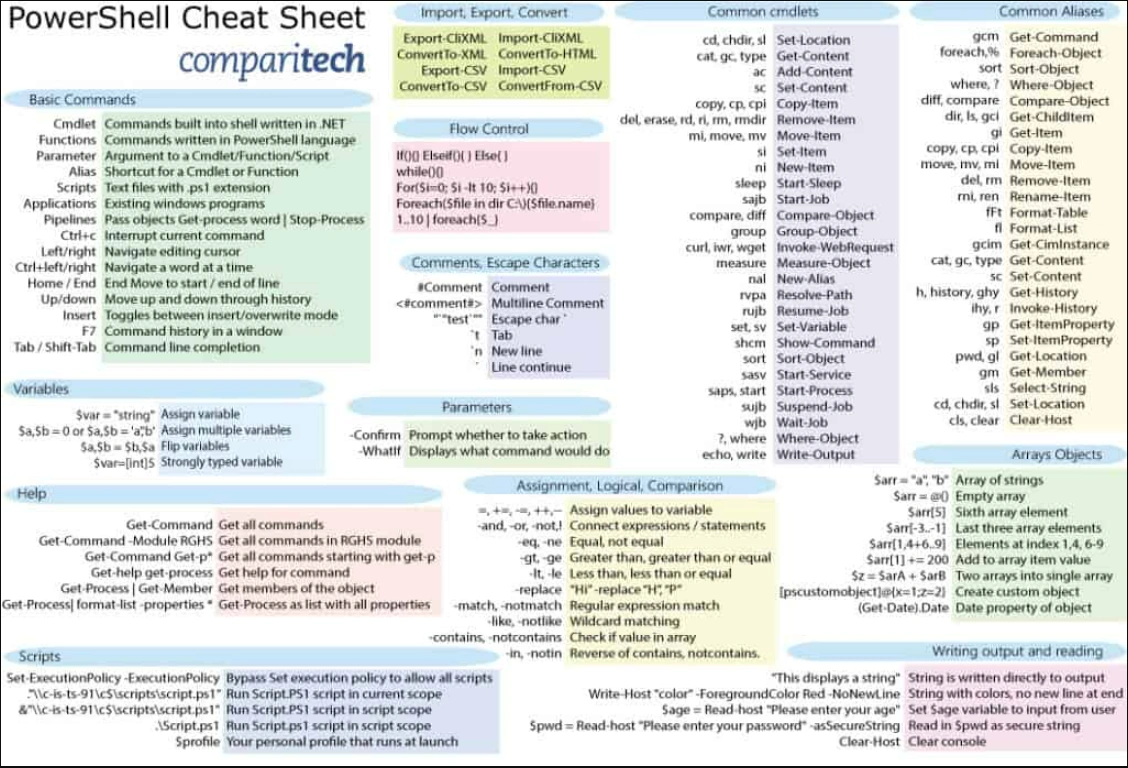
from Windows PowerShell Commands Cheat Sheet (PDF), Tips & Lists (comparitech.com)
D - Scripting
A script is a plain text file that contains one or more PowerShell commands. PowerShell scripts have a .ps1 file extension.
How To Run A PowerShell Script
There are two main ways to make a PowerShell script:
- The first, which will be familiar if you’ve used Windows Command Line before, is to write scripts directly in notepad. For example, open a new notepad file, and write
Write-Host “Hello World!”
Then save this file as FirstScript.ps1. You can call the script from PowerShell using the command,
& "X:\FirstScript.ps1"And you’ll see the output in PowerShell.
- The second, much more powerful way of making PowerShell scripts is to use the Windows PowerShell Integrated Scripting Environment (ISE). With ISE, you can run scripts and debug them in a GUI environment.
E - Difference Between Command prompt and PowerShell
Command prompt, also known as CMD, is a default interpreter in the Windows operating system and was first released in 1987.
The table below will present a comparative analysis of the Windows PowerShell and Windows Command Prompt
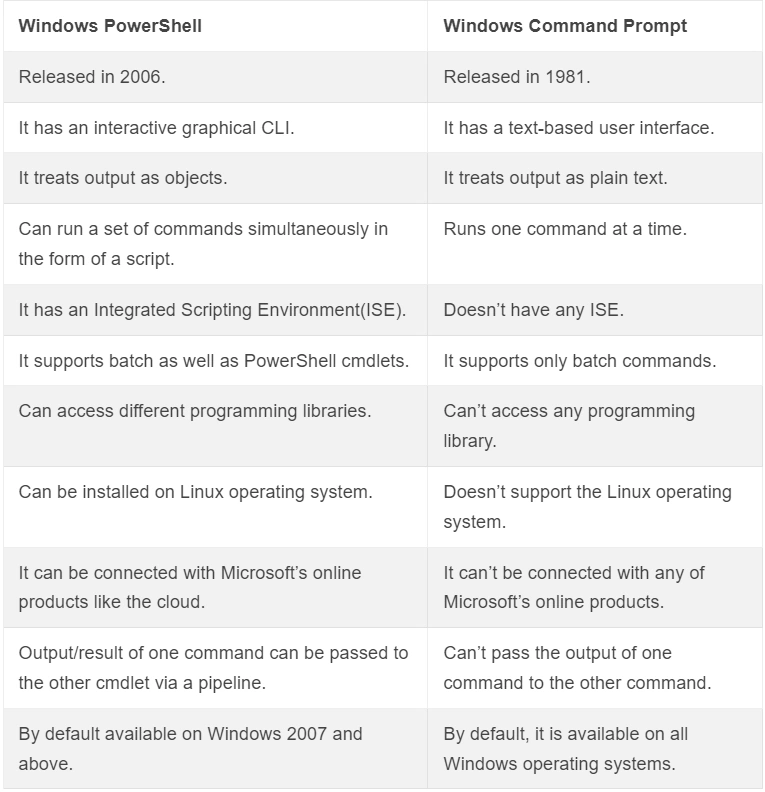
PowerShell is an object-oriented task automation engine and scripting language that assists the administrator to automate and configure administrative tasks. On the other hand, the command prompt is a native application in the Windows operating system that allows the user to perform different tasks using the commands.
Reference
- Wiki --- PowerShell - Wikipedia
- What is PowerShell --- What is PowerShell? - PowerShell | Microsoft Docs
- PowerShell ISE
- Commands
- Scripting:
- Introduction to scripting in PowerShell - Learn | Microsoft Docs
- How to Write and Run Scripts in the Windows PowerShell ISE - PowerShell | Microsoft Docs
- Powershell - Scripting (tutorialspoint.com)
- Windows PowerShell Scripting Tutorial For Beginners (varonis.com)
- about Scripts - PowerShell | Microsoft Docs
- Docs:
- Difference Between Command prompt and PowerShell
Join the conversation! Your thoughts help the community grow.