

Here are some questions representing the tips and tricks for Windows Phone,
- Version InstalledVersion = System.Environment.OSVersion.Version;
- if (DeviceNetworkInformation.IsNetworkAvailable)
- {
- }
- if (DeviceNetworkInformation.IsWiFiEnabled)
- {
- }
- if (DeviceNetworkInformation.IsCellularDataEnabled )
- {
- }
- // First create the instance of "Windows.Devices.Geolocation.Geolocator" class
- var geoLocator = new Geolocator();
- if (geoLocator.LocationStatus == PositionStatus.Disabled)
- {
- // Location Service is turned OFF
- }
- else
- {
- // Location Service is already enabled.
- }
- //In this example the publisher name is Suresh
- await Windows.System.Launcher.LaunchUriAsync(new Uri("zune:search?publisher=Suresh"));
- protected override void OnBackKeyPress(System.ComponentModel.CancelEventArgs e)
- {
- //back key is pressed
- }
- MessageBoxResult msg = MessageBox.Show("ConfirmExit_MSG", "Notes", MessageBoxButton.OKCancel);
- if (msg == MessageBoxResult.OK)
- {}
- else if (msg == MessageBoxResult.Cancel)
- {
- e.Cancel = true;
- }
- // To Remove Single Entry
- NavigationService.RemoveBackEntry();
- //To remove all navigation back entry
- while (NavigationService.CanGoBack) NavigationService.RemoveBackEntry();
- //Remove navigation back entry except MainPage
- if (NavigationService.BackStack.Any())
- {
- var length = NavigationService.BackStack.Count() - 1;
- var i = 0;
- while (i < length)
- {
- NavigationService.RemoveBackEntry();
- i++;
- }
- }
- if ((bool)typeof(PowerManager).GetProperty("PowerSavingModeEnabled").GetValue(null, null))
- {
- //Battery Saver enabled
- }
- ConnectionSettingsTask connectionTask = new ConnectionSettingsTask();
- connectionTask.ConnectionSettingsType = ConnectionSettingsType.WiFi;
- connectionTask.Show();
- await Windows.System.Launcher.LaunchUriAsync(new Uri("ms-settings-lock"));
- ms-settings-airplanemode: .
- ms-settings-bluetooth:
- ms-settings-cellular:
- ms-settings-emailandaccounts:
- ms-settings-location:
- ms-settings-power:
- ms-settings-screenrotation:
- ms-settings-wifi:
Question: How to hide the soft keyboard in Windows Phone by focusing the other UI element?
- this.Focus();
- string getMobileOperatorName = DeviceNetworkInformation.CellularMobileOperator;
- int getResolution = App.Current.Host.Content.ScaleFactor;
- double getHeight = App.Current.Host.Content.ActualHeight;
- double getWidth = App.Current.Host.Content.ActualWidth;
- NavigationService.Navigate(new Uri("/PageName.xaml", UriKind.Relative));
- string batterlvelinPercentage = Windows.Phone.Devices.Power.Battery.GetDefault().RemainingChargePercent.ToString();
- string remainingTime= Windows.Phone.Devices.Power.Battery.GetDefault().RemainingDischargeTime.ToString();
- object uniqueId;
- DeviceExtendedProperties.TryGetValue("DeviceUniqueId", out uniqueId);
- var hexString = BitConverter.ToString((byte[])uniqueId).Replace("-", string.Empty);
- IsolatedStorageFile getIsoInfo = IsolatedStorageFile.GetUserStoreForApplication();
- long avilableBytes = getIsoInfo.AvailableFreeSpace;
- long usedBytes = getIsoInfo.Quota - getIsoInfo.AvailableFreeSpace;
- Application.Current.Terminate();
- string ApplicationTitle = AppResources.ApplicationTitle;
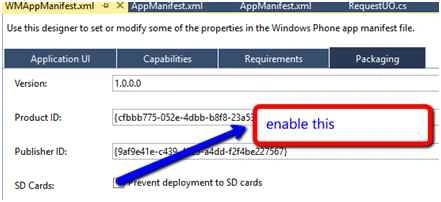
- Open the WMAppManifest.xml file. This will open the WMAppManifest.xml in GUI designer.
- Navigate to the Packaging tab.
- Enable “Prevent deployment to SD cards” and save the project.
Question: How to increase the Windows Phone App limited memory?
Windows Phone App is limited to use 150 MB at maximum per app. But sometimes it is required to be more than this limit at least to run in high spec devices. To solve this problem, you can define on your App to ensure you have high availability of application memory.
To increase the size of memory usage we add the following node to the Manifest file of Windows Phone App:
- ?
- <App>
- <FunctionalCapabilities>
- <FunctionalCapability Name="ID_FUNCCAP_EXTEND_MEM"/>
- </FunctionalCapabilities>
- </App>
- ?
- <App>
- <Requirements>
- <Requirements Name="ID_REQ_MEMORY_300"/>
- </Requirements>
- </App>
Based on your requirement, you can increase the size boundary from 150 MB to 300 MB or for some devices up to 1GB of application memory usage.
Question: How to find if the user has tapped on the Screen in Windows Phone 8 App?
- Touch.FrameReported += Touch_FrameReported;
- void Touch_FrameReported(object sender, TouchFrameEventArgs e)
- {
- TouchPoint touchPoint = e.GetTouchPoints(this.Content).FirstOrDefault();
- }
- string appVersionNumber = XDocument.Load("WMAppManifest.xml").Root.Element("App").Attribute("Version").Value;
- AudioRoutingEndpoint currentEndpoint = AudioRoutingManager.GetDefault().GetAudioEndpoint();
- public enum AudioRoutingEndpoint
- {
- Default = 0,
- // An earpiece.
- Earpiece = 1,
- // The speakerphone.
- Speakerphone = 2,
- // A Bluetooth device.
- Bluetooth = 3,
- // A wired headset.
- WiredHeadset = 4,
- // A wired headset for output only; the input is received from the default microphone.
- WiredHeadsetSpeakerOnly = 5,
- // A Bluetooth device with noise and echo cancellation.
- BluetoothWithNoiseAndEchoCancellation = 6,
- }
Question: How to test Windows Phone App on device without a Developer account?
Simply use your Microsoft account (live id), since it is enough for testing the app on device.
Only one device is allowed for per live id.
Question: How many device can be allowed to unlock the device using Developer account?
You can have up to 3 devices to be developer unlocked for app development and testing.
Question: How to Get the list of IP Address of the Windows Phone?
- List<string> IPaddressList = new List<string>();
- var Hosts = Windows.Networking.Connectivity.NetworkInformation.GetHostNames().ToList();
- foreach (var Host in Hosts)
- {
- string IP = Host.DisplayName;
- IPaddressList.Add(IP);
- }
- Geolocator geoLocator = new Geolocator();
- Geoposition position = await geoLocator.GetGeopositionAsync();
- Geocoordinate coordinate = position.Coordinate;
- string Location = "Latitude = " + coordinate.Latitude + " Longitude = " + coordinate.Longitude;
- WebClient client = new WebClient();
- client.DownloadStringCompleted += client_DownloadStringCompleted;
- string Url = "http://maps.googleapis.com/maps/api/geocode/json?latlng=""123235.4""," + "7643643" + "&sensor=true";
- client.DownloadStringAsync(new System.Uri(Url, UriKind.RelativeOrAbsolute));
- string remainingtime= Windows.Phone.Devices.Power.Battery.GetDefault().RemainingDischargeTime.TotalMinutes.ToString();
- string remainingPercentage= Windows.Phone.Devices.Power.Battery.GetDefault().RemainingChargePercent.ToString();
Get the access to the Battery instance with the Battery.GetDefault() and then use the property RemainingDischargeTime to retrieve the time left and RemainingChargePercent percentage left.
Question: How to Create a Toast Prompt in Windows Phone 8?
- var toastPrompt = new ToastPrompt
- {
- Title = "Suresh M",
- TextOrientation = System.Windows.Controls.Orientation.Vertical,
- Message = "https://windowsapptutorials.wordpress.com/"
- };
- toastPrompt.Show();
- VibrateController vibrate = VibrateController.Default;
- vibrate.Start(TimeSpan.FromMilliseconds(1000));
- How to Format the String in XAML TextBlock Control in Windows Phone?
- Text Formatting
- <TextBlock>
- <Run Text="String with 5 characters length: "/>
- <Run Text="{Binding Text, StringFormat=\{0\,5\} }"/>
- </TextBlock>
- <TextBlock>
- <Run Text="The number with 3 decimal point: "/>
- <Run Text="{Binding Number, StringFormat=\{0:n3\}}"/>
- </TextBlock>
- <TextBlock Text="{Binding SendingDate,StringFormat='dd/MM/yyyy HH:mm'}"/>
Sometimes we need to test the performance of the app in different version, so I tried to find out a way and share here.
- Launch the app under 512 MB emulator
- Stop the debugger (don’t close the emulator)
- Change the debug target to 256 MB emulator and launch the app gain.
- Now you can see both the emulators Up & Running.
- Now do your testing.
Question: How Windows Phone App Developer Getting Help to develop windows phone app?
Question: How to support Portrait and Landscape orientation in Windows Phone Screen?
In your Xaml page change the default SupportedOrientations="Portrait" to SupportedOrientations="PortraitOrLandscape"
To set default Orientation set the orientation="Landscape" or Portrait
Question: How to get all the contact details in windows phone?
- Contacts cons = new Contacts();
- //Identify the method that runs after the asynchronous search completes.
- cons.SearchCompleted += new EventHandler<ContactsSearchEventArgs>(Contacts_SearchCompleted_Many);
- //Start the asynchronous search.
- cons.SearchAsync(String.Empty, FilterKind.None, "Contacts Test #3 Picture");
- void Contacts_SearchCompleted_Many(object sender, ContactsSearchEventArgs e)
- {
- }
- var mel = new MediaLibrary();
- var Pictures = mel.Pictures;
- PictureAlbumCollection picture = mel.RootPictureAlbum.Albums;
- PictureAlbum cameraRoll = picture.Where(album => album.Name == "Camera Roll").First();
- var CameraRollPictures = cameraRoll.Pictures;
Don’t use too many Converters and Bindings, since they are Performance Killers
Converters are one of the most significant killers of performance (second perhaps to binding itself) in an XAML application.
- Load only the content needed.
The smaller the content, the faster loading occurs.
- Use DXT to compress textures.
Compressing the content is smaller, sometimes dramatically smaller. This reduces loading time.
Allocate memory for Reusable Objects.
Allocate a set of reusable objects and reinitialize them as needed. Reusable objects never need to be freed, and reduce the number of additional allocations.
- Manually call GC.Collect()
Manually call the garbage collector at the time of loading screen.
- Measuring Performance
Several tools are available for analyzing the .NET garbage collection heap. One tool available from Microsoft is the CLR Profiler. The tool is free and it is available for download at:
CLR Profiler for the .NET Framework 2.0.
- Steps to run the CLR profiler
Download the CLR Profiler, and then extract the files.
Navigate to CLRProfiler\Binaries\x86 (or x64), and then run CLRProfiler.exe.
Click Start Application, and then select your application.
It will generate a graph that displays information about all objects in the garbage collection heap, and references related to these structures.
Keep overall memory use under 90 MB.
Ibrahim ErsoyPosted Mar 3, 2016, 3:08 AM
Nice tips! Great job :)
Ankur MistryPosted Dec 1, 2015, 1:05 AM
Nice
Santhakumar MunuswamyPosted Nov 29, 2015, 11:49 PM
Good one
Sourabh SomaniPosted Nov 29, 2015, 10:30 PM
Nice one :)
Suresh MPosted Nov 29, 2015, 12:29 PM
Thank you ??
Mukesh KumarPosted Nov 28, 2015, 4:47 AM
Good Job
Banketeshvar NarayanPosted Nov 28, 2015, 3:34 AM
Nice Share
Banketeshvar NarayanPosted Nov 28, 2015, 3:30 AM
Good One
Gopi ChandPosted Nov 28, 2015, 3:27 AM
Interesting Suresh...Great effort Good one :)
RahulPosted Nov 28, 2015, 3:15 AM
Good collection Suresh!!!
Sibeesh VenuPosted Nov 28, 2015, 2:36 AM
Nice Share