
Description:
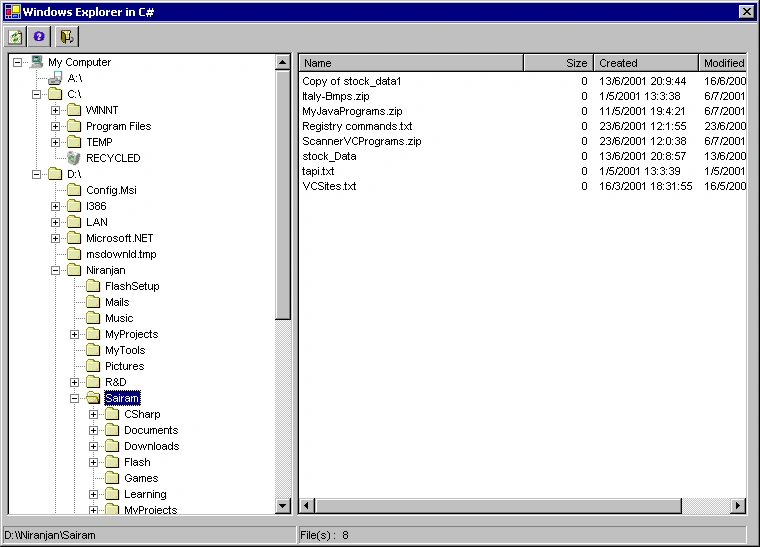
I have developed a Dialog based Windows Explorer Application in C# using Visual Studio.NET. This application gives you a picture of how to use Treeview, Listview, Imagelist, Toolbar, Statusbar, Tooltip, LinkLabel controls. This also gives you a picture on how to use System.IO namespace for Directory and file manipulations. Also throws light on System.Globalization for date formating. The treeview population is done using a PopulateFolders() recursive function. Floppy drive is read only when the tree node is clicked. The application doesn't create any folder or file. This is just a read only application of your hard-drive. Planning to add more features in next version.
Source Code:
The complete source code and executable is available in the WinExplorer.zip file. The main window code is available in WExplorer.cs
Ahmad HaghighiPosted Mar 19, 2013, 6:05 AM
tnx
Nguyen vuongPosted Apr 4, 2011, 4:05 AM
thank you very much
shashi mishraPosted Aug 27, 2010, 11:03 AM
I am having problem in using imagelist with listview.actually I need to show files of the selected directory from the treeview on the listview with icons.so tell me the procedure.
ShruthiPosted May 31, 2010, 8:24 AM
Hi...Thanks for the code..But how to create new files and folders?
dsg fgdgPosted Oct 15, 2009, 10:40 PM
it is not good~
Rolando BalladaresPosted Jul 29, 2009, 6:27 PM
Yeah I noticed too, it takes a long time to load, is there a reason for it, I'll have to see.
Rolando BalladaresPosted Jul 29, 2009, 6:25 PM
Thankyou this might be of help, I've been stuck in a class project because of this!!! :s
Tugbay AtillaPosted Aug 21, 2008, 7:09 AM
like previos comment it is time consumer and why did you get all folders on startup.
Tugbay AtillaPosted Aug 21, 2008, 7:09 AM
like previos comment it is time consumer and why did you get all folders on startup.
Dipak SalvePosted Feb 13, 2008, 4:31 AM
It takes the lots of time to open the application .Why?
sreenivas keerthiPosted Jan 7, 2008, 5:45 AM
hai niranjan kumar.....!!! this code is nice and simple to understand. if we able open the files in the list view then it became very nice.