

Introduction
This article is intended to illustrate how to implement callback operations in Windows Communication Foundation through a common business scenario where the service needs to notify that some events has happened to the client. During a callback, in many aspects the tables are turned: the service becomes the client, and the client becomes the server. So, we need to develop an interesting application supporting the solution.
Implementing the solution
The first thing to know before implementing this approach is that not all bindings support callback operations and only bidirectional-capable bindings can be used. Due to the connectionless nature of HTTP, this transport protocol cannot be used for callbacks, that's, you cannot use the BasicHttpBinding and WSHttpBinding for this purpose. In order to support callbacks in your application, WCF provides the WSDualHttpBinding, which actually sets up two HTTP channels: one for the calls from the client to the server, and one for the calls from the server to the client.
Now, let's create a console application to host the service in Visual Studio.NET and add a reference to the System.ServiceModel assembly.
Defining the callback contract
The callback operations are part of the service contract. A service contract can have at most one callback contract. Once defined, the clients are required to support the callback and also provide the callback endpoint to service in every call.
In our example, we have a service which provides a math service doing some long term calculation. We want to be notified when the calculation operation begins. The service contract attribute annotates our contract and offers a CallbackContract property of the type Type setting up our callback contract, as shown in Listing 1.
- using System;
- using System.Collections.Generic;
- using System.Text;
- using System.ServiceModel;
- namespace CallbackApp
- {
- public interface IMathCalculationCallback
- {
- [OperationContract]
- void OnCalculating();
- }
- [ServiceContract(CallbackContract = typeof(IMathCalculationCallback))]
- public interface IMathCalculation
- {
- [OperationContract]
- void DoLongCalculation(int nParam1, int nParam2);
- }
- }
The service implementation
In order to invoke the client callback from the service, we need a reference to the callback object. When the client invokes the service operations, it supplies a callback channel for the communication with the server through the callback. This channel can be referenced from the server by calling the GetCallbackChannel operation on the global OperationContext instance, as shown in the Listing 2. The DoLongCalculation operation does some long initialization, then notifies to the client the a complex operation begins now (in our case this complex operation is nParam1 + nParam2, I guess it is joke but with a delay System.Threading.Thread.Sleep(10000)).
- [ServiceBehavior(ConcurrencyMode=ConcurrencyMode.Reentrant)]
- public class MathCalculationService : IMathCalculation
- {
- public int DoLongCalculation(int nParam1, int nParam2)
- {
- System.Threading.Thread.Sleep(10000);
- IMathCalculationCallback objCallback = OperationContext.Current.GetCallbackChannel<IMathCalculationCallback>();
- if (objCallback != null)
- {
- objCallback.OnCalculating();
- }
- System.Threading.Thread.Sleep(10000);
- return nParam1 + nParam2;
- }
- }
You may notice that the service is invoking the callback reference while executing the operation DoLongCalculation. By default the service class is configure for single-threaded access, thus the service is associated with a lock, and only one thread at a time can own the lock and access the service instance. When the service invokes the callback reference while executing one of its operations, the service thread is blocked, because the thread which is processing the reply message from the client once the callback returns a message response requires ownership of the same lock, so a deadlock situation occurs. To avoid this situation, there are three possibilities:
-
Configure the service for multi-threaded access. The drawback is that the developer needs to provide synchronization codes.
-
Configure the service for reentrancy. The service is associated with a lock, and only one thread is allowed to access the service, however if the service is calling back to its clients, WCF will release the lock first. This is the strategy that I follow in my example, and I implemented it by decorating the service class with the attribute ServiceBehavior and setting the property ConcurrencyMode to ConcurrencyMode.Reentrant as shown in Listing 2.
-
Configure the operations as one-way operation because there is no reply message to contend for the lock.
The application's main workflow is shown in Listing 3.
- class Program
- {
- static void Main(string[] args)
- {
- MathCalculationServiceHost.StartService();
- System.Console.WriteLine("Please, press any key to finish ...");
- System.Console.Read();
- }
- }
Listing 3. The service application's main workflow.
And finally the configuration file is shown in Listing 4.
- <?xml version="1.0" encoding="utf-8" ?>
- <configuration>
- <system.serviceModel>
- <services>
- <service name="CallbackApp.MathCalculationService" behaviorConfiguration="MathCalculationServiceBeh">
- <endpoint contract="CallbackApp.IMathCalculation" binding="wsDualHttpBinding"/>
- </service>
- </services>
- <behaviors>
- <serviceBehaviors>
- <behavior name="MathCalculationServiceBeh" >
- <serviceDebug includeExceptionDetailInFaults="true" />
- <serviceMetadata httpGetEnabled="true" />
- </behavior>
- </serviceBehaviors>
- </behaviors>
- </system.serviceModel>
- </configuration>
Developing the client side
Now, add another application to the solution and name it CallbackClientApp, and also add a reference to the System.ServiceModel assembly.
In order to generate the proxy class, you need to open command windows and change to the directory of the client application, and run the following line command shown in Listing 5. As you can see the proxy inherits from the class System.ServiceModel.DuplexClientBase.
svcutil http://localhost:8080/CallbackApp/MathCalculationService.svc?wsdl
Listing 5.
- The generated proxy is shown in Listing 6.
- //---------------------------------------------------------
- // <auto-generated>
- // This code was generated by a tool.
- // Runtime Version:2.0.50727.42
- //
- // Changes to this file may cause incorrect behavior and will be lost if
- // the code is regenerated.
- // </auto-generated>
- //---------------------------------------------------------
- namespace CallbackClientApp
- { [System.CodeDom.Compiler.GeneratedCodeAttribute("System.ServiceModel", "3.0.0.0")]
- [System.ServiceModel.ServiceContractAttribute(ConfigurationName = "IMathCalculation", CallbackContract = typeof(IMathCalculationCallback))]
- public interface IMathCalculation
- {
- [System.ServiceModel.OperationContractAttribute(Action = "http://tempuri.org/IMathCalculation/DoLongCalculation", ReplyAction = "http://tempuri.org/IMathCalculation/DoLongCalculationResponse")]
- int DoLongCalculation(int nParam1, int nParam2);
- } [System.CodeDom.Compiler.GeneratedCodeAttribute("System.ServiceModel", "3.0.0.0")]
- public interface IMathCalculationCallback
- {
- [System.ServiceModel.OperationContractAttribute(Action = "http://tempuri.org/IMathCalculation/OnCalculating", ReplyAction = "http://tempuri.org/IMathCalculation/OnCalculatingResponse")]
- void OnCalculating();
- } [System.CodeDom.Compiler.GeneratedCodeAttribute("System.ServiceModel", "3.0.0.0")]
- public interface IMathCalculationChannel : IMathCalculation, System.ServiceModel.IClientChannel
- {
- }
- [System.Diagnostics.DebuggerStepThroughAttribute()] [System.CodeDom.Compiler.GeneratedCodeAttribute("System.ServiceModel", "3.0.0.0")]
- public partial class MathCalculationClient : System.ServiceModel.DuplexClientBase<IMathCalculation>, IMathCalculation
- {
- public MathCalculationClient(System.ServiceModel.InstanceContext callbackInstance)
- :base(callbackInstance)
- {
- }
- public MathCalculationClient(System.ServiceModel.InstanceContext callbackInstance, string endpointConfigurationName)
- :base(callbackInstance, endpointConfigurationName)
- {
- }
- public MathCalculationClient(System.ServiceModel.InstanceContext callbackInstance, string endpointConfigurationName, string remoteAddress)
- :base(callbackInstance, endpointConfigurationName, remoteAddress)
- {
- }
- public MathCalculationClient(System.ServiceModel.InstanceContext callbackInstance, string endpointConfigurationName, System.ServiceModel.EndpointAddress remoteAddress)
- :base(callbackInstance, endpointConfigurationName, remoteAddress)
- {
- }
- public MathCalculationClient(System.ServiceModel.InstanceContext callbackInstance, System.ServiceModel.Channels.Binding binding, System.ServiceModel.EndpointAddress remoteAddress)
- :base(callbackInstance, binding, remoteAddress)
- {
- }
- public int DoLongCalculation(int nParam1, int nParam2)
- {
- return base.Channel.DoLongCalculation(nParam1, nParam2);
- }
- }
- }
In order to use the callback capabilities the client application needs to create an instance of a class which implements the callback logic, host it in a context, create the proxy and call the service passing the callback instance's reference.
Let's define the callback class as shown in Listing 7.
- class MathCalculationCallback : IMathCalculationCallback
- {
- #region IMathCalculationCallback Members
- public void OnCalculating()
- {
- System.Console.WriteLine("The server begins to calculate, please for a moment ...");
- }
- #endregion
- }
Then, we define the client's main workflow as shown in Listing 8.
- class Program {
- static void Main(string[] args) {
- IMathCalculationCallback objCallback = new MathCalculationCallback();
- InstanceContext objContext = new InstanceContext(objCallback);
- int nResult = 0;
- using(MathCalculationClient objProxy = new MathCalculationClient(objContext))
- {
- nResult = objProxy.DoLongCalculation(1, 2);
- }
- System.Console.WriteLine("The result is {0}", nResult);
- System.Console.WriteLine("Press any key to finish ...");
- System.Console.Read();
- }
- }
And the configuration file is shown in Listing 9.
- <?xml version="1.0" encoding="utf-8"?>
- <configuration>
- <system.serviceModel>
- <bindings>
- <wsDualHttpBinding>
- <binding name="WSDualHttpBinding_IMathCalculation" closeTimeout="00:01:00"
- openTimeout="00:01:00" receiveTimeout="00:10:00" sendTimeout="00:01:00"
- bypassProxyOnLocal="false" transactionFlow="false" hostNameComparisonMode="StrongWildcard"
- maxBufferPoolSize="524288" maxReceivedMessageSize="65536"
- messageEncoding="Text" textEncoding="utf-8" useDefaultWebProxy="true">
- <readerQuotas maxDepth="32" maxStringContentLength="8192" maxArrayLength="16384"
- maxBytesPerRead="4096" maxNameTableCharCount="16384" />
- <reliableSession ordered="true" inactivityTimeout="00:10:00" />
- <security mode="Message">
- <message clientCredentialType="Windows" negotiateServiceCredential="true"
- algorithmSuite="Default" />
- </security>
- </binding>
- </wsDualHttpBinding>
- </bindings>
- <client>
- <endpoint address="http://localhost:8080/CallbackApp/MathCalculationService.svc"
- binding="wsDualHttpBinding" bindingConfiguration="WSDualHttpBinding_IMathCalculation"
- contract="IMathCalculation" name="WSDualHttpBinding_IMathCalculation">
- </endpoint>
- </client>
- </system.serviceModel>
- </configuration>
Let's see the client application's output in Figure 1.
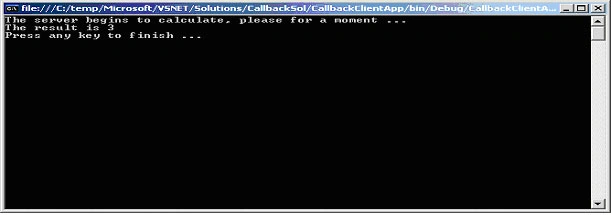
Figure 1: The client application's output.
Conclusion
In this article, I covered the main concepts and strategies to develop a WCF service which notifies events to the client using callback operations, and how the client must implement the logic associated to the event handling.
arvind bhattPosted Sep 28, 2010, 1:09 AM
John, I go through ur valuablbe article. I've created a test winform application with a test button which access a wcf window service. i want to callback to client at certain condition from window service. I've configure my window service as you depicted in your example but even then when i debug the code it doesn't step in to call back funcyion and application went to dealock state. plz help.
HKPosted Oct 9, 2008, 9:45 AM
John, I am facing the same issue as Sachin. It works for a console client but times out for winform client. Any solutions?
SachinPosted Oct 11, 2007, 11:27 AM
OK if I run in console app then it works fine but when I try to implement the same in winform application then I get timeout. Any clues
SachinPosted Oct 11, 2007, 11:26 AM
OK if I run in console app then it works fine but when I try to implement the same in winform application then I get timeout. Any clues
R. Seenivasaragavan RamaduraiPosted Jul 11, 2007, 8:34 PM
Hey john here is the error in your code plesae correct [ServiceContract(CallbackContract = typeof(IMathCalculationCallback))] public interface IMathCalculation { [OperationContract] void DoLongCalculation(int nParam1, int nParam2); } service contract is return void your implementation return int