

Introduction
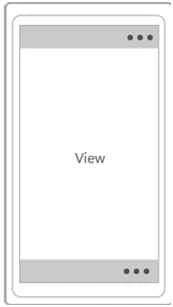
- TopAppBar
- BottomAppBar
You can put any control that you like in the app bar.
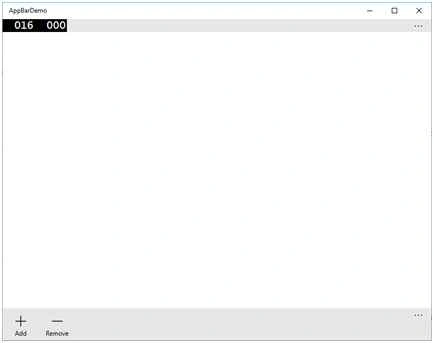
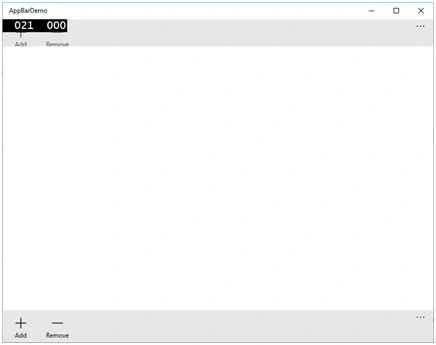
Application Bar for Bottom- <Page.TopAppBar>
- <AppBar>
- <StackPanel Orientation="Horizontal">
- <AppBarButton Name="Button3" Icon="Add" Label="Add"></AppBarButton>
- <AppBarButton Name="Button4" Icon="Remove" Label="Remove"></AppBarButton>
- </StackPanel>
- </AppBar>
- </Page.TopAppBar>
- <Page.BottomAppBar>
- <AppBar IsOpen="True" IsSticky="True">
- <StackPanel Orientation="Horizontal">
- <AppBarButton Name="Button1" Icon="Add" Label="Add"></AppBarButton>
- <AppBarButton Name="Button2" Icon="Remove" Label="Remove"></AppBarButton>
- </StackPanel>
- </AppBar>
- </Page.BottomAppBar
Here's the complete source code,
- <Page x:Class="AppBarDemo.MainPage" xmlns="http://schemas.microsoft.com/winfx/2006/xaml/presentation" xmlns:x="http://schemas.microsoft.com/winfx/2006/xaml" xmlns:local="using:AppBarDemo" xmlns:d="http://schemas.microsoft.com/expression/blend/2008" xmlns:mc="http://schemas.openxmlformats.org/markup-compatibility/2006" mc:Ignorable="d">
- <Page.TopAppBar>
- <AppBar>
- <StackPanel Orientation="Horizontal">
- <AppBarButton Name="Button3" Icon="Add" Label="Add"></AppBarButton>
- <AppBarButton Name="Button4" Icon="Remove" Label="Remove"></AppBarButton>
- </StackPanel>
- </AppBar>
- </Page.TopAppBar>
- <Page.BottomAppBar>
- <AppBar IsOpen="True" IsSticky="True">
- <StackPanel Orientation="Horizontal">
- <AppBarButton Name="Button1" Icon="Add" Label="Add"></AppBarButton>
- <AppBarButton Name="Button2" Icon="Remove" Label="Remove"></AppBarButton>
- </StackPanel>
- </AppBar>
- </Page.BottomAppBar>
- <Grid Background="{ThemeResource ApplicationPageBackgroundThemeBrush}"> </Grid>
- </Page>
- AppBar myAppBar = new AppBar();
- myAppBar.IsOpen = true;
- var content = new StackPanel { OrientationOrientation = Orientation.Horizontal };
- content.Children.Add(new Button { Content = "Button1"});
- content.Children.Add(new Button { Content = "Button2" });
- myAppBar.Content = content;
- this.BottomAppBar = myAppBar;
Summary
In this article, we learned about Windows 10 application bar.
Kuppurasu NagarajPosted Feb 11, 2016, 12:33 PM
Nice