
👋 Hey there, future developer!
If you’ve ever worked on a project and thought, “Oops... I shouldn’t have deleted that file” or “Which version of this file actually works?” — you’re not alone.
That’s where Git and GitHub come to the rescue. In this guide, let’s simplify everything you need to know to get started with these essential tools.
🧠 What is Git?
Git is a version control system. Think of it as a timeline for your project where you can:
-
Track all changes
-
Revert back if something breaks
-
Work on multiple features safely using branches
☁️ What is GitHub?
GitHub is the cloud platform that hosts your Git repositories online. It helps you:
-
Back up code
-
Collaborate with others
-
Review and merge code (via pull requests)
-
Show your work to the world (great for portfolios)
💡 Why Should You Learn It?
Here’s why Git and GitHub are essential:
-
No more losing code!
-
Revert mistakes with a few commands
-
Smooth teamwork on big or small projects
-
Every tech job expects you to know it
🚀 Getting Started
1. Install Git
Download and install Git from git-scm.com.
2. Create a GitHub Account
Head over to github.com and sign up.
3. Configure Git
git config --global user.name "Your Name" git config --global user.email "[email protected]"
📁 Start a New Git Project
mkdir my-first-git-project cd my-first-git-project git init
This creates a new Git repository in your folder.
Create a File
echo "# Hello GitHub!" > README.md git add README.md git commit -m "Initial commit"
☁️ Push to GitHub
-
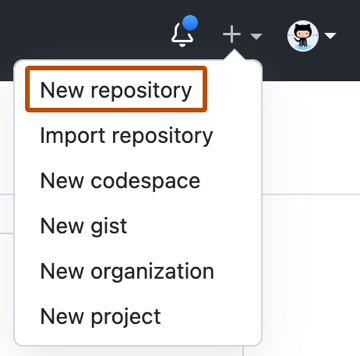
Create a new repo on GitHub (don’t initialize it).
-
Connect your local project:
git remote add origin https://github.com/your-username/my-first-git-project.git git push -u origin master
🛠 Common Git Commands
| Command | Use |
|---|---|
git status |
Check what’s changed |
git add . |
Stage changes |
git commit -m "message" |
Save a snapshot |
git log |
See history |
git pull |
Get latest changes |
git push |
Upload your work |
🤝 Tips for Success
✅ Commit small, commit often
✅ Use meaningful commit messages
✅ Don’t fear git branch
✅ Learn to resolve merge conflicts early
🔄 Workflow Summary
-
git init– start version control -
git add .– stage files -
git commit -m "message"– save changes -
git push– send to GitHub
Join the conversation! Your thoughts help the community grow.