

Python 3.13, the latest stable release, brings a range of significant updates to the language, implementation, and standard library. A notable improvement is the interactive shell (REPL), now enhanced with features such as color support, multi-line editing, block paste mode, and keyboard shortcuts for Linux and macOS. Error messages have also been refined, becoming more informative and featuring default colored tracebacks for easier debugging.
Among the experimental features introduced in Python 3.13 are the Just-in-Time (JIT) compilation (PEP 744) and the free-threaded CPython mode (PEP 703), both marking a step forward in performance and parallelism. Other updates include clearer semantics for the locals() function's returned mapping and support for default values in type parameters.
The standard library has undergone cleanup, with deprecated APIs and modules removed, including legacy modules previously marked for deprecation in Python 3.11 (PEP 594). Additionally, Python 3.13 optimizes memory usage by removing leading whitespace in docstrings. These changes collectively enhance Python’s user-friendliness, precision, and performance.
1. A better interactive interpreter
This interpreter is known as the REPL because it uses a read-evaluate-print loop. The REPL receives your input, evaluates it, and outputs the result before looping back and repeating the process.
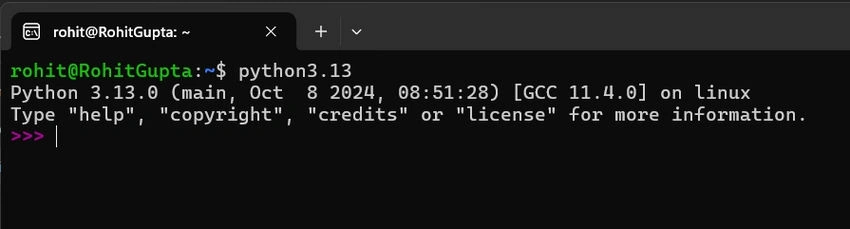
Python now features a new default interactive shell, adapted from the PyPy project, offering several improvements for a more seamless REPL experience.
- Users can now enjoy multiline editing with preserved history, as well as direct support for common REPL commands like help, exit, and quit, without needing to call them functions.
- By default, prompts and tracebacks are colorized for better readability.
- Additional interactive features include browsing help with F1, accessing a separate command history, and using F2 to navigate history while skipping output and prompts.
- The shell also introduces a "paste mode" (F3) for easily pasting larger blocks of code, which can be toggled off by pressing F3 again.
If users prefer the old shell, they can revert to it by setting the PYTHON_BASIC_REPL environment variable.
2. Improved Error Messages
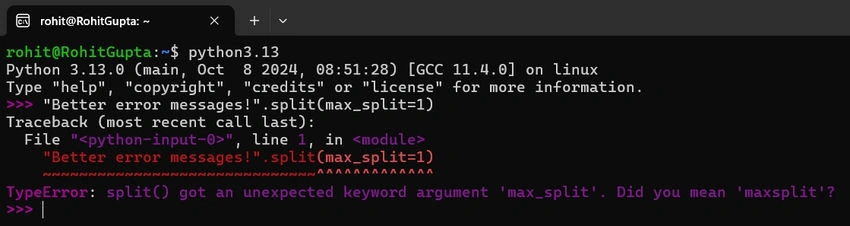
In Python 3.13, tracebacks displayed in the terminal now include color by default, enhancing readability when runtime errors occur. This behavior can be customized using the new PYTHON_COLORS environment variable, as well as the standard NO_COLOR and FORCE_COLOR options. Additionally, error messages have been improved to not only highlight issues but also provide suggestions for fixing them.
3. Free-Threaded CPython
Free-threaded execution enables optimal use of available processing power by allowing threads to run concurrently across CPU cores. Although not all software will automatically take advantage of this feature, programs designed with threading in mind are likely to perform better on multi-core systems. It's important to note that the free-threaded mode is still experimental, and ongoing improvements may lead to some bugs and a significant decrease in single-threaded performance. Free-threaded builds of CPython can optionally run with the Global Interpreter Lock (GIL) enabled at runtime by using the environment variable PYTHON_GIL or the command-line option -X gil=1.
To determine if the current interpreter supports free-threading, run
python -VV
and check if the output includes “experimental free-threading build.” Additionally, the new function
sys._is_gil_enabled()
can be used to verify whether the GIL is disabled in the running process.
4. Experimental JIT (Just-In-Time) compiler
A just-in-time (JIT) compiler serves as a middle ground by allowing the interpreter to compile certain code while a program is running, thereby enhancing its speed. In Python 3.13, a new experimental JIT compiler has been introduced. Being experimental means it is included in Python's source code but is not enabled by default.
To experiment with the JIT compiler, you must set up a specific version of Python 3.13 with JIT enabled, similar to the process for using free-threaded Python but with different build flags. When CPython is configured and built using the
--enable-experimental-jit
a JIT compiler is added that can potentially speed up certain Python programs. JIT compilation can significantly improve performance, particularly in scenarios where the same operation is executed repeatedly, allowing the JIT compiler enough time to analyze and optimize your code.
5. Improvements to standard library
There have been excellent additions made to the standard library, which are as follows:
- Add a new PythonFinalizationError exception, raised when an operation is blocked during finalization.
- The argparse module now supports deprecating command-line options, positional arguments, and subcommands.
- The new functions base64.z85encode() and base64.z85decode() support encoding and decoding Z85 data.
- The copy module now has a copy.replace() function, with support for many built-in types and any class defining the __replace__() method.
- The new dbm.sqlite3 module is now the default dbm backend.
- The os module has a suite of new functions for working with Linux’s timer notification file descriptors.
- The random module now has a command-line interface.
6. Removal of packages
Deprecated modules are functionalities in Python’s standard library that are discouraged for use in new projects, even though they may still function in older versions of Python. These are considered outdated, insecure, or no longer actively maintained.
- The remaining 19 “dead batteries” (legacy stdlib modules) have been removed from the standard library:
aifc,audioop,cgi,cgitb,chunk,crypt,imghdr,mailcap,msilib,nis,nntplib,ossaudiodev,pipes,sndhdr,spwd,sunau,telnetlib,uuandxdrlib. - Remove the 2to3 tool and
lib2to3module (deprecated in Python 3.11). - Remove the
tkinter.tixmodule (deprecated in Python 3.6). - Remove the
locale.resetlocale()function. - Remove the
typing.ioandtyping.renamespaces. - Remove chained
classmethoddescriptors.
Join the conversation! Your thoughts help the community grow.