

Introduction
Android has been very popular among developers and users for a long time now. Approximately 80 percent of mobile users are using Android-based smartphones worldwide.
Android is a very powerful, durable, and easy to operate OS. Moreover, it is changing very rapidly from touchscreens to foldable phones and from Android watches to Android auto. Since version 1.0 of Android when smartphones were just an idea, the Android OS has improved a lot and now smartphones are an integral part of our lives. They help us to stay in touch with others, organize our day, find restaurants and other desired places in the city and other such day-to-day tasks.
The latest version of Android is Android Q that is not yet fully released but is in talks because of many cool features. Let us discuss some of the newly introduced features of Android Q in this article.
Location Permission Changes
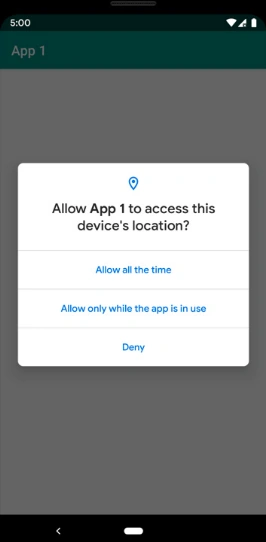
We can see there is a new option "Allow only while the app is in use". Previously, there were only two options - Allow and Deny. To support the new option, there is new permission called ACCESS_BACKGROUND_LOCATION. To enable this option, a developer needs to declare the permission in manifest like below.
To protect user privacy, the manual configuration of the list of Wi-Fi networks is now restricted to system apps and device policy controllers (DPCs). A given DPC can either be the device owner or the profile owner.
The app must have the ACCESS_FINE_LOCATION permission. If permission is denied, then your app cannot use several methods within the Wi-Fi, Wi-Fi Aware, or Bluetooth APIs when running on Android Q. The following list shows the affected methods according to Google.
- <manifest>
- <uses-permission android:name="android.permission.ACCESS_COARSE_LOCATION" />
- <uses-permission android:name="android.permission.ACCESS_BACKGROUND_LOCATION" />
- </manifest>
If your app runs on Android Q but targets Android 9 (API level 28) or lower, the following behavior applies.
- If your app declares a <uses-permission> element for either ACCESS_FINE_LOCATION or ACCESS_COARSE_LOCATION, the system automatically adds a <uses-permission> element for ACCESS_BACKGROUND_LOCATION during installation.
- If your app requests either ACCESS_FINE_LOCATION or ACCESS_COARSE_LOCATION, the system automatically adds ACCESS_BACKGROUND_LOCATION to the request.
Restriction on enabling and disabling Wi-Fi
- An app running on Android Q now cannot enable or disable the WiFi. The WifiManager.setWifiEnabled() method always returns false.
- If needed, we need to use the Settings panel to prompt users to enable and disable Wi-Fi.
Wi-Fi network configuration restrictions
Fine location permission for telephony, Wi-Fi, Bluetooth APIs
Telephony
- TelephonyManager
- getCellLocation()
- getAllCellInfo()
- requestNetworkScan()
- requestCellInfoUpdate()
- getAvailableNetworks()
- getServiceStateForSubscriber()
- getServiceState()
- TelephonyScanManager
- requestNetworkScan()
- TelephonyScanManager.NetworkScanCallback
- onResults()
- PhoneStateListener
- onCellLocationChanged()
- onCellInfoChanged()
- onServiceStateChanged()
- WifiManager
- startScan()
- getScanResults()
- getConnectionInfo()
- getConfiguredNetworks()
- WifiAwareManager
- WifiP2pManager
- WifiRttManager
Bluetooth
- BluetoothAdapter
- startDiscovery()
- startLeScan()
- LeScanCallback()
Support for foldables
Foldable Android devices? Really!! Yes, this year, a new trend is starting for foldable Android phones. There were OLED display phones, edge-to-edge glass phones, predictive typing, and much more than we have recently seen.
Machine Learning Powered Smart Reply
Live Captions
To make content more accessible, there is a one-tap caption when you access videos. For 466 million deaf and hard of hearing people around the world, captions are more than a convenience.
From the announcement, "We worked closely with the Deaf community to develop a feature that would improve access to digital media. With a single tap, Live Caption will automatically caption media that’s playing audio on your phone. Live Caption works with videos, podcasts and audio messages, across any app—even stuff you record yourself. As soon as speech is detected, captions will appear, without ever needing Wifi or cell phone data, and without any audio or tions leaving your phone."
Digital Wellbeing and Parental Controls
The Digital Wellbeing tool was created last year. This tool has helped people to take full control over their phone usage. Now, this year, Google released the enhanced version of this tool which is going to help you in the following ways. Firstly, the Focus mode is introduced which helps the user to focus without any distraction. Simply select apps that are distracting you, such as emails, news feeds - silence them until you come out from the Focus mode.
To help children and parents in a family to balance with the technology, Google has made a family link part in which parents can activate top requested features like bonus time and limit the use of an app for some time.
This article told about the amazing features of Android Q. Since phone manufacturers are advancing Android devices with different screen material and orientation and sizes, Android Q also supports foldable phones. The new Android Q has come with some API level essential changes that we have discussed above.
Pravesh DubeyPosted May 24, 2019, 1:27 AM
Is this OS version has support for foldable phones ?