

Introduction
The Windows operating system is used by millions of people around the world. It is a powerful and versatile platform that can be used for a wide variety of tasks, from everyday productivity to high-end gaming. In recent years, Microsoft has been focused on providing a more unified experience across its various Windows products. This includes Windows 10 and Windows 11, as well as cloud-based services like Microsoft 365 and Azure Virtual Desktop.
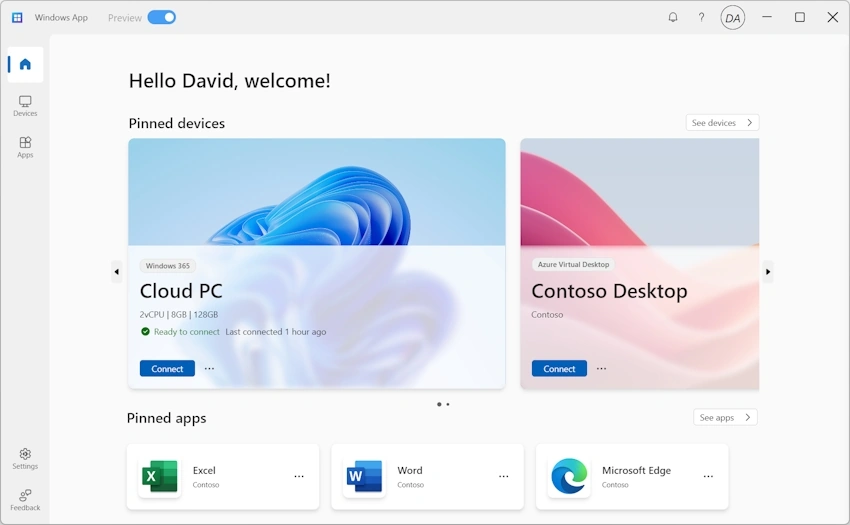
One of the key ways that Microsoft is achieving this unified experience is through the use of the Windows App. The Windows App is a centralized hub that provides users with a single location from which they can access all of their Windows devices, cloud PCs, and remote applications. This makes it easier than ever to stay productive and connected, no matter what device you are using or where you are located.
Windows App
Windows App is a lightweight and easy-to-use application that can be installed on a variety of devices, including Windows PCs, Macs, iOS devices, and Android devices. Once installed, the app can be used to launch cloud PCs, connect to remote desktops, and access other Windows resources. The app also includes a number of features that make it easy to manage your Windows environment, such as the ability to pin frequently used resources to your home screen and switch between different accounts. Additionally, the Windows App features a modern and consistent experience, making it easy to use on any device.
Benefits of Windows App
There are many benefits to using Windows App, including.
- Unified experience: Windows App provides a single location from which you can access all of your Windows devices, cloud PCs, and remote applications. This makes it easier than ever to stay productive and connected, no matter what device you are using or where you are located.
- Secure access: Windows App uses state-of-the-art security measures to protect your data and privacy. This includes support for multi-factor authentication and encryption.
- Multiple devices: Windows App can be used on a variety of devices, including Windows PCs, Macs, iOS devices, and Android devices. This makes it easy to access your Windows environment from anywhere.
- Easy to use: Windows App is a lightweight and easy-to-use application that can be installed in just a few minutes.
How to Use Windows App?
To use the Windows App, simply follow these steps.
- Download and install the Windows App from the Microsoft Store.
- Sign in with your Microsoft account.
- You will be presented with a list of your Windows devices, cloud PCs, and remote applications.
- Click on the resource you want to access.
- The resource will be launched in a new window.
Additional Features
In addition to the core features mentioned above, Windows App also includes a number of additional features, such as:
- Multiple monitor support: Windows App supports multiple monitors, allowing you to maximize your productivity.
- Custom display resolutions: You can customize the display resolution of your cloud PC or remote application to fit your needs.
- Dynamic display resolutions and scaling: Windows App automatically adjusts the display resolution and scaling of your cloud PC or remote application to match your device.
- Device redirection: You can redirect devices, such as webcams, audio, storage devices, and printers, to your cloud PC or remote application.
- Microsoft Teams optimizations: The Windows App is optimized for Microsoft Teams, providing a seamless experience for collaboration.
Conclusion
Windows App is a powerful and versatile tool that can help you stay productive and connected, no matter what device you are using or where you are located. With its unified experience, secure access, and support for multiple devices, Windows App is a must-have for any Windows user.
Join the conversation! Your thoughts help the community grow.