

Azure IoT hub allows you to get on with developing cool IoT stuff, and not worry about how it all gets connected up and managed.
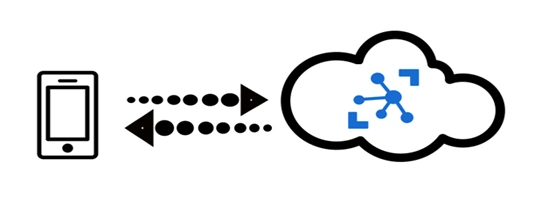
Internet of Things (IoT) offers businesses immediate and real-world opportunities to reduce costs, to increase revenue, as well as transforming their businesses. Azure IoT hub is a managed IoT service which is hosted in the cloud. It allows bi-directional communication between IoT applications and the devices it manages. This cloud-to-device connectivity means that you can receive data from your devices, but you can also send commands and policies back to the devices. How Azure IoT hub differs from the existing solutions is that it also provides the infrastructure to authenticate, connect and manage the devices connected to it.
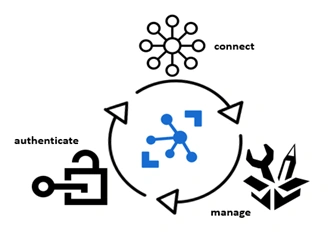
Azure IoT Hub allows full-featured and scalable IoT solutions. Virtually, any device can be connected to Azure IoT Hub and it can scale up to millions of devices. Events can be tracked and monitored, such as the creation, failure, and connection of devices.
Azure IoT Hub provides,
- Device libraries for the most commonly used platforms and languages for easy device connectivity.
- Secure communications with multiple options for device-to-cloud and cloud-to-device hyper-scale communication.
- Queryable storage of per-device state information as well as meta-data.
Managing devices with IoT Hub
The needs and requirements of IoT operators vary substantially in different industries, from transport to manufacturing to agriculture to utilities. There is also a wide variation in the types of devices used by IoT operators. IoT Hub is able to provide the capabilities, patterns and code libraries to allow developers to build management solutions that can manage very diverse sets of devices.
Configuring and controlling devices
Devices which are connected to IoT Hub can be managed using an array of built-in functionality. This means that-
- Device metadata and state information for all your devices can be stored, synchronized and queried.
- Device state can be set either per-device or in groups depending on common characteristics of the devices.
- A state change in a device can be automatically responded to by using message routing integration.
The lifecycle of devices with IoT Hub
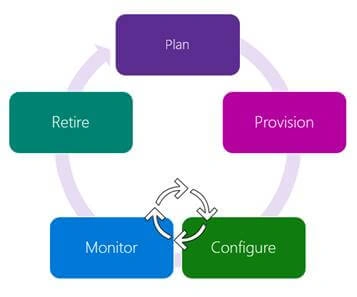
- Plan
Operators can create a device metadata scheme that allows them to easily carry out bulk management operations.
- Provision
New devices can be securely provisioned to IoT Hub and operators can quickly discover device capabilities. The IoT Hub identity registry is used to create device identities and credentials.
- Configure
Device management operations, such as configuration changes and firmware updates can be done in bulk or by direct methods, while still maintaining system security.
- Monitor
Operators can be easily alerted to any issues arising and at the same time the device collection health can be monitored, as well as the status of any ongoing operations.
- Retire
Devices need to be replaced, retired or decommissioned. The IoT Hub identity registry is used to withdraw device identities and credentials.
Device management patterns
IoT Hub supports a range of device management patterns including,
- Reboot
- Factory reset
- Configuration
- Firmware update
- Reporting progress and status
These patterns can be extended to fit your exact situation. Alternatively, new patterns can be designed based on these templates.
Connecting your devices
You can build applications which run on your devices and interact with IoT Hub using the Azure IoT device SDK. Windows, Linux distributions, and real-time operating systems are supported platforms. Supported languages currently include,
- C
- C#
- Java
- Python
- Node.js.
Messaging Patterns
Azure IoT Hub supports a range of messaging patterns including,
- Device to cloud telemetry
- File upload from devices
- Request-reply methods which enable devices to be controlled from the cloud
Message routing and event grid
Both IoT Hub message routing and IoT Hub integration with Event Grid makes it possible to stream data from your connected devices. However, there are differences. Message routing allows users to route device-to-cloud messages to a range of supported service endpoints such as Event Hubs and Azure Storage containers while IoT Hub integration with Event Grid is a fully managed routing service which can be extended into third-party business applications.
Device data can be routed
In Azure IoT Hub, the message routing functionality is built in. This allows you to set up automatic rules-based message fan-out. You can use message routing to decide where your hub sends your devices’ telemetry. Routing messages to multiple endpoints don’t incur any extra costs.
Building end-to-end solutions
End-to-end solutions can be built by integrating IoT Hub with other Azure services. For example,
- Business processes can be automated using Azure Logic Apps.
- You can run analytic computations in real-time on the data from your devices using Azure Stream Analytics.
- AI models and machine learning can be added using Azure Machine Learning.
- You can respond rapidly to critical events with Azure Event Grid.
Azure IoT Hub or Azure Event Hub?
Both Azure IoT Hub and Azure Event Hub are cloud services which can ingest, process and store large amounts of data. However, they were designed with different purposes in mind. Event Hub was developed for big data streaming while IoT Hub was designed specifically to connect IoT devices at scale to the Azure Cloud. Therefore, which one you choose to use will depend on the demands of your business.
Security
Businesses face security, privacy, and compliance challenges which are unique to the IoT. Security for IoT solutions means that devices need to be securely provisioned and there needs to be secure connectivity between the devices and the cloud, as well as secure data protection in the cloud during processing and storage.
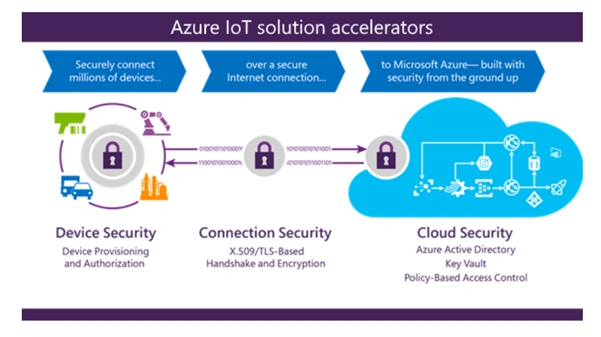
IoT Hub allows data to be sent on secure communications channels. Each device connects securely to the hub and each device can be managed securely. You can control access at the per-device level and devices are automatically provisioned to the correct hub when the device first boots up.
There’s also a range of different types of authentication depending on device capabilities, including SAS SAS token-based authentication, individual X.509 certificate authentication for secure, standards-based authentication, as well as X.509 CA authentication.
High Availability and Disaster Recovery
Uptime goals vary from business to business. Azure IoT Hub offers three main High Availability (HA) and Disaster Recovery (DR) features including:
- Intra-region HA
The IoT Hub service provides intra-region HA by implementing redundancies in almost all layers of the service. The SLA published by the IoT Hub service is achieved by making use of these redundancies and are available automatically to developers. However, transient failures should be expected when using cloud computing; therefore, appropriate retry policies need to be built into components which interact with the cloud in order to deal with these transient failures.
- Cross region DR
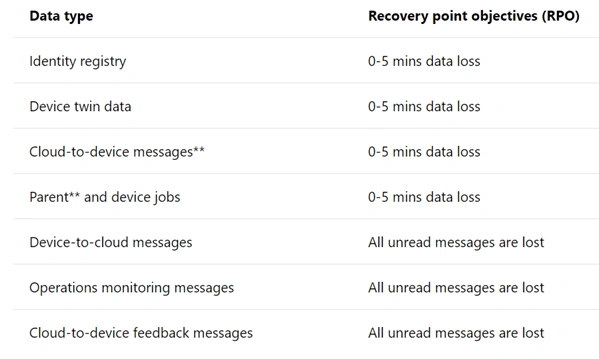
Situations may arise when a datacentre suffers from extended outages or some other physical failure. It is rare but possible that intra-region HA capability may not be able to help in some of these situations. However, IoT Hub has a number of possible solutions for recovering from extended outages or physical failures. In these situations, a customer can have a Microsoft initiated failover or a manual failover.
Both of these options offer the following recovery time objectives (RTO),
Achieving cross region HA
If the RTOs provided by either the Microsoft initiated failover or manual failover aren’t sufficient for your uptime goals, then another option is to implement a per-device automatic cross region failover mechanism. In this model, the IoT solution runs in a primary and secondary datacentre in two different locations. If there’s an outage or a loss of network connectivity in the primary region, the devices can use the secondary location.
Choosing the right IoT Hub tier
Azure IoT hub offers two tiers, basic and standard. The basic tier which is uni-directional from devices to the cloud is more suitable if the data is going to be gathered from devices and analyzed centrally. However, if you want bi-directional communication, enabling you to, for example, control devices remotely, then the standard tier is more appropriate. Both tiers have the same security and authentication features.
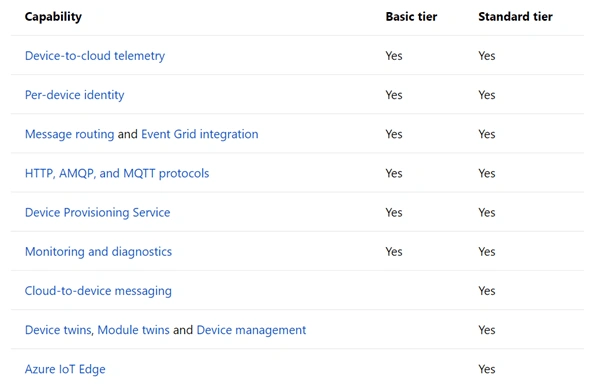
Each tier has three different sizes (1, 2 and 3), depending on how much data they can handle in a day. For instance, a level 3 unit can handle 300 million messages a day while a level 1 unit can handle 400,000.
If you want to learn more about the information in this article., here are some great links for you to start with!
Official documentation for Azure IoT Hub
Microsoft labs for Azure IoT Hub
Video - Azure IoT Hub
Muthu KumarPosted Aug 28, 2018, 1:11 AM
Nice Article
Kapil Singh KumawatPosted Aug 27, 2018, 7:37 AM
Nice article Allen
Sarathlal SaseendranPosted Aug 27, 2018, 2:14 AM
Nice Article