

An MCP Server (short for Model Context Protocol Server) is a program that acts like a bridge between an AI assistant and your data or apps. Think of it like a smart adapter: one side talks to the AI, the other works with things like files, databases, or web services.
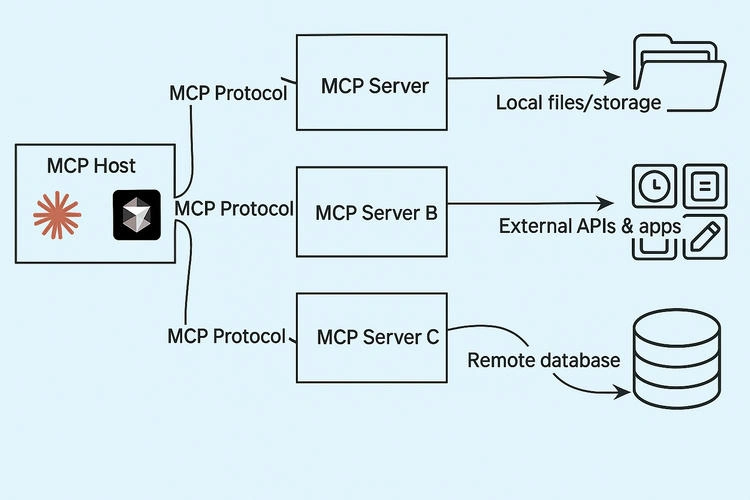
Why MCP Servers Matter
- Standard way to talk to AI: MCP gives AI tools a shared language to discover what resources are available, ask for them, and get answers back.
- Faster to build: Instead of making separate integrations for each tool, one MCP Server can bring them all together.
- Safer access: MCP Servers include built-in safety checks—asking your permission before doing anything and protecting private data.
How MCP Servers Work
- Host starts: You use an app (like Claude Desktop or VS Code) that acts as a host.
- Clients connect: Behind the scenes, clients talk to the MCP Servers.
- Server shares tools: The MCP Server tells the client what it can do (e.g., “I can read files” or “I can post on Slack”).
- AI requests actions: When the AI wants something done, it sends a request.
- Server acts and replies: The MCP Server performs the task—like reading a file—and sends the result back.
All of this uses a standard JSON‑RPC format.
Key Features of an MCP Server
- Discover tools: The server lets the AI find what it can do.
- Perform safe actions: It handles requests like "read file", checks permission, and executes them.
- Return results: Sends clean, structured answers the AI can use.
- Secure session: Keeps track of who asked what, what happened, and keeps data safe.
Real‑World Uses
- File access: Let AI search, read, and edit your local files or documents in Google Drive.
- Developer tools: Use AI to list GitHub issues, post comments, or even run code.
- Business data: AI can safely pull data from CRMs, databases, or ERP systems.
- Cloud services: Access cloud tools—like Azure resources—using natural language.
Popular MCP Server Examples
- File system MCP Server: Read and write local files.
- GitHub, Slack, Google Drive: Official servers supported by MCP SDKs.
- Azure MCP Server (Preview): Let's AI interact with Azure via Entra ID and Azure CLI.
- Make.com MCP Server: Turns automation scenarios into callable tools for AI.
Benefits at a Glance
| Benefit | Description |
|---|---|
| 🔄 Easy integration | Connect once, use many tools with the same protocol |
| 🔐 Secure access | Built-in permissions and safe data handling |
| 🌐 Local & remote | Works with files on your PC or services in the cloud |
| 🤝 Interoperability | Works with multiple AI platforms like Claude, OpenAI, and VS Code |
Challenges & Security
- Security risks: If MCP Servers are poorly secured, they can introduce vulnerabilities like unauthorized access.
- Need for safe design: Developers must implement authentication, encryption, and auditing. Tools like “MCP Guardian” help enforce security standards.
Summary
An MCP Server simplifies how AI tools connect to your data. It sets a standard, secure way for AI to read files, call APIs, and automate tasks. By acting like a smart, safety‑first adapter, it helps build richer, more capable AI assistants, while giving you control over what happens.
Join the conversation! Your thoughts help the community grow.